PDF Parser Review: Fast AI-Powered Data Extraction from PDFs
Overview & Purpose

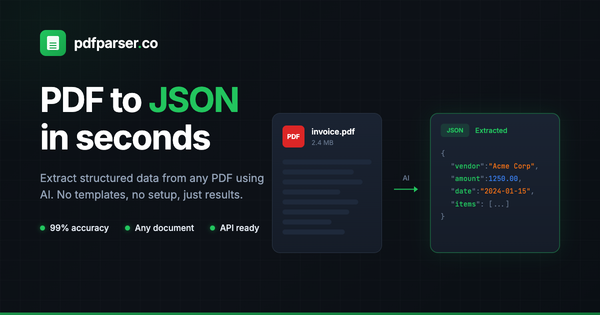
PDF Parser (https://pdfparser.co/) is an AI-powered tool designed to extract structured data from PDFs and images, automatically converting unstructured or semi-structured documents into clean JSON or CSV output. It uses advanced AI for context-aware extraction, handling OCR for scanned documents, layout analysis, and field identification without requiring manual templates or complex rule setup. Primary use cases include automating data entry from invoices, receipts, bank statements, contracts, resumes, insurance claims, medical records, and other business or HR documents. It targets a broad audience: non-technical users (e.g., operations, finance, HR teams) who need quick web-based extraction, developers integrating via REST API for automation workflows, and businesses in industries like insurance, supply chain, legal, and research seeking to streamline document processing.
Key Features & Capabilities
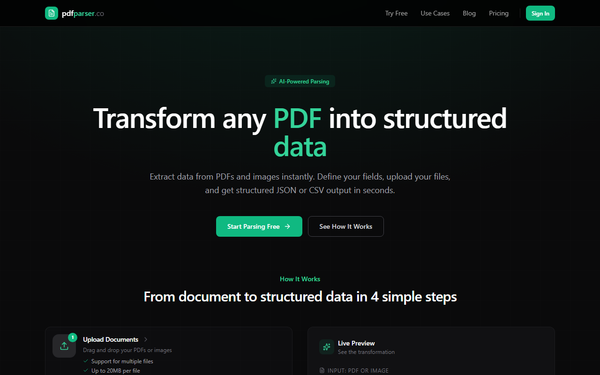
Core functionality revolves around uploading PDFs or images (JPEG, PNG, WebP, TIFF, BMP, GIF; up to 20 MB per file), defining custom fields (with names, data types like string/number/date/boolean, and descriptions), and letting the AI perform parallel, context-aware extraction. Outputs are immediately available as structured JSON (ideal for databases/APIs) or CSV (for spreadsheets), with batch processing support for multiple files simultaneously.
Standout features include lightning-fast processing (under 30 seconds per document), template-free AI that adapts to varying layouts and complex tables, secure HTTPS processing with no permanent document storage (leveraging OpenAI's API without using customer data for training), and full API access across all plans for seamless integration. It differentiates from competitors like Docparser or traditional rule-based parsers by emphasizing simplicity and speed—no upfront template mapping or maintenance for layout changes—while offering high accuracy on diverse document types.
Limitations include reliance on internet connectivity (no offline/on-premise option), potential need for human review on highly degraded scans or heavy handwriting, file size caps (20 MB), and credit-based usage that may not suit extremely high-volume enterprise needs without custom plans. It also lacks advanced features like custom model training found in enterprise tools such as Amazon Textract.
User Experience
The interface is intuitive and web-based with drag-and-drop upload, live previews (e.g., showing invoice-to-JSON transformation), smart field suggestions, and one-click export—making it accessible even for non-developers with a minimal learning curve. Batch uploads and parallel processing enhance efficiency for teams.
Interface quality is clean and modern, focusing on speed-to-value: users can go from upload to structured data in under a minute. Documentation appears integrated into the dashboard (API docs with copy-paste examples), with support via email (response within 24 hours on business days; priority for paid plans). No extensive public tutorials were found, but the workflow is self-explanatory. User reviews highlight ease and accuracy as major positives.
Performance & Reliability
The tool claims consistent sub-30-second processing with parallel engine support, making it suitable for moderate-to-high throughput (hundreds to thousands of pages monthly). Reviews praise extraction accuracy (capturing details reliably for reports and forms) and reliability on standard business documents.
Known issues are minimal in public feedback; common PDF parsing challenges (e.g., complex multi-page tables or low-quality scans) are mitigated by AI but may still require occasional verification. No widespread complaints about downtime or failures were identified in reviews as of April 2026, though edge-case accuracy can lag behind heavily customized enterprise solutions. Overall, it performs reliably for its target scale.
Pricing & Value
PDF Parser offers a free tier (no credit card required, limited pages/credits for testing) and simple monthly subscription plans with full API access: Starter at $9/month (100 pages, ~$0.09/page), Pro at $29/month (500 pages, ~$0.058/page), and Business at $99/month (2,500 pages, ~$0.04/page). All plans allow cancellation anytime; custom enterprise options are available via support. Pricing is credit-based per page/document processed.
Value is strong for teams prioritizing simplicity and speed over deep customization: it undercuts template-heavy tools like Docparser on setup time and maintenance while delivering competitive accuracy at lower entry costs. It's particularly cost-effective for variable or moderate volumes compared to per-page cloud giants like AWS Textract. Free tier enables low-risk evaluation, though high-volume users may need enterprise scaling.
Practical Tutorial
Official detailed public tutorials are limited (API docs are dashboard-based), so here is a step-by-step walkthrough for a common task—extracting invoice data—based on the tool's documented workflow (as of April 2026). This mirrors the live preview example on the site.
-
Sign up and access the dashboard: Go to https://pdfparser.co/, create a free account (no credit card needed), and log in to start your free tier credits.
-
Upload your document: Drag and drop a PDF or image file (e.g., an invoice PDF under 20 MB). Support batch uploads for multiple files.
-
Define custom fields: In the extraction interface, add fields like "invoice_number" (string), "date" (date), "total_amount" (number), "vendor" (string), and "line_items" (with description). Use smart suggestions or add descriptions for better AI context.
-
Process with AI: Click to extract. The AI handles OCR (if scanned), layout understanding, and outputs structured data in seconds (typically <30s).
-
Review and export: Preview the JSON (e.g.,
{"invoice_number": "INV-2024-001", "date": "2024-01-15", "total_amount": 1250.00, "vendor": "Acme Corp"}). Edit if needed, then download as JSON or CSV. For automation, copy the API endpoint and integrate with your code/workflows.
For real examples, test with sample invoices, receipts, or contracts from your workflow. API users can reference dashboard-provided examples for REST calls. For more, check in-app resources or contact [email protected].
Final Verdict
Overall rating: 4.5/5. PDF Parser excels as a fast, user-friendly AI solution for structured data extraction, ideal for small-to-medium businesses, operations teams, and developers needing quick automation without template overhead. It shines for invoices, contracts, and similar documents where speed and simplicity add immediate value. Avoid it if you require on-premise deployment, ultra-high-volume processing (>10k pages/month without custom pricing), or heavy customization for proprietary formats—enterprise tools like Google Document AI may suit better there. One-sentence recommendation: If you're tired of manual data entry from PDFs and want instant structured output with minimal setup, PDF Parser is an excellent, affordable choice worth trying on your free tier today.