Petal Review: The Ultimate AI Tool for Research and Citations
Overview & Purpose
Petal is an AI-powered document analysis and reference management platform that functions as a centralized, secure cloud drive for users' knowledge bases. It automatically synchronizes documents and uses context-aware generative AI—trained exclusively on user-uploaded sources—to deliver fully cited, reliable answers, effectively turning personal documents into a conversational "digital expert." Primary use cases include streamlining literature reviews, synthesizing technical or scientific papers, organizing research materials, generating reports or comparisons, and enabling team collaboration without email back-and-forth.
Target audience is primarily researchers, faculty, students, and industry experts in academic or technical fields. It is trusted by over 20,000 such professionals and officially listed by MIT as a university resource. Teams (e.g., student-faculty groups) benefit from its sharing and annotation tools, making it ideal for collaborative knowledge work rather than general consumers, marketers, or designers.
Key Features & Capabilities
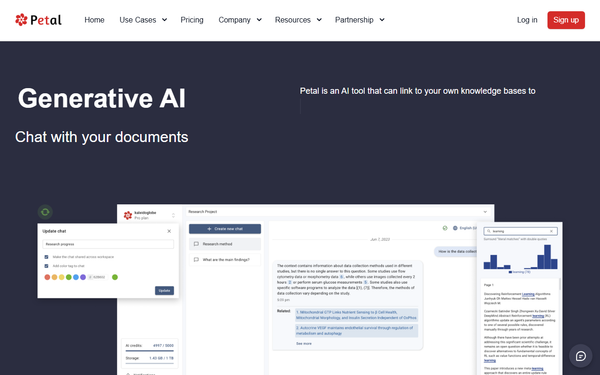
Core functionality revolves around uploading documents (strong support for PDFs and scientific files) to a cloud workspace where Petal automatically extracts metadata, deduplicates files, organizes via collections/tags/semantic search, and enables AI interactions. Users can chat with single or multiple documents, receive sourced responses, and leverage specialized tools like AI Table for extracting structured data across files.
Standout features differentiating it from competitors (such as general AI chatbots, Notion AI, or basic reference managers) include its context-aware AI that minimizes hallucinations by grounding answers in user documents only, the AI Table for automated literature review comparisons (e.g., metrics, outcomes, weaknesses), browser plugin for seamless reference import and metadata population, unlimited citation list generation/export, and built-in collaboration via annotations, comments, and sharable workspace links. It also supports multi-language queries and AI-guided full report creation.
Limitations include a metered credit system for AI usage (which can deplete quickly on complex or lengthy queries), restricted graphical/figure analysis (often misses or inaccurately describes visuals), a 400-character query limit in some cases, web-only access with no desktop app, and limited single-document chat or advanced AI trials in the free tier. Cross-workspace sharing and certain exports are unavailable on lower plans. Compared to alternatives like UPDF AI, it offers stronger reference management and collaboration but fewer unlimited credits and weaker multimodal handling.

User Experience
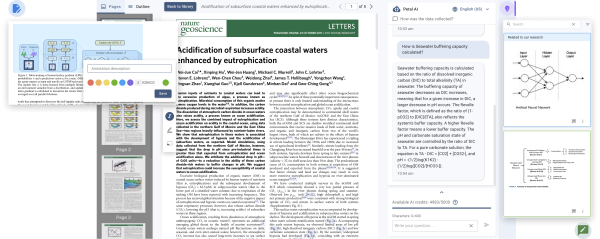
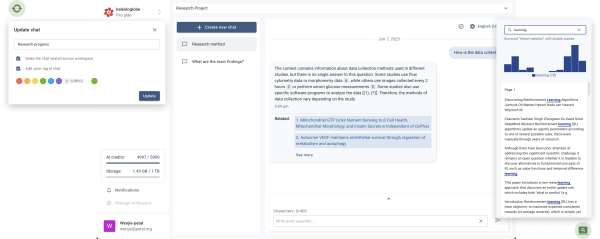
Petal features a clean, professional web-based interface resembling a specialized cloud drive with an integrated AI chat sidebar or tab for queries, summaries, explanations, and table generation. Navigation includes document viewer, collections, metadata panels, and annotation tools—intuitive for basic uploads and chats but requiring some exploration for optimal use of AI Table, semantic search, or multi-document workflows.
The learning curve is moderate: beginners can start chatting like with ChatGPT after quick sign-up and upload, but mastering advanced features (e.g., precise prompting for tables or organization) takes practice and benefits from community tutorials. Documentation is available at docs.petal.org (covering uploads, chats, tables, sharing, and API), supplemented by responsive support (standard on free, priority on paid plans) and high-quality YouTube guides. Overall interface quality feels functional and research-focused, with positive mentions of productivity gains, though some users note initial setup for imports or credit tracking adds minor friction.
Performance & Reliability
Responses are generally fast and efficient for text-based queries, summaries, explanations, and table generation, with semantic search and metadata handling providing quick organization. Reliability stands out due to mandatory citations from user documents, making answers more trustworthy than general-purpose AI for domain-specific research.
Known issues are limited given sparse public reviews, but common complaints include rapid credit depletion on detailed or multi-step queries, occasional inaccuracies or grammatical issues in summaries (especially with complex papers), and failures to interpret figures, charts, or images. No widespread reports of downtime, major bugs, or hallucination problems exist as of March 2026 research, and academic users frequently praise workflow simplification and sourced accuracy. Performance holds up well for text-heavy scientific documents but may require verification for visual content.
Pricing & Value
Petal offers a robust free tier and tiered paid plans with annual discounts and .edu pricing advantages:
- Free: $0/mo – 1 GB storage, 1 seat + 3 guests, 400 credits (non-replenishing upper limit), 2 collections, 3 annotations per document, 7-day trials for multi-doc chat/AI Table/AI Create.
- Plus: ~$2.55–$4.99/mo – 2 GB, 400 credits/mo, unlimited collections/annotations, full AI features.
- Advanced: ~$8.49–$13.99/mo – 10 GB, 1200 credits/mo, priority support.
- Premium: $25.49/mo – 25 GB, 2000 credits/mo, priority support.
All plans support unlimited citation lists; credits can be exceeded via add-ons. No dedicated multi-seat team pricing beyond guests.
Value is strong for researchers: the free tier allows meaningful testing, while paid plans (especially with .edu discounts) deliver cost-effective access compared to unlimited-credit competitors. It excels for targeted academic use where sourced accuracy and collaboration justify the metered model, though heavy users may find credits restrictive versus flat-rate alternatives.
Practical Tutorial
Official documentation provides high-level guidance, with excellent community YouTube tutorials available (e.g., "Mastering Literature Reviews: How Petal Ai Tool Simplify Your Research Process" at https://www.youtube.com/watch?v=r7VcxcWkMHk and "The AI That's Changing Academia?" by Andy Stapleton). Here is a step-by-step walkthrough for a common task—conducting a multi-document literature review using AI Table—based on official capabilities and real examples from user tests (e.g., querying COVID-19 research papers).
- Sign up for a free account at petal.org and log in to your workspace.
- Upload documents: Drag-and-drop or use the browser plugin/URL import to add PDFs (e.g., 5–10 scientific papers on a topic). Petal auto-extracts metadata, deduplicates if needed, and organizes them.
- Create or use a collection: Group the papers in a collection or folder for easy multi-doc access; apply tags or semantic search if desired.
- Access AI features: Navigate to the AI Table tool (or multi-document chat mode). Select the documents.
- Prompt for structured output: Enter a natural-language query like "Create a table comparing key metrics, methods, outcomes, and weaknesses across these studies, with citations from each source." Include filters (e.g., "only papers from 2020+").
- Review and refine: The AI generates a cited table instantly. Follow up in chat for explanations, expansions, or report drafting (e.g., "Summarize the table into a paragraph").
- Collaborate: Add annotations/highlights/comments on specific sections, then generate a sharable link or invite guests to the workspace for real-time input.
- Export: Download the table or full report with citations.
This process typically takes minutes versus hours of manual review and works best with text-focused papers. Credits are consumed based on query complexity—start with free tier trials. For visuals, supplement with manual notes as AI may miss figures.
Final Verdict
Overall rating: 4.5/5. Petal shines for researchers and academic teams seeking a reliable, sourced AI knowledge base with excellent metadata automation, collaboration, and specialized tools like AI Table—making it a productivity powerhouse in literature-heavy fields. It offers strong value on free or low-cost plans for moderate use.
Who should use this tool: Academics, faculty, students, or industry researchers needing accurate answers from their own documents, centralized organization, and easy team sharing—especially those conducting frequent literature reviews or managing reference libraries.
Who should avoid this tool: Heavy daily users who would exhaust credits quickly without upgrading, professionals requiring strong graphical analysis or desktop/offline access, or anyone preferring unlimited flat-rate AI without a metered model.
Petal delivers trustworthy, document-grounded intelligence for knowledge workers who value precision over generality—highly recommended for researchers ready to build their personal AI expert.