Picjam Review: Transform Product Photos into Studio-Quality AI Images
Overview & Purpose

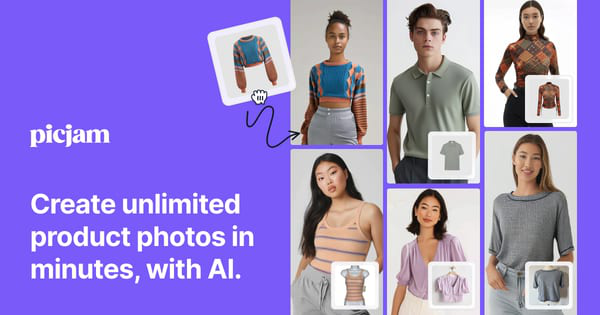
Picjam is an AI-powered visual content engine tailored for fashion brands, transforming simple DIY product photos—such as mannequin shots, ghost mannequins, hangers, or flat lays—into hyper-realistic, studio-quality images, videos, and UGC-style content in approximately 60 seconds. It enables users to generate diverse on-model lifestyle imagery, professional listing photos, and dynamic videos without physical samples, studios, or traditional photoshoots, allowing brands to launch new SKUs faster and update catalogs efficiently. Primary use cases include creating campaign assets for e-commerce platforms like Shopify, Amazon, or Etsy; split-testing creatives for marketing; showcasing product fit and movement; and producing engaging social media or ad visuals. The target audience consists primarily of apparel brands, e-commerce marketers, store owners, and creatives in the fashion industry—ranging from small Shopify sellers and dropshippers to established labels like Volcom, Wicks Intimates, and Zepia Moda—who seek to save time and significant costs on visual production.
This review is based on information available as of March 2026.

Key Features & Capabilities
Core functionality revolves around uploading a single product photo, after which the AI automatically removes the background, swaps in diverse virtual models (including Asian, Black, Caucasian, Indian, Latino, Mediterranean, Middle Eastern, Multiracial, and South East Asian options), applies professional poses from a library exceeding 2,000 (or 80,000+ in higher plans), and places the product in customizable scenes ranging from studio whites to lifestyle settings like beaches, offices, or apartments. Additional capabilities include image enhancement for realism and upscaling, imperfection fixes, prompt-based art direction for infinite variations, and conversion of static images into short dynamic videos or UGC content (included in all plans). Standout features that differentiate it from general AI tools or basic background removers include its fashion-specific training on millions of images for hyper-realistic fit and movement depiction, built-in SEO keyword generation to optimize product listings, precise model customization for inclusivity and split-testing, and one-click video generation—making it a true all-in-one production agent rather than a simple editor.
Limitations include heavy dependence on high-quality input photos (poor lighting or unclear fit reduces output realism), a credit-based system where retries for refinements can quickly consume allowances, and the absence of advanced features like full 3D modeling or custom model training in base plans. It is apparel-focused, so non-fashion products may see suboptimal results compared to specialized alternatives.

User Experience
Picjam boasts a low learning curve and highly intuitive interface, with drag-and-drop photo uploads, selector-based model/background choices, and optional prompt editing via a simple chat-like system—making it accessible even for non-technical users like small business owners. The clean, modern web app (with seamless Shopify integration) receives consistent praise for ease of navigation and quick workflow. Documentation includes a robust library of official YouTube how-to videos and blog tutorials covering everything from basic generation to advanced masking. Support resources are solid, with responsive team access noted in many testimonials and priority/concierge options in higher tiers, though isolated reports mention occasional missed demo calls or slower responses.

Performance & Reliability
Generation speed is a major strength, with most images and variations produced in around 60 seconds, enabling rapid campaign creation and bulk processing for active users. Reliability is generally high, delivering commercially usable, hyper-realistic outputs trusted by over 1,200 brands, with consistent performance for well-lit inputs. Known issues include occasional AI artifacts or inconsistencies requiring 2–3 retries (increasing credit usage), variable quality depending on source photos, and rare platform glitches reported by a small minority of users; however, recent feedback indicates steady improvements in realism and stability.

Pricing & Value
Picjam offers a generous entry point with the first image free and a $3 3-day trial (cancel anytime), followed by three main subscription tiers with annual billing discounts of approximately 20%: Pro at $29 per month (200 credits, up to 10 products), Studio at $99 per month (2,000 credits, up to 100 products, expanded poses/backgrounds, and onboarding), and Concierge at $599 per month (full team-managed service with quality assurance). Credits are consumed per generation, with no perpetual free tier beyond the trial. The value proposition stands out strongly against traditional photography (often $195+ per SKU) or general AI tools, delivering 99% cost savings and 10x faster production for small-to-medium apparel businesses—making professional visuals accessible without agency fees or equipment.
Practical Tutorial
Official tutorials are available via Picjam’s YouTube channel, including the step-by-step video “Picjam How To: Generate Stunning Images With a Model.” Here is a practical walkthrough for the common task of transforming a mannequin product photo into diverse on-model lifestyle images (tested conceptually from official guides and user workflows):
- Visit https://www.picjam.ai/ and sign up for a free account (your first image generation is free; activate the $3 trial for more).
- From the dashboard, click to upload your DIY product photo—ideally a clear mannequin, ghost mannequin, hanger, or flat-lay shot with good lighting that demonstrates garment fit.
- The AI automatically removes the background and prompts you to select a generation mode (e.g., “Fit to Model”).
- Choose models by ethnicity/diversity or let the AI suggest options; select from 2,000+ poses or refine via text prompt (e.g., “model walking on beach, casual pose”).
- Pick a background from preset categories (studio, home, outdoor) or describe a custom scene; optionally apply enhancements for added realism.
- Hit “Generate”—images appear in seconds; use the masking tool for precise adjustments if needed.
- Review outputs, iterate with AI chat edits if desired, then generate a short video version for UGC.
- Access the built-in SEO keyword generator to auto-create optimized listing tags and descriptions.
- Download high-resolution images/videos or export directly to your Shopify store.
For best results, follow Picjam’s internal image guide for input quality. Full video walkthrough: https://www.youtube.com/watch?v=1FQTttQsfyg.
Final Verdict
Overall rating: 4.5 out of 5.
Picjam excels for apparel e-commerce brands, marketers, and small-to-medium store owners who want to produce diverse, professional visuals quickly and affordably without traditional photoshoots or expensive agencies—offering unmatched specialization in fashion realism, inclusivity, and all-in-one features like video and SEO. It should be avoided by large enterprises needing guaranteed photoreal human models, non-apparel product creators, or users sensitive to occasional credit-intensive iterations and minor output variability.
Picjam is a game-changer for fashion e-commerce teams seeking studio-quality output from basic DIY shots at a fraction of the usual time and cost.