Ping AI Tasklist Review: The Ultimate AI-Powered To-Do List
Overview & Purpose

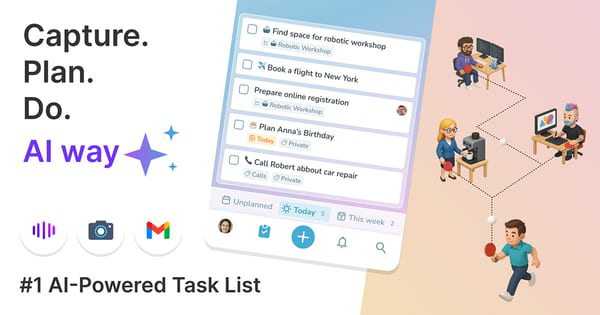
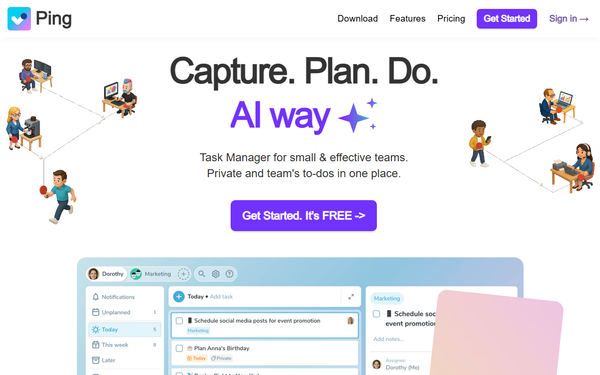
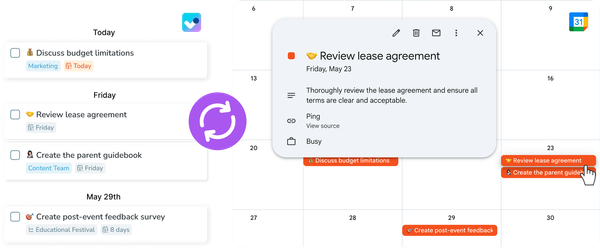
Ping AI Tasklist (ping.tm) is an AI-powered task management tool designed to simplify how individuals and small teams capture, organize, and track tasks. Users can dictate tasks conversationally (as if sending a message), with AI automatically extracting titles, deadlines, reminders, assignees, and generating concise summaries. It also turns starred Gmail emails into fully actionable tasks complete with AI-generated summaries and direct links back to the original message. The app syncs seamlessly with calendars for deadline visibility, supports effortless team collaboration without extra setup, and includes tools for daily planning and prioritization (e.g., scheduling tasks for Today, Tomorrow, This Week, or Later).
Primary use cases include quick voice or photo-based task capture on mobile, clearing email inboxes by converting important messages into trackable items, and lightweight team project management for small groups. It positions itself as a modern to-do list that feels more like chatting with an assistant than traditional project software.
Target audience: Busy professionals, individuals with ADHD or task overload, small teams (up to 15 people), freelancers, and anyone seeking simple productivity without the complexity of enterprise tools like Asana or ClickUp. It claims over 100k users and is especially appealing to those who prefer mobile-first, voice-driven workflows.
Research conducted as of March 2026 using the official website, pricing page, blog, and third-party directories (limited public reviews available on G2 and similar platforms).
Key Features & Capabilities
Core functionality revolves around AI-assisted task creation and smart organization:
- Voice and Photo Input: Dictate tasks naturally; AI parses details and summarizes. Snap photos to generate tasks (Pro only).
- Email Integration: Star any Gmail message; AI scans subject, body, and thread to create a titled task with bullet-point summary and back-link.
- Calendar Sync & Planning: Automatic deadline tracking; easy prioritization via Today/Tomorrow/This Week/Later buckets.
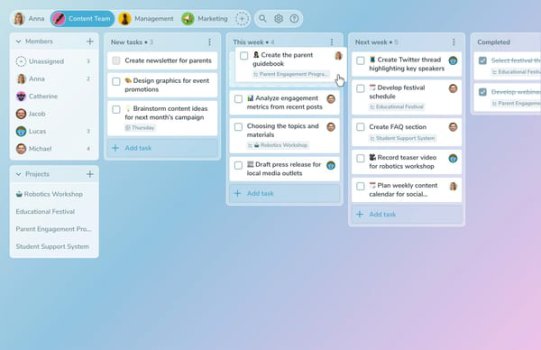
- Collaboration & Visualization: Private tasks alongside shared team to-dos; Kanban boards, task dependencies, status notifications, and snoozing (Pro).
- Other Essentials: Unlimited colored tags, recurring tasks (weekly/monthly), reminders, repeating patterns, and an AI Task Assistant for real-time guidance. Integrations include Gmail, Calendar, Slack, and ChatGPT.
Standout differentiators: Frictionless capture methods (voice like messaging, one-star email magic, photo recognition) combined with automatic summarization and zero-setup collaboration. The flat-fee Team plan (up to 15 users) avoids per-seat pricing common in competitors. Daily planning and AI summaries reduce cognitive load significantly compared to basic lists like Todoist or TickTick.
Limitations and missing features: Free plan caps at 3 projects; email integration limited strictly to starred messages (no full inbox scanning or rules); no offline mode; lacks advanced enterprise tools like Gantt charts, time tracking, custom reports, or public API; AI is helpful but described by some users as “not extraordinary” for complex parsing. No native subtasks in basic views per available descriptions.
User Experience
Ease of use is a major strength—most users report a very low learning curve thanks to natural voice input and simple starring mechanics. The interface is clean, modern, and mobile-optimized with desktop apps available for iOS, Android, Windows, and Mac. Navigation feels intuitive: dictate or star → AI handles the rest → drag-and-drop planning or Kanban view.
Interface quality earns praise for simplicity and visual appeal (colored tags, clear summaries). Testimonials highlight its helpfulness for ADHD users and the convenient ChatGPT-linked assistant.
Documentation and support resources are light: primarily in-app guidance, a short blog with practical posts, and occasional YouTube demos. No extensive public knowledge base or community forum was found; support appears email-based. This is typical for smaller productivity tools but may frustrate power users needing detailed guides.
Performance & Reliability
Task creation and AI processing are fast and efficient on mobile and desktop, with reliable calendar sync and real-time collaboration reported in available feedback. Email-to-task conversion works smoothly via Gmail starring and produces useful, structured summaries quickly.
Known issues or common complaints: Public reviews are sparse (fewer than 10 aggregated across platforms), with no widespread reports of bugs, downtime, or sync failures as of March 2026. Minor user notes mention occasional AI parsing inaccuracies (standard for voice tools) and the project limit in Free tier forcing upgrades. No major reliability complaints surfaced on Reddit, G2 snippets, or social searches. Overall performance appears solid for its target small-team scale.
Pricing & Value
Ping uses a clear freemium model with generous Free tier access:
- Free: Unlimited tasks, colored tags, recurring tasks, reminders, 3 projects, Slack + ChatGPT integrations.
- Pro: $5.99/month (billed monthly) or $3.66/month (billed annually) — adds full AI voice/photos, AI Task Assistant, Calendar + Gmail integrations, unlimited projects, Kanban boards, task snoozing.
- Team: $23.99/month (billed monthly) or $14.99/month (billed annually) flat fee for up to 15 users — everyone gets Pro features.
No free trials or enterprise custom pricing listed. Value proposition is strong for individuals and small teams: the low annual Pro cost and flat Team pricing undercut per-user competitors while delivering unique AI capture tools. Free tier covers basic needs well, making it accessible. Compared to alternatives (Todoist, Notion, ClickUp), Ping offers better voice/email automation at a fraction of the price for simple workflows, though it trades depth for simplicity.
Practical Tutorial
Official guidance exists via the Ping blog for email integration—the most unique and practical feature. Here is a step-by-step walkthrough for converting a starred email into a task (tested conceptually from official instructions; works on Gmail mobile or web).
- Open your Gmail inbox (app or browser) and locate any email containing an actionable item (e.g., “Follow up with the contractor about the playground fence by next week”).
- Star the email using Gmail’s built-in star ⭐ icon—no extra setup or Ping login required at this step (Gmail integration must be enabled once in Ping settings).
- Switch to the Ping app (mobile or desktop). The AI automatically scans the starred email’s subject, body, and thread.
- Within seconds, a new task appears in your Ping inbox with:
- A clear, actionable title (e.g., “🏗️ Find the playground renovation contractor”).
- An AI-generated summary bullet list extracting key details (location, budget, deadlines, etc.).
- A direct clickable link back to the original Gmail thread.
- Edit if needed: assign due date, set reminder, add tags, or move to Today/Tomorrow planning bucket. Share with team members instantly.
Example in action: Star an email from a client requesting a project update → Ping creates “Prepare Q1 report for Client X” with summary bullets and deadline auto-detected.
For voice tasks (Pro): Open Ping, tap the microphone, speak naturally (“Remind me to buy milk tomorrow at 5pm and summarize the shopping list”), and AI fills title, date, reminder, and summary.
Full official guide: https://ping.tm/blog/turn-emails-into-tasks.
Additional quick tip: Use the AI Task Assistant chat for follow-ups like “Prioritize my Today list.”
Final Verdict
Overall rating: 4.3 out of 5. Ping excels at effortless task capture and lightweight team organization with genuinely useful AI smarts, backed by affordable pricing and positive (if limited) user feedback.
Who should use this tool: Individuals, freelancers, small teams (under 15), or anyone overwhelmed by email and meetings who wants fast voice/photo/email-to-task magic without steep learning curves or high costs—especially valuable for ADHD users or mobile-heavy workflows.
Who should avoid this tool: Larger organizations needing advanced reporting, Gantt charts, time tracking, or API integrations; users requiring robust offline support or highly customizable workflows (consider ClickUp or Asana instead); or those expecting revolutionary AI beyond solid but basic automation.
One-sentence recommendation: If you want a delightfully simple AI assistant that turns spoken words, photos, and starred emails into organized tasks without the bloat of traditional project tools, Ping AI Tasklist is an excellent, budget-friendly choice worth trying today.