PlainScribe Review: Affordable AI Transcription and Summarization
Overview & Purpose

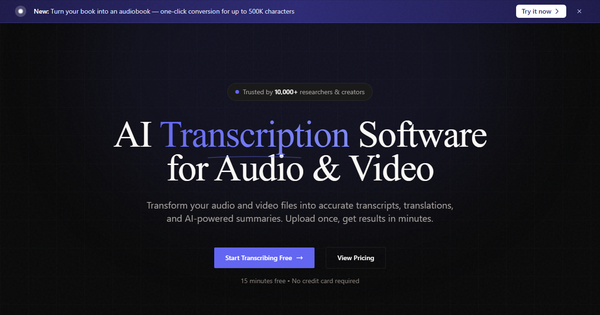
PlainScribe is an AI-powered web application that automatically transcribes audio and video files into accurate text, translates content to English from 47 supported languages, generates context-aware summaries with key points, and creates subtitles. Its primary purpose is to convert raw media into editable, searchable, and shareable text assets quickly and affordably. Common use cases include transcribing interviews, podcasts, meetings, lectures, and video content for analysis, accessibility, SEO, or repurposing into notes, blogs, or captions. It targets researchers (noted as trusted by 10,000+), journalists, content creators, podcasters, and global teams who need multilingual support without long-term commitments. Research conducted as of March 14, 2026.
Key Features & Capabilities
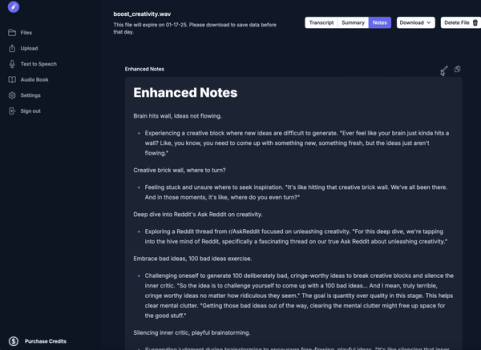
Core functionality revolves around a simple upload-process-export workflow using state-of-the-art speech-to-text AI. It offers automatic speaker diarization (identification and labeling), punctuation, formatting, in-browser editing, one-click AI translation (to English only), summarization of every 15-minute segment with Smart Notes for polishing rough transcripts into professional Markdown-formatted output, and subtitle generation. Standout differentiating features include its all-in-one integration of transcription + translation + summarization at a single low price, automatic file deletion for privacy, support for speaker-labeled exports, and flexible pay-as-you-go model with no subscriptions. Download formats include TXT, CSV, PDF, DOCX, SRT, VTT, and JSON.
Compared to competitors like Otter.ai or Rev, it stands out for lacking monthly fees and bundling summarization natively, plus lower per-minute rates. Limitations include unidirectional translation (only to English, not between other languages or from English outward), accuracy that drops with poor audio quality, heavy accents, background noise, or technical jargon (claimed 95-99% for clear audio), no real-time/live transcription or advanced collaboration tools, and a maximum file size of 2 GB (larger files must be split; enterprise plans offer higher limits). It also relies on third-party APIs, so highly sensitive data is not recommended.
User Experience
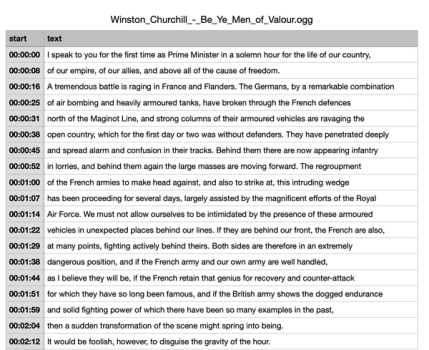
The interface is clean and intuitive with a drag-and-drop upload area on the dashboard, making it accessible even for non-technical users. The learning curve is minimal—most users can start productively within minutes thanks to the three-step process (upload, AI processing with email notification, review/edit/export). The in-app editor allows easy corrections, speaker label adjustments, and one-click additions of translations or summaries. Documentation consists of a helpful FAQ covering formats, accuracy factors, and billing, plus a blog with practical guides; support resources appear basic (standard via dashboard or email) with dedicated options only on enterprise plans. Overall, the experience feels modern and effortless, with positive mentions for simplicity in independent comparisons.
Performance & Reliability
Processing typically completes in one-third to one-half the duration of the media (e.g., a 60-minute file in 20-30 minutes), with instant handling for smaller uploads under standard limits. Reliability is strong for clear recordings, delivering 95-99% accuracy alongside consistent speaker identification and formatting. No widespread known issues or common complaints surfaced in searches across Reddit, review aggregators, or forums as of the research date—user feedback (though limited in volume) highlights speed and ease. Potential variability exists with challenging audio, but users can edit outputs directly. Enterprise tiers add priority processing.
Pricing & Value
PlainScribe uses a pure pay-as-you-go structure at $0.067 per minute (approximately $4.02 per hour) covering transcription, translation, and summarization with no hidden fees or minimum usage requirements beyond an initial $10 credit purchase. New users receive 15 free minutes with no credit card needed; credits are purchased in convenient batches (e.g., 150 minutes for $10) and expire after one year. There are no subscription plans—ideal for sporadic use—though enterprise options exist for higher limits, priority support, and enhanced security. Compared to alternatives, it delivers excellent value: far cheaper than Rev AI ($0.25/min) or Otter.ai subscriptions ($16.99+/month minimum commitment), especially for occasional or bursty workflows. The bundled features and privacy focus enhance the proposition for budget-conscious creators and researchers.
Practical Tutorial
Official tutorials are available on the PlainScribe blog. A complete walkthrough for a common task—generating an editable transcript and summary from a video podcast episode—is provided below, adapted from the site's guide and how-it-works section for real-world use.
- Visit https://www.plainscribe.com/ and sign up for a free account (or log in). Start with the 15 free minutes.
- Navigate to the upload area (dashboard or /dashboard/upload) and drag-and-drop your video file (e.g., a 10-minute MP4 interview podcast in MP4, WAV, or M4A format—under 2 GB).
- The AI automatically detects the language, processes the file (expect 3-5 minutes for this example), and notifies you via email when complete.
- Open the transcript in the intuitive editor: review for accuracy, adjust speaker labels (e.g., "Interviewer:" and "Guest:"), and fix any minor errors from accents or noise.
- With one click, generate an AI translation (to English if needed) and a summarized version with key points extracted plus Smart Notes for polished, professional formatting.
- Export the results: choose SRT for video subtitles, CSV for data analysis, or PDF/DOCX for sharing. For the podcast example, the final output might include timestamped dialogue, a concise 300-word summary of main takeaways, and ready-to-use captions.
Full official step-by-step guide: https://www.plainscribe.com/blog/how-to-generate-transcript-from-video. Test with a public-domain sample video for best results.
Final Verdict
Overall rating: 4.5 out of 5. This tool excels for occasional or project-based users seeking an affordable, privacy-conscious all-in-one solution for transcription, translation, and summarization without subscriptions. Researchers, journalists, podcasters, and global content creators should use it for its flexible pricing, quick turnaround, and built-in editing/summarization tools that save hours of manual work. Avoid it if you need bidirectional translations, real-time transcription, advanced collaboration features, or processing for highly sensitive data (due to third-party APIs). One-sentence recommendation: PlainScribe is a smart, no-commitment choice for anyone tired of expensive subscriptions who wants reliable AI media-to-text conversion with extras included.