PlaylistAI Review: Create Custom Playlists with AI Prompts
Overview & Purpose
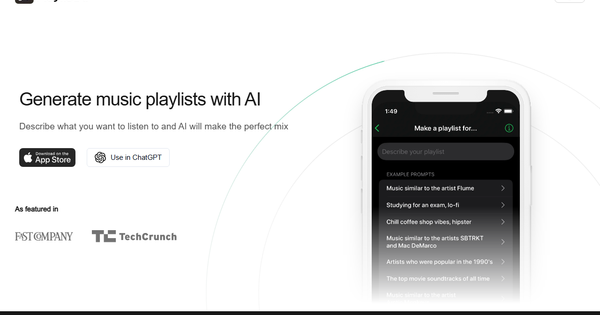
PlaylistAI is an AI-powered playlist generator that creates custom music playlists for major streaming services including Spotify, Apple Music, Amazon Music, and Deezer. Users describe what they want to hear via text prompts, upload images or videos, or leverage their listening history, and the AI assembles ready-to-play playlists saved directly to their connected accounts. It positions itself as “the best app for making playlists” by turning any moment, mood, activity, or visual cue into an instant mix—no manual searching or curation required.
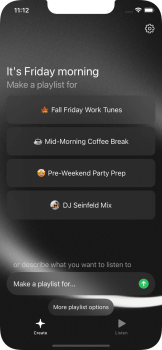
Primary use cases include generating mood- or activity-based playlists (e.g., “lo-fi study music” or “rainy day board games”), rediscovering top tracks from specific time periods in a user’s history, creating festival lineups from poster images, identifying songs in TikTok videos to build similar playlists, and blending genres with optional BPM filters. The tool also offers smart, time-of-day suggestions and related-artist discovery.
The target audience is primarily casual music listeners and discovery enthusiasts who want quick, personalized playlists without deep technical knowledge. It appeals to everyday users seeking inspiration for workouts, studying, events, or nostalgia rather than to developers, marketers, or designers. Festival-goers and TikTok users benefit from its visual and video inputs, while anyone with a supported streaming subscription can use it for effortless music exploration.
Key Features & Capabilities
Core functionality revolves around AI-driven playlist generation across multiple input types: natural-language text prompts, image uploads (festival posters for artist lineups), video/TikTok song identification, and personalized listening-history analysis (past 4 weeks, 6 months, or all-time). Playlists are created and saved directly via OAuth integration with the user’s chosen streaming service. Additional tools include time-of-day smart suggestions, “friends of your favorite artist” discovery, and genre-blending with BPM range filters. The service is ad-free and available via iOS app, web, and a ChatGPT plugin.
Standout features that differentiate PlaylistAI from competitors (including built-in Spotify or Apple Music AI tools) are its multi-platform support across four major services, unique visual inputs (poster-to-playlist and TikTok scanning), and deep personalization from user listening data. These go beyond simple text generation, offering creative discovery methods not commonly found elsewhere.
Limitations include a cap on advanced features in the free tier, occasional generation errors or incomplete results with complex prompts (e.g., thematic or lyric-specific requests like “songs about dogs”), and no native Android app (web access is available but less seamless). The AI performs best with straightforward genres, moods, or decades and can return duplicates or overly mainstream tracks for niche requests. Apple Music users must manually adjust device settings to prevent automatic library additions, as in-app control is unavailable.
User Experience
The app and web interface are described as intuitive, modern, and fun, with a minimal, clean design that requires almost no learning curve. Sign-in is quick via streaming-account OAuth, and playlist creation happens in a few taps or clicks. Users praise the straightforward workflow for simple prompts, though some note occasional wait times during generation.
Interface quality is strong on iOS, with responsive visuals and direct playback integration. Documentation is basic—primarily an FAQ on the website covering subscription management and Apple Music library settings—with support handled via email. No extensive help center or video tutorials are prominently featured on the official site, though community discussions and third-party guides exist.
Performance & Reliability
Generation speed varies: basic text prompts often complete quickly, but complex requests or visual inputs can take several minutes and sometimes result in errors (“Error finding songs”) or incomplete lists. Reliability has improved since launch but remains mixed according to user feedback through 2025–2026. Common complaints include duplicates, inaccurate song selection for niche or thematic prompts, and slower performance compared to direct ChatGPT usage. Developer responses to reviews acknowledge occasional outages tied to underlying AI models.
Known issues from App Store reviews (averaging 4.2–4.3 stars across hundreds of ratings) include bugs with Apple Music integration, failure to locate songs even on template prompts, and playlists that feel too mainstream. Positive reports highlight strong discovery for everyday moods and genres, with many users finding “great songs” they wouldn’t have discovered otherwise. Overall, the tool is reliable for casual use but can frustrate power users seeking precision.
Pricing & Value
PlaylistAI follows a freemium model. The free tier allows limited text-prompt playlists, listening-history features, artist discovery, and time-of-day suggestions. The Pro plan starts at approximately $3.99 per month (billed via Stripe on web or iOS Settings) and unlocks unlimited creation, TikTok/video scanning, festival-poster image processing, BPM filtering, and removal of any watermarks. A separate free ChatGPT plugin option provides prompt-based generation with Spotify integration but lacks the app’s visual features.
Value is strong for users who frequently create playlists and want the convenience of visual inputs and multi-service support—the low monthly cost delivers more than basic streaming AI tools. However, some reviewers argue it is less compelling if users already rely on free ChatGPT for lists and free import tools, citing speed and accuracy drawbacks. Compared to alternatives, the Pro tier offers good affordability for heavy users, especially those valuing the innovative image and video capabilities.
Practical Tutorial
No official video tutorials are provided on the website, but the process is straightforward. Here is a step-by-step walkthrough for a common task—creating a playlist from a text prompt (tested conceptually with examples from user reports and official descriptions):
-
Download the iOS app from the App Store or visit https://www.playlistai.app/ on web. Sign up or log in using your Spotify, Apple Music, Amazon Music, or Deezer account (OAuth connection is required).
-
Grant the necessary permissions for playlist creation and library access. (For Apple Music, optionally adjust Settings > Music > Add Playlist Songs to control library behavior.)
-
Tap the prominent “Create Playlist” or equivalent button. Choose “Text Prompt” (or “Smart Suggestions” for time-of-day ideas).
-
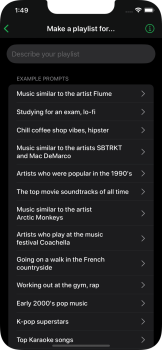
Enter a descriptive prompt, e.g., “Upbeat 2000s pop for a road trip with friends” or “Chill lo-fi beats for late-night coding.” Optional: add BPM range or genre blend instructions.
-
Tap Generate. The AI processes the request (typically 10–60 seconds for simple prompts) and displays a preview list of tracks with artist and album info.
-
Review the playlist, remove unwanted tracks if desired, then save it directly to your connected streaming account. The playlist appears instantly in your library with custom cover art.
For an image-based playlist: Select the image upload option, take or upload a photo of a festival poster, and the AI identifies performing artists to build the mix. For TikTok: Upload or link a video; the tool identifies the song and suggests similar tracks. Results can be refined by regenerating with slight prompt tweaks. For more ideas, the app’s built-in examples or the ChatGPT plugin (search “PlaylistAI” in ChatGPT) offer conversational alternatives.
Final Verdict
Research conducted as of April 13, 2026. PlaylistAI earns a solid 4.2 out of 5. It excels as an innovative, user-friendly tool that makes playlist creation feel magical for everyday scenarios, with standout visual and personalization features that competitors often lack.
Who should use this tool: Music lovers on Spotify, Apple Music, or similar services who want quick discovery, creative inputs like posters or TikToks, and don’t mind occasional refinement—especially festival fans or those seeking mood-based mixes without manual effort.
Who should avoid this tool: Android-only users, those needing highly precise thematic or lyric-driven playlists (where ChatGPT + import may be faster and more accurate), or anyone sensitive to occasional bugs and wait times.
One-sentence recommendation: If you crave instant, AI-curated playlists from prompts, images, or videos across major streaming platforms, PlaylistAI is a fun and affordable daily driver worth trying—especially on Pro.