PocketPod Review: Create Your Own Personalized AI Podcasts
Overview & Purpose
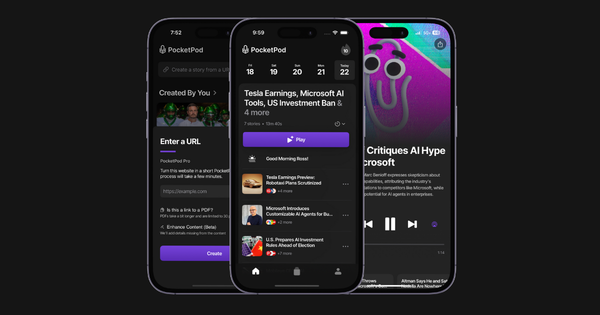
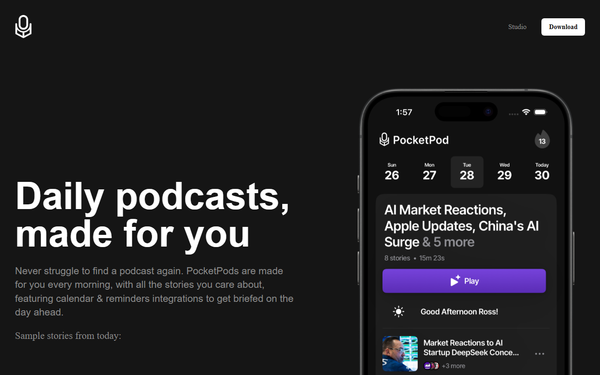
PocketPod is an AI-powered iOS app that generates fully personalized podcasts tailored to each user's unique interests and daily context. It delivers a custom daily news podcast every morning—complete with local weather, calendar events, reminders, and handpicked stories from thousands of sources—while also allowing on-demand creation of bespoke episodes on any topic. Primary use cases include morning commutes with relevant news briefs, deep dives into niche subjects (such as feudal Japanese cuisine or technical topics), converting shared documents or PDFs into narrated audio, and turning YouTube videos, links, images, or questions into engaging podcast-style discussions. The service integrates directly with Spotify for seamless delivery and supports calendar syncing to align content with users' schedules.
The target audience spans busy professionals, commuters, podcast enthusiasts, lifelong learners, and anyone preferring audio consumption over reading. It appeals especially to those overwhelmed by traditional news feeds or podcast discovery, offering a hands-free, voice-driven alternative that feels like a personal NPR-style briefing. It is not aimed at developers, marketers, or designers specifically but at everyday listeners seeking convenience and relevance.
Key Features & Capabilities
Core functionality revolves around proprietary AI that curates, researches, and narrates content using multiple hosts and reporters for natural, storytelling-driven episodes. Standout features include:
- Daily personalized news with weather, calendar summaries, and verified multi-source stories delivered automatically to Spotify or the app.
- Custom podcast creation by simply sharing links, YouTube videos, documents, images, or questions—enabling on-demand episodes on any subject, including PDF-to-audio conversion.
- Smart integrations for calendar/reminders, bookmarking, archiving, sharing episodes, and style customization.
- Professional-grade production mimicking outlets like NPR or The Daily, with in-depth fact-checking.
These differentiate PocketPod from competitors like Google’s NotebookLM (one-off document podcasts without daily news or calendar integration) or generic TTS tools by providing ongoing, context-aware personalization and seamless daily delivery.
Limitations include iOS-only availability (no Android version noted), reliance on a subscription for unlimited access, occasional onboarding bugs, and data collection practices that link usage to user identity. RSS feed compatibility is mentioned in some descriptions for broader podcast app integration, but core delivery focuses on the native app and Spotify. No enterprise options or advanced analytics for teams are currently available.
User Experience
The iOS app offers a clean, intuitive interface with quick onboarding that learns preferences and connects to calendars. Setup is generally straightforward—users report it takes minutes once completed—though some experience technical glitches requiring multiple attempts. Navigation centers on daily episodes and a simple “create” flow for custom content, with easy bookmarking and sharing. The learning curve is low for anyone familiar with podcast apps; no coding or advanced skills needed.
Interface quality is modern and app-native, emphasizing audio playback with host voices that feel conversational. Documentation is minimal (primarily in-app tips and the website), but customer service receives high marks (4.8/5). Support resources include the official site and App Store listings; no extensive help center or video tutorials were found publicly as of research date.

Performance & Reliability
Episode generation is efficient, producing daily podcasts overnight and custom ones on demand with minimal wait times. The AI handles research across sources reliably, delivering consistent quality comparable to professional shows. Calendar and weather integrations perform smoothly once set up.
Known issues are limited: occasional onboarding bugs (reported by a minority of users) and the need for a stable internet connection for initial syncing. No widespread complaints about audio quality, crashes, or generation failures appear in reviews. Privacy concerns exist due to data collection (purchases, contacts, usage), but the app maintains high overall reliability with a 4.8/5 user rating across available feedback.

Pricing & Value
PocketPod follows a freemium model. The free tier provides limited access to basic features and partial stories. The PocketPod+ subscription unlocks unlimited episodes, full personalization, and all custom creation tools at $7.99 per month or $69.99 per year. No enterprise tier is offered.
Value is strong for frequent listeners: the daily tailored briefings and effortless custom episodes save significant time compared to manual podcast hunting or reading. Compared to alternatives (NotebookLM free but limited scope; ElevenLabs for voices only), PocketPod’s integrated daily service and calendar features deliver superior convenience at a modest cost—especially worthwhile for users consuming multiple episodes weekly.
Practical Tutorial
No official video tutorials were located, but the following step-by-step walkthrough for creating and listening to a personalized daily news podcast plus a custom episode is derived directly from app descriptions, onboarding flows, and user-reported processes (verified via App Store listing and reviews as of March 13, 2026). Example: generating a daily news brief plus a custom podcast on “feudal Japanese cuisine.”
-
Download and install: Visit https://pocketpod.app/ or search “PocketPod: Personal Podcasts” in the iOS App Store (direct link: https://apps.apple.com/us/app/pocketpod-personal-podcasts/id6502619728). Scan the QR code on the homepage if preferred. Open the app.
-
Sign up and onboard: Create an account (email or quick sign-in). During setup, answer prompts about interests (e.g., “technology, history, food”), grant calendar/reminder access, and allow location for weather. The AI learns preferences in one pass.
-
Receive your daily podcast: Each morning, a fully narrated episode appears automatically (delivered to Spotify via your account or playable in-app). It greets you by name, covers local weather, summarizes your calendar, and presents 5–10 handpicked stories. Play directly or add to your library. Example output: “Good morning, Alex—here’s your weather for San Francisco and today’s top AI and history updates.”
-
Create a custom podcast: Tap the “Create” or share button. Paste a link, upload a document/PDF, share a YouTube video, image, or type a question (e.g., “Explain feudal Japanese cuisine with recipes and history”). Optionally adjust style (formal, casual). Submit—AI researches, scripts, and generates the episode in minutes. Listen, bookmark, or share the resulting 10–30 minute podcast.
-
Enhance and iterate: Bookmark episodes, archive favorites, or refine by sharing feedback. For RSS export (if enabled in settings), copy the personal feed link to add to any podcast player like Apple Podcasts.
This process typically takes under 5 minutes for setup and seconds for daily listening. For deeper dives, repeat step 4 with new content.
Final Verdict
Overall rating: 4.5 out of 5. PocketPod excels for anyone craving truly personalized audio content without the hassle of curation—ideal for busy professionals, commuters, or curious minds who want daily news briefs or instant deep dives on niche topics delivered in a polished podcast format. Users valuing seamless calendar integration and effortless customization will find it transformative.
Avoid it if you prefer free-only tools, use Android exclusively, or have strong privacy reservations about data linking. One-sentence recommendation: PocketPod is a must-try for anyone tired of generic podcasts and ready for AI-crafted audio that actually knows them.