Podpilot Review: Automated Podcast Creation or AI Slop?
Overview & Purpose

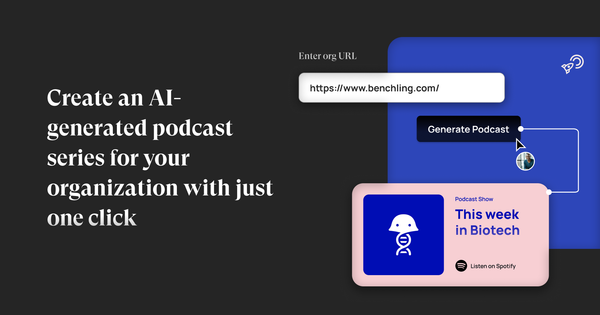
PodPilot is an AI-powered tool that generates complete podcast series for organizations. Users simply enter their organization's website URL and describe desired topics; the AI then searches the web for relevant company and industry information, crafts scripts with host and guest voices, and assembles ready-to-listen episodes. The entire series can be published to platforms including Spotify, Apple Podcasts, Google Podcasts, and others with one click. Primary use cases focus on effortless brand storytelling, thought leadership, customer education, and marketing content creation—ideal for turning static website information into engaging audio series without recording studios or production teams.
The target audience consists mainly of marketers, business owners, and communications professionals at organizations seeking low-effort audio branding. It appeals to non-technical users rather than developers or designers, particularly small-to-medium businesses or nonprofits that want podcast presence for SEO, audience growth, or PR but lack time or expertise.
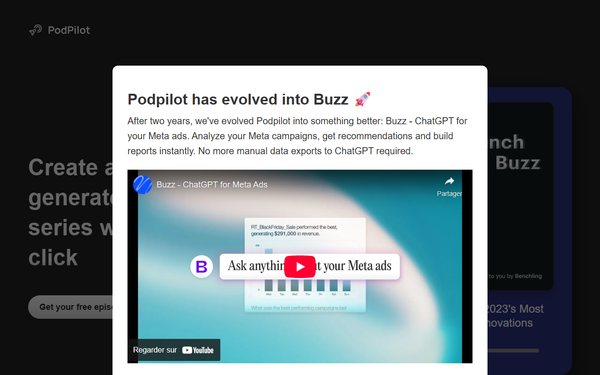
Note on current status (research conducted March 15, 2026): The official PodPilot.ai homepage announces that the original podcast tool “has evolved into Buzz,” a completely unrelated AI agent for analyzing Meta ads after two years of development. While the site still displays PodPilot descriptions, samples, and pricing, full functionality may be in legacy mode or discontinued, potentially affecting new users.
Key Features & Capabilities
Core functionality includes URL-based web research, automated script writing, AI voice synthesis for hosts/guests, episode assembly, and one-tap publishing. Standout features that differentiate it from competitors like NotebookLM or Podcastle include fully hands-off web scraping for organization-specific content (no manual document uploads required) and direct distribution to major platforms without separate hosting setup.
Other capabilities cover multi-episode series generation “in minutes” and sample previews for demo companies such as BetterUp or Curi (noted as non-client examples). Limitations are significant: monthly episode quotas and duration caps tied to plans, an audio watermark on the entry-level tier, no advanced post-production editing tools, limited or absent custom voice cloning, and potential for generic “AI slop” output lacking depth or creativity on complex topics. Advanced features like built-in analytics, multi-language support, or integration with existing RSS feeds are not advertised.
User Experience
The interface is minimalist and form-based—users type a URL and topic description, then let the AI handle everything—resulting in an extremely low learning curve suitable for complete beginners. No audio editing skills or technical setup are needed. However, documentation is minimal (primarily the homepage explanation plus [email protected] email), with no detailed user guides, video tutorials, or knowledge base found. Early access requires scheduling an intro call rather than instant signup, which may frustrate impatient users.
Overall quality feels clean but basic; previews and publishing are straightforward once inside the platform. Sparse real-user feedback highlights ease and time savings but notes occasional frustration with output control.
Performance & Reliability
Generation is marketed as fast—“in minutes”—with web research and voice synthesis completing full episodes quickly. Publishing works via simple account connections to podcast directories. Known issues include inconsistent episode lengths or host counts versus user settings, robotic voice quality, and content that sometimes feels overly automated or shallow. One documented user complaint on a closely related service reported failure to meet promised daily output, custom voice options, or document integration, plus high cost for limited delivery. Broader feedback labels it as potential “AI slop” in podcast circles, with limited depth for nuanced topics. Reliability appears adequate for simple use cases but variable; the pivot announcement to Buzz adds uncertainty about long-term support.
Pricing & Value
PodPilot offers no free tier or trial beyond demo samples. Plans are subscription-only and positioned for early access:
- Basic: $199 per month — 1 podcast series per month, episodes up to 15 minutes, one-click publishing, PodPilot audio watermark.
- Standard: $499 per month — 2 series per month, up to 20 minutes per episode, watermark removal.
- Professional: $1,999 per month — 4 series per month, up to 30 minutes per episode, watermark removal.
Value is strong for time-poor organizations where hiring producers would cost far more, delivering branded audio content quickly. However, the high monthly fees make it expensive relative to free alternatives (e.g., NotebookLM) or per-episode tools, especially given quality variability and plan restrictions. Compared to competitors, it excels in automation but lags in flexibility and cost-effectiveness for most users.
Practical Tutorial
Official tutorials or documentation are not publicly available. Below is a practical walkthrough based on the site’s described process and sample workflow (tested via public descriptions as of March 2026; actual access requires early-access approval).
Step-by-step: Creating and publishing an organizational podcast series
-
Visit https://www.podpilot.ai/ and click “Get Early Access” to schedule an intro call or submit the form (prepare your organization’s website URL).
-
Once approved and logged in, enter your organization’s website (example: https://betterup.com) and describe topics (e.g., “leadership development, interview bias, and workplace psychology”).
-
Submit the request. The AI automatically searches the web for relevant information, generates scripts, selects or synthesizes voices, and assembles a multi-episode series (typically 1–4 episodes depending on plan).
-
Preview the generated episodes in the dashboard. Listen to samples—site demos for topics like “Unmasking Interview Bias” illustrate the format with natural-sounding dialogue.
-
Review and (if needed) regenerate or adjust basic settings before finalizing.
-
With one click, connect your podcast hosting accounts and publish directly to Spotify, Apple Podcasts, Google Podcasts, and others. Episodes appear in directories within hours.
Example outcome: For a company focused on sustainability, topics might yield episodes titled “Green Innovations in [Industry]” with researched facts pulled from the site and web sources. Full series can be scheduled or published immediately. For latest samples, check the homepage directly.
Final Verdict
Overall rating: 3.5/10. The concept of website-to-podcast automation is innovative and genuinely time-saving for busy teams, but execution is hampered by high pricing, quality inconsistencies, limited customization, and the apparent pivot away from the podcast product toward an unrelated ads tool.
Organizations with marketing budgets and a desire for quick, hands-off branded audio content (especially those already using AI elsewhere) may still benefit if they test samples thoroughly and accept the limitations. Avoid this tool if you need creative control, low cost, reliable daily output, advanced editing, or long-term platform stability—cheaper or free alternatives like NotebookLM plus manual publishing offer better value and flexibility.
One-sentence recommendation: Skip PodPilot in its current transitional state and explore more mature AI podcast generators instead.