Ponder Review: The Ultimate AI-Powered Visual Knowledge Workspace
Overview & Purpose

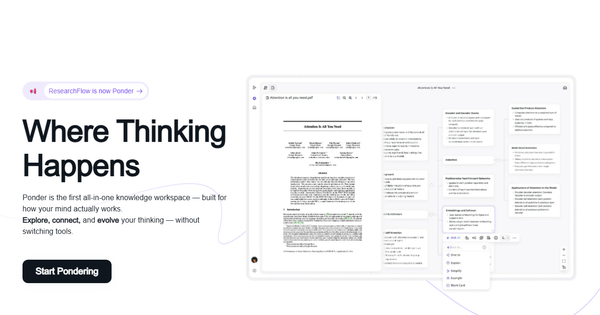
Ponder (formerly ResearchFlow) is an all-in-one AI-powered knowledge workspace designed to mirror how the human mind naturally processes and connects ideas. It combines document import and management, interactive visual knowledge mapping on an infinite canvas, and a conversational AI partner into a single environment, eliminating the need to switch between tabs, note apps, or chat interfaces. Users start with a question, file upload, or existing knowledge base, and the platform instantly generates a personalized thinking space where ideas branch organically.
Primary use cases include synthesizing literature reviews for academics, turning reports and datasets into strategic insights for analysts, organizing course materials for students, and building connected knowledge graphs from experimental results or multi-source research. It positions AI not as a replacement for thinking but as an augmentation that suggests connections, identifies blind spots, and helps structure evolving insights.
The target audience is researchers (including PhD students and postdocs), analysts, knowledge workers, graduate students, academic writers, and professionals in fields like law, medicine, and content creation who deal with complex, multi-source information and need deeper synthesis rather than quick answers.
Key Features & Capabilities
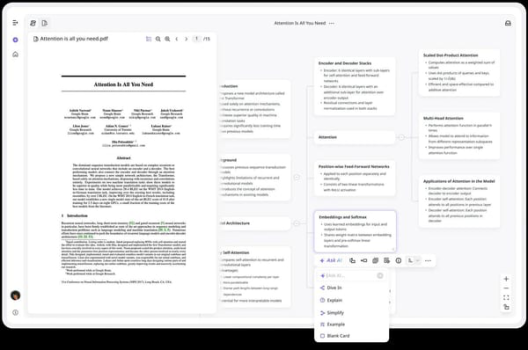
Core functionality revolves around an infinite, Figma-style canvas for visual knowledge mapping, seamless import of diverse content (PDFs, YouTube videos, web pages, text), and real-time AI synthesis. Users build “Ponders” (thinking spaces) where nodes represent concepts, notes, or sources; connections are labeled semantically; and everything stays contextual.
Standout features that differentiate Ponder include the Ponder Agent—an intelligent thinking partner that conducts real conversations with your knowledge base, follows up on ideas, challenges assumptions, explores “what-ifs,” and surfaces hidden patterns across documents. Other highlights are one-click PDF-to-knowledge-graph extraction, multi-document comparison, AI-generated outlines and questions, semantic search, automatic citation tracking with retraction alerts, and exports to PNG, HTML, Markdown, or structured reports. Collaboration via shared workspaces and real-time editing is supported, though details remain lighter than dedicated team tools.
These capabilities set it apart from linear note-takers (Notion, Obsidian), reference managers (Zotero, Mendeley), or general AI chatbots (ChatGPT, NotebookLM), which lack the persistent visual canvas and deep-thinking focus. Ponder emphasizes spatial, associative thinking over flat lists or temporary responses.
Limitations include a credit-based system for advanced AI usage (daily and monthly caps vary by plan), a 150 MB per-file upload limit, and only basic project organization (no robust folder hierarchies or advanced search reported). There is no dedicated mobile app, limited third-party integrations, and team collaboration features are present but not as polished as enterprise alternatives. Some setup is required to maximize value.

User Experience
Ponder offers a clean, modern interface with an intuitive infinite canvas that feels responsive and natural for visual thinkers. Most users describe it as “Figma for thinking,” with easy drag-and-drop, zoom/pan controls, and minimal friction for uploading or starting a new space. The learning curve is gentle for those familiar with mind-mapping tools but may require 30–60 minutes to master Agent prompting and canvas organization for power users.
Interface quality is high—minimalist, distraction-free, and focused on flow. Testimonials and video demos consistently praise its speed in turning uploads into interactive maps and the Agent’s contextual awareness. Documentation is solid via the official blog (guides on concept mapping, research organization, and alternatives) and numerous community YouTube tutorials. In-app support appears limited to FAQs, with no public help center or extensive community forum noted; email or in-app chat is the likely channel.
Performance & Reliability
Upload processing, summarization, and map generation are fast in demos, with AI responses appearing near-instant for most tasks. The platform handles multiple documents reliably and maintains context across sessions. As a newer tool (public launch around late 2025), it shows strong stability with no widespread outage reports.
Known issues are minor and usage-related: free-tier users can exhaust daily AI credits quickly during intensive sessions, and very large uploads occasionally hit the 150 MB cap. No major bugs, slowdowns, or data-loss complaints appear in available reviews or searches as of March 2026. Overall reliability suits daily professional use, though heavy users upgrade for unlimited basic AI.
Pricing & Value
Ponder follows a freemium model with four tiers (pricing as of March 2026, with 20% yearly discount):
- Free: $0 – 20 AI credits/day, limited uploads (≈5/day), 150 MB/file limit, unlimited Ponders.
- Casual: $8/month (yearly) or $24/month – higher upload limits, 800 AI credits/month.
- Plus: $24/month (yearly) or $48/month – unlimited basic AI + 2,500 credits/month (most popular).
- Pro: $48/month (yearly) or $96/month – 6,000 credits/month.
Discount codes (e.g., PONDER15) and referral links often reduce costs further. No enterprise plan is listed.
Value is excellent for the target audience: it replaces multiple tools (reference manager + mind mapper + AI summarizer + note app), delivering measurable time savings in literature reviews and synthesis. Compared to free NotebookLM (limited to one notebook, no canvas) or paid Roam/Notion (less visual/AI depth), Ponder’s unified workflow justifies the upgrade for serious researchers. Free tier works for light or trial use.
Practical Tutorial
Official guides and community videos provide excellent walkthroughs. Here is a step-by-step tutorial for a common task—conducting a literature review on “AI ethics in healthcare”—created from official blog instructions and verified demo flows.
- Sign up and create a space: Go to ponder.ing, create a free account (Google or email), and click “New Ponder” to start a fresh thinking space.
- Import sources: Drag in 3–5 PDFs (research papers), paste YouTube video links, or add web article URLs. Ponder auto-processes them into nodes.
- Generate initial map with AI: Type a seed question (“What are the main ethical challenges of AI in diagnostics?”) or use the Agent to auto-generate a concept map. The platform extracts key concepts and builds hierarchical branches.
- Interact with the Ponder Agent: Click any node and ask follow-ups (“Compare this argument with Paper X,” “What blind spots exist here?” or “Suggest connections to regulatory frameworks”). The Agent suggests new branches, highlights contradictions, and adds cited insights.
- Refine visually: Drag nodes to organize, draw labeled connections (“leads to,” “contradicts”), color-code categories, and add personal notes. Use AI whiteboard for real-time collaboration if sharing with a team.
- Review and export: Ask the Agent for a synthesized outline or knowledge gaps. Export as interactive HTML mind map, PNG, Markdown report, or structured document.
Total time for a basic review: 15–30 minutes versus hours manually. For video walkthroughs, see official-style tutorials such as “Ponder AI Review & Tutorial” on YouTube or the blog post “How to Make a Concept Map.”
Final Verdict
Overall rating: 4.5/5 (excellent for depth and innovation; slightly docked for credit limits and early-stage organization tools).
This tool is ideal for researchers, PhD students, analysts, and anyone performing complex synthesis who values visual thinking and AI augmentation—saving hours while producing richer insights. Avoid it if you need unlimited free AI, simple linear note-taking, heavy mobile use, or quick one-off answers (better served by NotebookLM or ChatGPT).
Ponder transforms scattered research into connected, actionable knowledge—highly recommended for deep thinkers ready to upgrade their workflow.