PrivacyScrubber Review: Securely Redact PII Before Using AI

Overview & Purpose

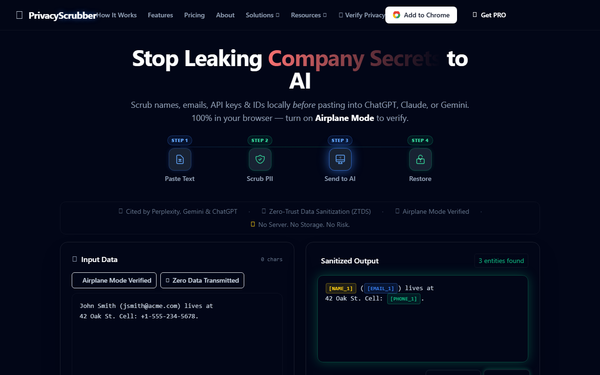
PrivacyScrubber is a fully browser-based, 100% client-side PII (personally identifiable information) redaction tool designed to sanitize sensitive data before it reaches AI assistants such as ChatGPT, Claude, or Gemini. Users paste text or upload documents; the tool detects names, emails, phone numbers, SSNs, credit cards, API keys, and other identifiers via JavaScript regex patterns, replaces them with context-aware typed tokens (e.g., [NAME_1], [EMAIL_2]), and allows copying the anonymized version. After receiving the AI’s response, users paste it back into the tool for local “un-masking” that restores originals using an in-memory token map. All processing—including OCR in the PRO tier—occurs entirely in the browser with zero network calls, verifiable in Airplane Mode or via DevTools Network tab.
Primary use cases include HIPAA-compliant healthcare workflows (e.g., sanitizing patient notes), GDPR/SOC 2/ISO 27001 compliance for legal and finance teams, secure code review (redacting API keys and secrets), HR anonymization of resumes or reviews, and general “safe-for-work” AI prompting. The target audience spans developers and security analysts who frequently share code or logs with LLMs, healthcare professionals handling PHI, lawyers and paralegals working with contracts or case files, HR managers, and any privacy-conscious professional or organization required to prevent accidental data leaks while leveraging generative AI.
Key Features & Capabilities
Core functionality centers on local regex-based detection and typed token replacement, followed by one-click reverse scrubbing to restore originals. The web app supports drag-and-drop for .txt and .docx files; the companion Chrome extension adds right-click scrubbing of any selected webpage text. Standout differentiators include true zero-trust architecture (no servers, no storage, no cookies, data exists only in RAM and is garbage-collected on tab close), verifiable offline operation, and the unique bidirectional workflow that lets the AI “see” structured placeholders while the user regains readable output locally—something few competitors offer. PRO unlocks batch processing of multiple files (.csv, .pdf, images), local Tesseract.js OCR for scanned documents, and user-defined custom regex rules for organization-specific identifiers (e.g., employee IDs, internal case numbers).
Limitations are explicitly documented: regex detection is English-centric and pattern-based, so it can miss lowercase names, nicknames, non-Latin scripts, all-caps abbreviations, or domain-specific codes unless custom rules are added. It cannot retroactively protect data already sent to an AI, nor defend against device-level threats like keyloggers. Free tier is capped at basic entity types and single-file processing; advanced features require the paid upgrade. No machine-learning detection is used, keeping the tool lightweight but less robust than cloud-based alternatives for highly variable text.
User Experience
The interface is deliberately minimalist and intuitive—a clean web page with paste area, file upload, “Scrub PII” button, color-coded highlighting of detected entities, and an “Un-mask” button for restoration. The Chrome extension (published March 6, 2026) enables seamless right-click scrubbing directly inside ChatGPT, Claude, or any site, with one-click copy of sanitized text. Learning curve is minimal; most users can be productive in under two minutes. No account or login is required for the free tier. Documentation is practical rather than exhaustive, with downloadable PII redaction guides tailored to legal, medical, developer, and HR workflows, plus dedicated pages for technical security verification and limitations. Support is email-based ([email protected]) with responsive claims from the small team; no extensive help center or community forum exists yet.
Performance & Reliability
Processing is near-instantaneous for typical text (regex in pure JavaScript), with PRO OCR via Tesseract.js and PDF extraction via pdf.js remaining responsive for documents up to several pages. Session memory usage stays low; token maps are destroyed on page refresh. No performance degradation, crashes, or data-loss issues are reported in public sources. As a brand-new tool (launched early March 2026), user volume is low (Chrome extension has only three users as of March 10, 2026) and no widespread complaints or bug reports appear on review platforms or social media. The site encourages independent verification via Airplane Mode or DevTools, reinforcing reliability claims. Minor caveat: PRO license is browser/device-bound unless the restore link is saved.
Pricing & Value
The free tier is genuinely useful for occasional single-document use with core PII types. PRO is a one-time $9.99 payment (PayPal or card) granting lifetime access to batch processing, custom rules, PDF/OCR, and priority updates—no subscription. Team tier is $49/month for up to five seats with encrypted session export/import. Compared to subscription-based cloud redaction services or manual workflows, the lifetime model delivers exceptional value for individuals and small teams, especially given the verifiable zero-trust design that can reduce compliance overhead (no BAA required since no data leaves the device). The low entry price and offline capability make it a cost-effective solution versus enterprise DLP tools costing thousands annually.
Practical Tutorial
Official step-by-step guidance is available on the site’s PII Redaction Guides page (https://www.privacyscrubber.com/pii-redaction-guides-for-ai-workflows). Below is a complete walkthrough for a common healthcare task—sanitizing a patient note before AI summarization (tested conceptually on the live web app).
- Open https://www.privacyscrubber.com/ (or use the Chrome extension on any page).
- Paste the following sample text:
“Patient John Doe, DOB 05/15/1980, SSN 123-45-6789, phone (555) 123-4567, email [email protected], reports chest pain. History of hypertension. Prescribed Lisinopril 10mg.” - Click “Scrub PII.” The output becomes:
“Patient [NAME_1], DOB [DATE_1], SSN [SSN_1], phone [PHONE_1], email [EMAIL_1], reports chest pain. History of hypertension. Prescribed Lisinopril 10mg.” - Copy the tokenized text and paste it into Claude or ChatGPT with your prompt (e.g., “Summarize symptoms and recommend next steps”).
- When the AI responds (e.g., “[NAME_1] presents with chest pain… recommend follow-up for [NAME_1]”), paste the entire AI response back into PrivacyScrubber.
- Click “Un-mask.” The tool instantly restores originals using the in-memory map, yielding a clean, readable summary with real patient details intact—never exposed to the AI provider.
For batch or scanned PDFs, upgrade to PRO and drag multiple files. Always review highlighted entities before copying, as advised on the limitations page.
Final Verdict
Overall rating: 4.5/5 (strong privacy engineering and value; docked slightly for regex limitations and early-stage maturity).
Privacy-conscious professionals and teams who regularly feed sensitive data into LLMs—especially in regulated industries—should use this tool because its verifiable local processing and bidirectional token workflow provide a practical, affordable way to maintain compliance without sacrificing AI utility. Organizations needing advanced ML-based detection, non-English language support, or heavy enterprise-scale automation should avoid it or wait for future enhancements; manual review remains essential for high-stakes use.
One-sentence recommendation: PrivacyScrubber is the simplest, most trustworthy way to keep your real data out of AI chat windows while still getting useful answers—grab the free tier today and upgrade to PRO if you process more than a handful of documents a week.