Prodpad Review: The Ultimate AI-Powered Product Management Tool
Overview & Purpose

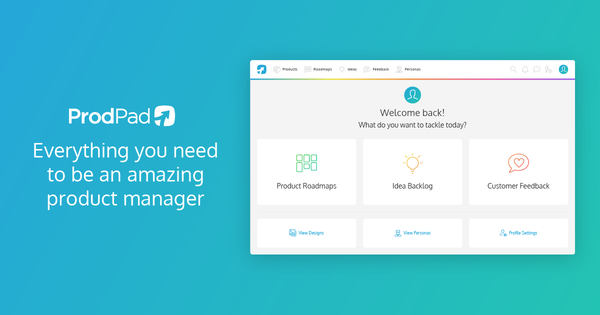
ProdPad is a comprehensive product management platform designed as a single source of truth for the entire product lifecycle. It helps teams organize ideas, collect and analyze customer feedback, build strategic roadmaps, manage OKRs, and drive alignment from discovery through to delivery. Primary use cases include prioritizing backlogs based on real customer needs, creating flexible outcome-focused plans that avoid rigid timelines, turning scattered feedback into actionable insights, and enabling cross-functional collaboration without endless stakeholder updates or disconnected tools.
It is primarily used by product managers, VPs of Product, Chief Product Officers, and cross-functional teams including engineering, marketing, sales, and support. Target users span startups, scale-ups, enterprises, government agencies, and organizations like Depop, NBC Universal, and NHS, where strategic clarity and data-driven decisions are critical.
Key Features & Capabilities
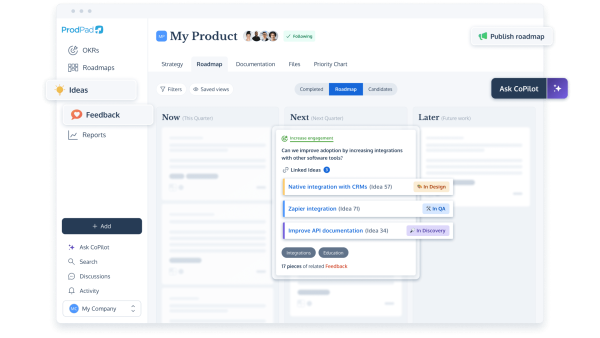
Core functionality centers on three modular pillars—Roadmaps, Ideas, and Feedback—plus integrated OKR management and workflows. Users build customizable Now/Next/Later roadmaps tied directly to objectives and key results, organize backlogs with visual prioritization grids and scoring, and collect unlimited customer feedback via branded portals, email dropboxes, and CRM integrations. AI-powered automation handles theme detection, duplicate removal, and strategic alignment checks across all areas.
Standout features include the advanced ProdPad CoPilot AI, which acts as a personal coach, drafts user stories and specifications, suggests initiatives aligned with vision, and serves as a stakeholder buffer—capabilities that go beyond basic AI in most competitors. The platform emphasizes outcome-focused, theme-based roadmapping (problems to solve rather than fixed features or dates), seamless two-way syncs with tools like Jira, Slack, Salesforce, and Zapier, and portfolio-level views for multi-product organizations. This holistic connection of feedback, ideas, and strategy in one place differentiates it strongly from timeline-heavy or siloed alternatives.
Limitations include no native advanced resource allocation or in-depth delivery tracking (reliance on integrations for dev handoff), moderate customization options for roadmaps and templates, and lighter built-in reporting/analytics compared to enterprise project tools. Some advanced features require combining multiple modules, and there is no free tier beyond limited reviewer access.
User Experience
ProdPad offers a clean, visual interface that makes roadmaps and prioritization intuitive once users are familiar with its theme-based philosophy. The learning curve is moderate—most teams get value quickly during the free trial, but the unique structure (focusing on problems and outcomes over tasks) can feel different from traditional tools and requires initial adjustment. Minor UX papercuts, such as input focus issues or information density, occasionally surface but do not significantly hinder core workflows.
Documentation is excellent, with detailed guides, webinars, and an active help center. Support receives consistent high praise for responsiveness and hand-holding during onboarding and beyond. Overall, the platform earns strong marks for accessibility and collaboration, though some users find default notifications and layout overwhelming at first.

Performance & Reliability
The platform performs efficiently with real-time collaboration, offline mode, fast AI synthesis, and automatic updates across views. Speed remains consistent even for large backlogs or multi-product portfolios, and integrations like Jira sync reliably for most users.
Known issues are minor and infrequent: occasional email digest overload, isolated integration sync hiccups, and rare permission-related bugs that are quickly addressed in updates. There are no widespread reports of downtime or major reliability problems; complaints focus more on UX polish than performance degradation. The tool is considered stable and production-ready for daily use.

Pricing & Value
ProdPad uses modular per-seat pricing (billed annually with a 20% discount or monthly): Roadmaps at $44 per seat per month, Ideas at $36, and Feedback at $36. A full suite typically totals around $116 per user per month. Unlimited free reviewers can be invited for idea/feedback contribution and viewing (with restrictions), and a no-credit-card free trial provides immediate access to all features. Enterprise plans are custom-priced with additional options like invoicing or multi-year deals.
Value is strong for teams seeking focused, outcome-driven product management with powerful AI—often more efficient and less bloated than all-in-one alternatives like Aha! or Productboard. The modular approach lets organizations start small and scale, though costs can accumulate quickly when all modules are needed. Compared to competitors, ProdPad delivers excellent alignment and feedback integration at a competitive rate for mid-market and enterprise teams, with high ROI through reduced meeting time and better decision-making.
Practical Tutorial
Official tutorials and guides are available on the ProdPad resources site. Below is a complete step-by-step walkthrough for a common task: building and publishing a theme-based product roadmap. This example uses a fictional fitness app team prioritizing user retention.
-
Set up your structure: Log in, navigate to the Roadmaps module, and create a new roadmap using the Now/Next/Later template. Define columns for current work (Now), upcoming priorities (Next), and future exploration (Later). Link the roadmap to your product objectives/OKRs (e.g., “Increase retention by 15%”).
-
Identify initiatives: Brainstorm high-level problems to solve rather than features. Example: “Improve onboarding experience” (tied to retention OKR). Use CoPilot AI to suggest initiatives based on your vision statement or attached feedback.
-
Build initiative cards: Click “Add Initiative” for each item. In the card, add: problem description, linked customer feedback (e.g., portal submissions about confusing signup), related ideas from the backlog, and user stories. Attach supporting files or notes. For the fitness app, include feedback themes like “too many steps to start workout tracking.”
-
Prioritize and organize: Drag cards between Now/Next/Later columns. Apply tags or color-coding (e.g., “Retention” tag) and use the visual prioritization grid or scoring to rank them. Enable AI to check for duplicates or strategic alignment automatically.
-
Refine with details: As an initiative moves closer to Now, add deeper context—user stories, designs, or success metrics. Set automation rules if desired (e.g., move to Completed when linked Jira tickets close).
-
Publish and share: Customize a public view (hide sensitive data), generate a shareable link or embed, and publish to stakeholders. The view auto-updates from the master roadmap. For external sharing, create a “lite” version focused on benefits.
-
Review and iterate: Schedule regular reviews; use activity feed and real-time discussions to collaborate. Export or present the roadmap directly in meetings.
This approach replaces confusing Gantt charts with a clear, flexible strategy everyone understands. Full official guide and template resources: https://www.prodpad.com/blog/how-to-build-a-product-roadmap-everyone-understands/ and https://www.prodpad.com/resources/guides/product-management-process/roadmapping/.
Final Verdict
Overall rating: 4.2 out of 5. ProdPad excels for product managers and cross-functional teams that want an integrated, AI-enhanced platform focused on strategy, customer insights, and outcome-driven roadmapping—ideal for mid-sized to enterprise organizations seeking clarity amid chaos. It should be avoided by very small teams on tight budgets (modular costs add up) or those needing heavy resource management, advanced analytics, or pure project-tracking features better handled by dev-centric tools. One-sentence recommendation: If you’re tired of disconnected spreadsheets and want a single source of truth that turns customer feedback into strategic decisions with smart AI assistance, ProdPad is an excellent choice.