Prompt Box Review: The Best Free AI Prompt Manager for Teams
Overview & Purpose
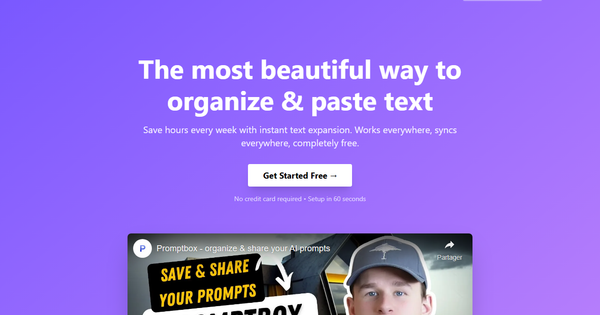
Prompt Box (promptbox.ai) is a versatile, 100% free text snippet and prompt management tool designed to help users save, organize, and instantly access reusable text across any application. It functions as a personal (and team) library for AI prompts, email templates, calendar links, job descriptions, idea banks, and more, with seamless integration into tools like ChatGPT, Jasper, Midjourney, Stable Diffusion, and any other AI or text-based platform.
Primary use cases include maintaining consistent AI outputs through saved prompts with dynamic variables, speeding up repetitive tasks like customer support replies or content creation, and enabling quick pasting via browser extension or keyboard shortcuts. It targets digital artists, copywriters, marketers, content creators, AI enthusiasts, freelancers, remote workers, and job seekers—essentially anyone who interacts frequently with AI tools or reuses text snippets in their workflow.
Key Features & Capabilities
Core functionality revolves around creating unlimited text prompts and snippets, organizing them into customizable folders with drag-and-drop support, tagging, search, favorites, and visual customization (images, colors, dark mode). Standout capabilities include dynamic variables (e.g., {{name}} placeholders that prompt for input on paste), text expansion via custom shortcuts (type "/greeting" in any field to auto-replace), right-click save via Chrome extension, cloud synchronization across devices, team collaboration with shared folders (including potential monetization of access), and import/export options.
It offers full mobile and desktop apps plus web access, priority support, and regular updates. These features differentiate it from competitors like AIPRM (community-focused prompt library) or PromptHero (public marketplace) by emphasizing beautiful, personal/team organization and instant, context-aware pasting rather than massive shared collections. Limitations include the absence of a built-in public prompt marketplace or advanced AI analytics/optimization tools found in paid alternatives; it is strictly user-driven content. Some older user feedback noted occasional bugs or slower feature development, though the platform continues to evolve.
User Experience
Prompt Box boasts an intuitive, modern interface praised for its clean design and low learning curve—even non-tech-savvy users can quickly master folder creation, prompt saving, and pasting. The Chrome extension enables one-click saving from any webpage, while desktop/mobile apps and system-tray/⌘+E shortcuts make access effortless across platforms. Documentation is available at promptbox.ai/docs, covering advanced features like variables and cursor positioning, with additional resources including YouTube walkthroughs from the creator. Support is positioned as a priority in the free plan, though some AppSumo reviewers have reported occasional delays in responses. Overall, the experience prioritizes speed and aesthetics, turning prompt chaos into an organized, visually appealing library.
Performance & Reliability
The tool delivers fast snippet retrieval, cloud syncing, and text expansion with minimal latency, making it efficient for daily use. Cloud sync and cross-device access work reliably for most users, with regular updates addressing enhancements. Known issues are minor and infrequent: some AppSumo reviews (overall ~4.0/5 from dozens of users) mention past glitches, occasional data sync hiccups, or support response times, but these appear less common in recent feedback. No widespread outages or major complaints surfaced in 2026 searches; reliability is generally strong for a free tool serving over 30k users.
Pricing & Value
Prompt Box is completely free with no subscriptions, hidden fees, credit card requirements, or usage limits on prompts, folders, or features. All core and advanced capabilities—including apps, cloud sync, team collaboration, and priority support—are included at no cost. This represents exceptional value compared to paid prompt managers or extensions that charge monthly fees for similar (or fewer) features. For users transitioning from AppSumo lifetime deals or freemium competitors, the unlimited free model eliminates ongoing costs while delivering professional-grade organization. The value proposition shines for individuals and small teams seeking a no-compromise, beautiful alternative without vendor lock-in.
Practical Tutorial
A common task is creating and using a dynamic AI art prompt or email template with variables. Here is a step-by-step walkthrough (current as of April 2026; official docs and creator YouTube videos provide visual supplements):
- Sign up for free at promptbox.ai (no credit card needed) and log in via web, desktop app, or mobile.
- Create a new folder (e.g., "Midjourney Prompts") and customize it with a cover image and color for visual organization.
- Click "New Prompt" and enter your text. Use variables like: "A futuristic cityscape at {{time_of_day}}, with {{weather}} lighting, highly detailed, cinematic --ar 16:9".
- Optionally add a trigger shortcut (e.g., "/city") and position the cursor for easy editing after expansion.
- Save. Install the Chrome extension from the site; now right-click any text on a webpage and select "Save to Prompt Box."
- To use: In any AI chat or text field (e.g., ChatGPT or Midjourney Discord), type your trigger "/city" or open the desktop app/system tray and search/paste. Variables will prompt for input (e.g., "sunset" and "golden hour"), then the full prompt expands instantly.
- For teams: Share the folder via collaboration settings for real-time access.
This workflow typically takes under 30 seconds once set up and eliminates re-typing long prompts. For official video guides, search "PromptBox organize & share your AI prompts" on YouTube.
Final Verdict
Overall rating: 4.5/5 – A polished, genuinely useful free tool that excels in simplicity and aesthetics while delivering real productivity gains.
Use this tool if you are a solo creator, freelancer, or small team tired of scattered prompts and repetitive typing; its free unlimited access, variables, and beautiful organization make it ideal for streamlining AI and text workflows without complexity or cost.
Avoid it if you primarily need a massive public prompt marketplace/community features (consider AIPRM or PromptHero instead) or require enterprise-level analytics and priority enterprise support beyond the free tier.
In one sentence: Prompt Box is the beautiful, free prompt organizer every AI user should have in their toolkit for effortless consistency and speed.