Prompt Sloth Review: Level Up Your AI Prompts with One Click
Overview & Purpose

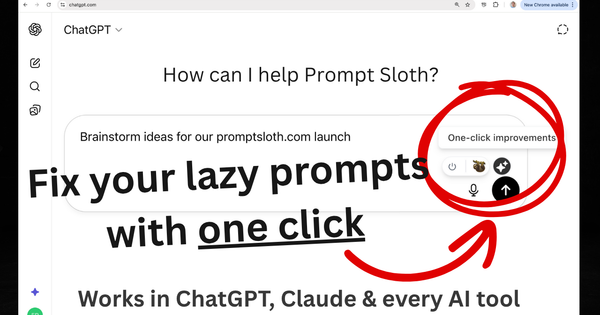
Prompt Sloth is a Chrome extension designed as an AI prompting copilot that instantly transforms simple or vague user requests into detailed, professional-grade prompts for leading AI platforms. By adding a small helper icon directly into any text input field and supporting a "//" shortcut for templates, it enables one-click improvements and quick template insertion without leaving the AI chat interface. Primary use cases include refining brainstorming sessions, generating marketing copy, coding assistance, email drafting, research analysis, and creative content creation—ultimately delivering more relevant, higher-quality AI outputs while eliminating the need for manual prompt engineering expertise.
It targets a broad audience: everyday users and beginners who struggle with "lazy" prompts, as well as professionals such as marketers, content creators, developers, educators, and business strategists who interact with AI tools daily. The extension works seamlessly across ChatGPT, Claude, Gemini, Perplexity, Grok, and any website with a text box, making advanced prompting accessible to non-technical users.

Key Features & Capabilities
Core functionality revolves around two standout elements: one-click prompt enhancement via an in-chat icon that refines rough ideas into structured, context-rich instructions, and a built-in library of over 2,000 expert templates accessible by typing "//" followed by a keyword (e.g., "//summarize", "//email", "//code"). Users can also create and reuse private custom templates by highlighting text and right-clicking to save, with templates encrypted and tied to the account for cross-session use.
Differentiating features include universal integration—no extra tabs, sign-ups, or copy-pasting required—and context memory in Pro tiers for smarter, ongoing suggestions. It explicitly avoids storing user prompts for privacy. Compared to competitors like standalone prompt optimizers or GPT wrappers, Prompt Sloth stands out for its native, in-place workflow and lifetime ownership option, plus compatibility with any AI site beyond major platforms.
Limitations include Chrome exclusivity (no support for other browsers or mobile), reliance on an internet connection for AI enhancements, and no offline mode. Free-tier users face restrictions on the number of prompt improvements (typically around 20 quick actions per month), with advanced models and unlimited usage locked behind paid plans. There is also no multi-language template support or template sharing, and some users note it may occasionally over-optimize prompts, potentially diluting personal voice.
User Experience
Installation takes seconds via the Chrome Web Store with no sign-up or account creation required—users simply add it, pin the icon if desired, and it auto-activates in supported AI interfaces. The learning curve is minimal; most users grasp the one-click icon and "//" shortcut immediately, with intuitive right-click saving for customs. The interface is clean and non-intrusive: a small sloth-themed helper icon appears in input fields, and the template menu pops up seamlessly on "//".
Interface quality receives high praise in testimonials for seamless integration and speed, feeling like a native feature rather than an add-on. Documentation is straightforward via the official how-to-use guide, with basic in-app cues; support is available through email ([email protected]). No extensive knowledge base or video library exists, but the simplicity makes this sufficient for most.
Performance & Reliability
Enhancements process quickly (typically under a second for basic refinements), with users reporting noticeably better AI responses without workflow disruption. The extension has maintained a perfect 5.0 rating on the Chrome Web Store (from 14 ratings as of early 2026) and positive feedback across testimonials for reliability and consistency. As of the last update in February 2026, it supports over 1,000 active users and has processed tens of thousands of prompts.
Known issues are minimal; web searches and reviews reveal no widespread bugs, crashes, or compatibility problems. Isolated mentions of feature limitations in free tiers appear, but no complaints about downtime, inaccurate enhancements, or privacy breaches. The privacy policy confirms no prompt storage and compliant data handling. Research conducted as of March 2026 shows strong reliability for daily use, though heavy users may hit free-tier caps quickly.
Pricing & Value
Prompt Sloth offers a generous free tier with access to all 2,000+ templates, unlimited custom template creation and use, and a limited number of one-click improvements (approximately 20 per month). No credit card or signup is needed.
Pro upgrades to unlimited enhancements, advanced AI models, context memory, and priority support for $3.99/month (or $47.88 billed annually, saving 20%). The Lifetime Pro option provides permanent access to all Pro features for a one-time $89 payment (discounted from $149, with limited availability at the lower price). All plans include cancel-anytime flexibility for subscriptions.
Value is excellent for frequent AI users: the lifetime option costs less than a few months of alternatives, and even Pro is cheaper than a weekly coffee while delivering consistent time savings. Compared to paid prompt tools or manual engineering courses, it provides superior convenience and integration at a lower entry point. Free tier suits light users well, though power users will quickly justify Pro.
Practical Tutorial
Official step-by-step guidance is available at https://promptsloth.com/how-to-use. Below is a complete walkthrough for a common task—creating a beginner workout plan—using real examples drawn from the tool's documentation and site demos.
-
Install the extension from the Chrome Web Store (https://chromewebstore.google.com/detail/prompt-sloth/nkalaahhnoopcmopdlinibokjmjjacfa) and pin it for easy access. No login required.
-
Open any AI platform (e.g., chatgpt.com or claude.ai) and start typing your rough idea in the input box. Example: "create a workout plan for beginners".
-
A small Prompt Sloth icon appears next to or inside the input field. Click it for one-click improvement. The tool instantly refines it into a detailed prompt such as: "You are a certified fitness trainer specializing in beginner programs. Create a 4-week workout plan for complete beginners (no gym experience). Include 3 full-body sessions per week, 45 minutes each. For each exercise, specify sets, reps, rest times, proper form cues, modifications for home use (no equipment), warm-up/cool-down routines, progression tips, nutrition notes, and safety warnings. Structure the response in a clear weekly calendar format with daily checklists."
-
Alternatively, use templates: Type "//workout" or "//plan" in the input box to browse and insert a pre-built template instantly—no copying needed. Customize placeholders like [SKILL] and [TASK] on the fly.
-
For reuse, highlight any refined prompt (or your own), right-click, and select "Save as template." Name it (e.g., "FitnessExpert") and access later by typing "//FitnessExpert" anywhere.
-
Send the improved prompt to the AI and review results. Repeat in previous chats for deeper exploration. To activate on non-standard sites, click the extension icon in Chrome and toggle "Activate for this site."
This process typically takes under 5 seconds and works identically across platforms. For more examples, visit the official guide linked above.
Final Verdict
Overall rating: 4.5/5. Prompt Sloth excels for anyone who uses AI assistants regularly but wants professional results without studying prompt engineering. Beginners, marketers, writers, developers, and casual users will benefit most from the effortless one-click upgrades and templates, saving hours while producing consistent, targeted outputs.
Avoid it if you primarily use non-Chrome browsers, need fully offline tools, or prefer manual control over every prompt detail—its free-tier limits and Chrome dependency may frustrate power users on other ecosystems.
One-sentence recommendation: Prompt Sloth is the simplest, most effective way to level up your AI interactions instantly—install it today if you want better results with zero extra effort.