PromptDC Review: The Ultimate AI Coding Prompt Enhancer
Overview & Purpose

PromptDC is an AI-powered coding prompt enhancer delivered as browser and IDE extensions that instantly rewrites vague developer prompts into precise, structured, implementation-ready instructions optimized for AI code generation across all major LLMs. It works directly inside your coding environment—whether in web-based platforms like ChatGPT, Claude, Lovable, Bolt.new, or IDEs like Cursor and VS Code—eliminating tab-switching or copy-pasting while automatically detecting system prompts and platform context for superior results.
Primary use cases center on AI-assisted software development: turning casual natural-language requests (e.g., “create a food tracking app”) into detailed specifications with architecture, constraints, error handling, and production standards; accelerating prototyping in AI coding agents; reducing hallucinations and follow-up iterations; and maintaining consistent code quality across teams. It is explicitly built for developers who use AI tools daily for coding tasks, not general content, marketing, or non-technical prompt work.
Target audience is primarily software developers, AI coding enthusiasts, indie hackers, and engineering teams using tools like Cursor, Claude Code, GitHub Copilot, or Replit. It is not aimed at marketers, designers, or casual ChatGPT users seeking broad prompt management.

Key Features & Capabilities
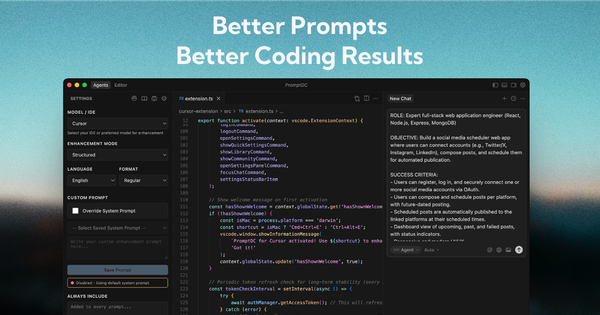
Core functionality revolves around one-click or keyboard-shortcut prompt rewriting with two modes: Simple (quick one-paragraph enhancements) and Structured (detailed sections including ROLE, OBJECTIVE, SCOPE, and PLAN). Supported output formats include regular text, JSON, XML, and YAML; output can be generated in 9 languages. The tool automatically adapts to the target platform or model, appends custom “Always Include” rules (e.g., “Use TypeScript strict mode”), and allows full override of the enhancement logic with your own system prompt.
Standout features that differentiate it from competitors include deep, seamless integration via Chrome extension (floating toolbar on 40+ web platforms) and native VS Code/Cursor extensions (sidebar + shortcuts like Cmd+Ctrl+E), a personal prompt + Markdown file library, a community-shared library with category filtering (Security, UI/UX, Debugging), right-click “Save to Library,” and platform-aware rewriting that outperforms general optimizers like PromptPerfect for coding-specific context. Users can store unlimited prompts on higher plans and access reusable templates instantly with “//” search.
Limitations and missing features: It is strictly coding-focused and offers no general-purpose prompt templates, versioning workflows, collaboration dashboards, or non-coding use cases (e.g., marketing copy or image generation). No dedicated web app exists—everything runs as an extension. Library storage is capped on lower plans (50 files on Pro), and there is no free unlimited tier. External integrations beyond the listed AI platforms are absent, and the tool relies on your chosen LLM rather than providing its own model.

User Experience
Ease of use is excellent with virtually no learning curve for developers already comfortable with browser or VS Code extensions. Installation takes seconds; enhancement happens in place via a single click on the floating toolbar or one customizable keyboard shortcut, replacing the original prompt automatically. The interface feels native: a clean floating toolbar on web platforms and a dedicated sidebar panel in VS Code with tabs for Settings, Library, and Community. Customization (language, format, mode, overrides) lives in an intuitive settings panel.
Interface quality is modern, minimal, and non-intrusive—exactly what busy coders need. Documentation includes a growing blog/knowledge base with practical guides (e.g., “AI Coding Prompt Engineering: Mistakes + Fixes”) and clear in-tool tooltips. Support is responsive via email; testimonials highlight the developer quickly implementing user feedback. No extensive help center or video academy exists, but the three-step workflow is self-explanatory.
Performance & Reliability
Enhancements complete in seconds with consistent, high-quality structured output that demonstrably reduces follow-up questions and improves code accuracy. The tool has no reported speed or downtime issues; it runs locally where possible and leverages your own API key on the Developer plan for privacy and control. As of March 2026, user feedback across Chrome Web Store (5.0/5 from 6 ratings) and VS Code Marketplace is uniformly positive, praising time savings and accuracy. No widespread complaints, bugs, or reliability problems appear in public forums, Reddit discussions, or review aggregators—likely due to its focused scope and active maintenance (last Chrome update January 2026).
Minor caveats: Performance depends on the underlying LLM and your internet connection for cloud-based enhancement logic; very large prompts may hit platform token limits before enhancement.
Pricing & Value
PromptDC follows a freemium model with paid upgrades for production use. The base extensions are free to install, but prompt enhancements are metered. Plans include:
- Pro: $9/month – 200 enhancements/month, 50 prompt/MD files, full formatting and community access.
- Enterprise: $15/month – unlimited enhancements and files, dedicated support (8-hour response), private files.
- Developer Lifetime: $69 one-time – unlimited everything, bring-your-own OpenAI API key, lifetime access.
No free trial is explicitly advertised, though basic use may be possible with limited credits. All plans support all languages and formats; higher tiers remove caps and add faster support.
Value is strong for active AI-coding developers: at roughly the cost of a few LLM API credits per month, it delivers measurable productivity gains and reduced wasted tokens. Compared to generic tools (PromptPerfect, AIPRM) or manual structuring, the coding-specific engine and zero-friction integration provide superior ROI for the target audience. Teams or heavy users will find Enterprise or Lifetime plans pay for themselves quickly.
Practical Tutorial
Official documentation is light on full video tutorials, but the blog contains practical guides (e.g., https://promptdc.com/blog/ai-coding-prompt-engineering-mistakes-fixes). Below is a complete step-by-step walkthrough for a common task—enhancing a prompt to build a React food-tracking app in Cursor (or any supported platform). This uses real examples drawn directly from PromptDC’s before/after demos.
-
Install the extension — Add the Chrome extension (for web) or search “PromptDC” in the VS Code/Cursor marketplace and install. Restart your editor if needed.
-
Open your AI coding chat — In Cursor or on claude.ai/chatgpt.com, start a new conversation. Write your initial vague prompt:
“create a food tracking app” -
Trigger enhancement — Highlight or place cursor in the prompt box, then either:
- Click the ✨ floating toolbar button (web), or
- Press Cmd+Ctrl+E (Mac) / Ctrl+Alt+E (Windows/Linux) in the IDE.
The prompt is instantly rewritten. Example output (Structured mode):
“You are an expert full-stack React developer with TypeScript. Build a responsive food tracking web app using modern best practices.
ROLE: Senior frontend engineer.
OBJECTIVE: Create a calorie/macronutrient tracker with daily logs, charts, and export.
SCOPE: React 18 + Vite, Tailwind, localStorage persistence, Chart.js. Include dark mode and accessibility.
PLAN: 1. Project setup… [full detailed spec follows]”
-
Customize (optional) — Before enhancing, open the sidebar (VS Code) or settings gear: switch to Structured mode, select JSON format, add “Always Include: Use TypeScript strict mode and follow .mdc rules,” or pick a community template.
-
Send and iterate — Copy or let the extension auto-replace, then submit to your LLM. Review the superior code output. Right-click any good prompt and “Save to Library” with category “UI/UX” for future reuse.
-
Browse community — In the Library tab, search “//food” or browse categories to import ready-made prompts from other developers.
Repeat for any coding task—refactoring, bug fixes, or complex features. Total time: under 10 seconds per enhancement. For more examples, see the official blog articles linked above.
Final Verdict
Overall rating: 4.5/5. PromptDC excels as a lightweight, highly focused tool that delivers immediate, tangible improvements to AI coding workflows with zero friction. Developers and teams relying on Cursor, Claude, or similar tools should use it because it turns mediocre prompts into production-grade specifications, saves hours weekly, and integrates perfectly into existing environments. Avoid it if you need general-purpose prompt management, marketing/content templates, or a full SaaS dashboard—its strict coding-only scope and metered free usage make it unsuitable for non-developers or broad AI experimentation. One-sentence recommendation: If you code with AI every day, install PromptDC today—it’s the missing keyboard shortcut that finally makes prompt engineering effortless.