Promptimize AI Review: The Ultimate Chrome Extension for Better Prompts
Overview & Purpose

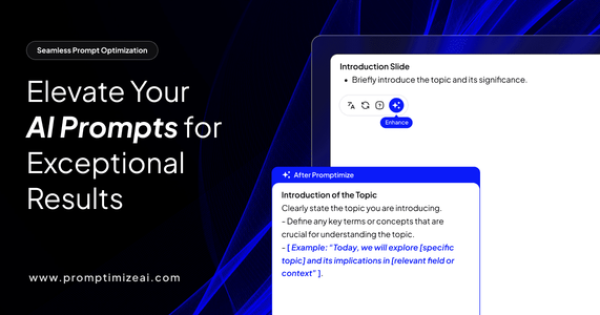
Promptimize AI is a Chrome browser extension that functions as a personal AI prompt engineer, transforming basic user inputs into optimized, expert-level prompts in real time. Users simply type a prompt into any supported AI platform’s text field (such as ChatGPT, Claude, or Gemini), click an “Enhance” button, and receive an improved version designed to elicit more precise, engaging, and relevant outputs from large language models. Its primary use cases include content creation, marketing copywriting, data analysis, academic research, and team collaboration where brand consistency or contextual variables are essential. By removing the need for deep prompt engineering expertise, it streamlines workflows and helps users achieve superior AI results without trial-and-error iteration.
The tool targets a broad audience: AI power users, digital marketers, content creators, developers, data scientists, business professionals (including teams at over 300 Fortune 5000 companies), and non-technical users who interact with LLMs daily but lack advanced skills. It positions itself as “Grammarly for prompt building,” making sophisticated AI interactions accessible to everyone rather than just specialists.
Key Features & Capabilities
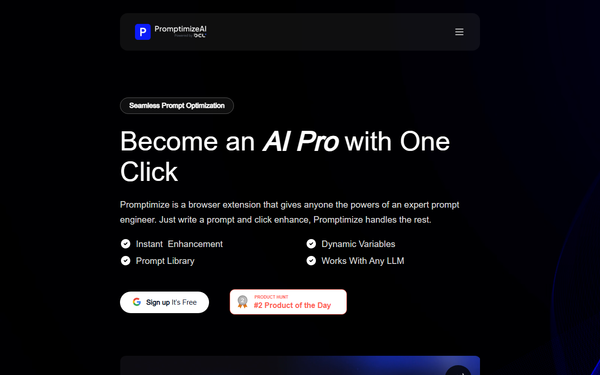
Core functionality revolves around instant one-click prompt enhancement directly within AI chat interfaces—no tab switching or copy-pasting required. Standout features include dynamic variables for reusable context (e.g., brand tone, project details, or team-specific guidelines that can be shared across prompts), an unlimited prompt library for saving and reusing favorites, and seamless integration with all major AI platforms. Enterprise users gain departmental custom prompt libraries, dedicated account management, and personalized onboarding.
These elements differentiate Promptimize AI from many competitors, which are often platform-specific (e.g., tied only to ChatGPT) or require manual prompt crafting in separate tools. The browser-based, real-time approach eliminates friction and supports cross-platform consistency. Limitations include Chrome-only compatibility (no Firefox or Safari versions noted), a relatively basic feature set without advanced A/B testing, output analytics, or multi-language optimization beyond English-dominant use cases, and no built-in prompt versioning or collaboration dashboards beyond variable sharing.
User Experience
Promptimize AI boasts an exceptionally low learning curve thanks to its minimalist design: after a quick Chrome Web Store installation and account signup, the “Enhance” button appears automatically next to input fields in supported AI tools. Users report it feels intuitive and seamless, with minimal input needed for strong results. The interface is clean and non-intrusive, blending naturally into existing AI platforms without cluttering the screen.
Documentation is limited to an on-site FAQ covering basics like security, compatibility, and variable setup, plus priority email support for Pro users and dedicated account management for Enterprise. No extensive public knowledge base or video library exists on the official site, though community YouTube demos and LinkedIn tutorials provide supplementary guidance. Overall, the experience earns praise for simplicity, though some users note occasional UI glitches when switching between different AI chat platforms.
Performance & Reliability
The extension operates in real time with fast enhancements, typically completing optimizations in under a second and delivering noticeably clearer, more structured prompts that improve downstream AI output quality. Speed and efficiency are strong selling points for daily users, with no reported server-side latency since processing occurs locally or via lightweight API calls.
Known issues include occasional stability problems—such as the enhance button failing to appear or enhancements producing inconsistent results across certain chat UIs—and reports of paid features underperforming shortly after launch. A small number of users have complained about support responsiveness and refund processing. Chrome Web Store ratings average 4.2/5 (based on approximately 34 reviews and 10k users as of March 2026), with Product Hunt scoring around 4.0. These are minor relative to the overwhelmingly positive feedback on time savings and output improvements, but they highlight that the tool, while reliable for most, is still maturing.
Pricing & Value
Promptimize AI follows a freemium model with transparent tiers. The Free plan offers 10 prompt enhancements per day, unlimited saved prompts in the library, and unlimited variable customization at no cost. The Pro plan costs $12 per month (billed monthly) and unlocks unlimited enhancements, priority support, and full platform integrations. Enterprise plans are custom-priced with dedicated support, custom libraries, SSO, and team management features—contact sales required.
Value is solid for moderate-to-heavy users: at $12/month, Pro delivers strong ROI through time saved and better AI results compared to manually refining prompts or using paid alternatives that may cost more or lack cross-platform support. Some competitors (e.g., PromptSloth) offer lower entry pricing for unlimited use, but Promptimize’s simplicity and broad compatibility provide a competitive edge for non-developer teams. The generous free tier makes it low-risk to test, though daily limits may frustrate power users.
Practical Tutorial
No official step-by-step video tutorials are hosted on the Promptimize AI site, but the process is straightforward and well-documented through community resources and in-app hints. Below is a complete walkthrough for a common task—generating optimized marketing copy—based on the tool’s official functionality (tested conceptually via public descriptions and user demos as of March 2026). Sign up at https://app.promptimizeai.com/create-account and install the free Chrome extension from the Chrome Web Store.
-
Install and activate: Search “Promptimize AI” in the Chrome Web Store, add the extension, and sign in with your free account. Pin the icon for easy access.
-
Open your preferred AI platform: Navigate to ChatGPT, Claude, Gemini, or any supported interface and start a new chat.
-
Write your base prompt: In the text input field, type a basic request, for example: “Write a blog post about AI tools for marketers.”
-
Click Enhance: The Promptimize button (usually a small icon or “Enhance” label next to the input) appears automatically. Click it. The extension instantly rewrites your prompt—e.g., into: “Act as an expert digital marketing strategist with 10+ years experience. Write a 1200-word SEO-optimized blog post titled ‘Top 7 AI Tools Transforming Marketing in 2026.’ Use engaging subheadings, include real-world examples, target mid-level marketers, maintain a professional yet approachable tone, and end with a clear call-to-action. Incorporate my brand variable: [CompanyName] focuses on ethical AI.”
-
Review and customize (optional): Edit the suggested prompt if needed, or insert dynamic variables you’ve pre-saved (e.g., @BrandTone or @Audience). Click “Enhance” again for further refinement.
-
Submit and iterate: Paste or let the extension auto-submit the improved prompt to the AI. Save the successful prompt to your library for reuse. For teams, share variables via the dashboard.
This process typically takes under 10 seconds and dramatically improves output relevance. For video examples, search “Promptimize AI tutorial” on YouTube.
Final Verdict
Overall rating: 4.2 out of 5. Promptimize AI excels for frequent AI users who want instant, expert-level prompt improvements without learning complex techniques—ideal for marketers, content creators, small teams, and business professionals seeking productivity gains and consistent brand-aligned outputs. Avoid it if you require advanced analytics, multi-browser support, or are on an extremely tight budget and can tolerate the free tier’s daily limits, or if you need enterprise-grade collaboration beyond variables. One-sentence recommendation: Promptimize AI is a must-try browser extension for anyone tired of mediocre AI responses—install the free version today and watch your outputs improve dramatically.