Promptve Review: The Git-Style Version Control for AI Prompts
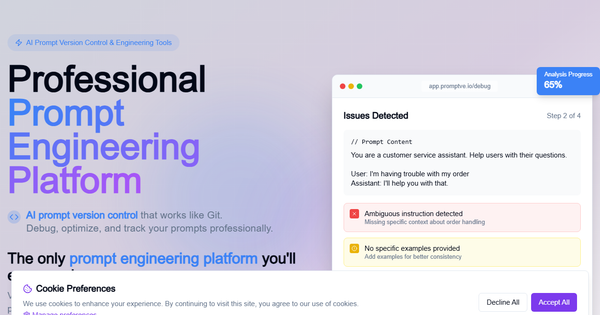
Overview & Purpose
Promptve is an AI prompt engineering platform that functions as "Git for AI prompts," providing version control, debugging, optimization, and collaboration tools for managing prompts across generative AI applications. It centralizes prompt development workflows, allowing users to track changes, experiment with branches, debug issues automatically, score performance, and collaborate in teams—eliminating scattered prompt files across notebooks, docs, or chats. Primary use cases include building reliable AI features for production apps, scaling prompt experiments without chaos, optimizing for quality/speed/cost, and maintaining audit trails for enterprise compliance.
The tool targets AI engineers, developers, and technical teams at startups or enterprises shipping AI-powered products (e.g., customer support agents, content generators, or data analysis tools). It is less suited for non-technical marketers or solo creators, focusing instead on professional development workflows where prompts are treated like code.
Research for this review was conducted as of March 2026.
Key Features & Capabilities
Core functionality revolves around a Git-like repository system for prompts: full version history, branching for experiments, merging improvements, and instant rollbacks. The standout Smart Debugging Engine uses AI to scan prompts in real-time, detecting over 50 issue types (e.g., ambiguity, bias, missing context, poor structure) and providing automated suggestions plus quality scores. Optimization tools enable A/B testing of variants, performance metrics tracking (quality, token usage, latency, cost), and historical comparisons. Team features include shared workspaces, review workflows, access controls, and collaboration on prompt repositories.
Differentiators include the deep integration of AI-powered analysis (12x faster debugging claimed) and production-ready design built by AI engineers—going beyond basic playgrounds or spreadsheets offered by competitors like Promptfoo or general tools like Notion/GitHub. It supports testing against major providers (e.g., GPT, Claude) via user-connected API keys and offers powerful APIs for workflow integration. Enterprise additions cover advanced security, compliance, and custom setups.
Limitations include opaque public pricing details (no tier breakdowns listed without signup), lack of built-in production monitoring/tracing (focus is more on development than runtime observability found in tools like LangSmith), and no native support for every niche LLM provider without custom API work. Documentation appears minimal publicly, with reliance on in-app guidance.
User Experience
The interface earns praise for its clean, developer-first design with intuitive Git-style workflows, real-time analysis dashboards, and quick 2-minute setup—no credit card required for the free tier. Learning curve is low for users familiar with version control systems like Git; others may need 30–60 minutes to grasp branching and debugging flows, but the automated suggestions lower the barrier significantly.
Navigation feels modern and responsive, with live demo access highlighting progress bars, issue highlights, and version timelines. Support resources are light on public documentation—no dedicated docs site or extensive video library was found—but the platform claims 24/7 response and includes in-app help. Testimonials highlight "incredible support" for teams.
Performance & Reliability
Speed is a highlighted strength, with the debugging engine reportedly identifying and suggesting fixes in under 30 seconds and delivering overall 12x faster workflows. Claims include 99.9% uptime, quality improvements up to 40%, and token/cost reductions of 30%+. No widespread user-reported outages or bugs surfaced in searches.
Known issues are minimal; as a relatively new tool (promoted heavily on Reddit since late 2024), common complaints are absent from public forums. Independent validation is sparse, but site metrics (150K+ prompts optimized, 500+ active teams) and testimonials report consistent reliability in production scenarios.
Pricing & Value
Promptve follows a freemium model: a generous free tier for individuals or small experiments (limited features), with scalable paid plans available monthly or yearly for teams. Enterprise plans are custom-priced for large organizations needing advanced security, SSO, compliance, and dedicated support. Exact paid pricing is not publicly detailed and requires signup or contact, which some may view as a transparency drawback.
Value is strong for development teams: the time and cost savings (e.g., $50K annual API reductions cited) often pay for itself quickly compared to manual tools or alternatives like custom scripts or less specialized platforms. It outperforms scattered workflows or basic alternatives in consistency and scalability, making it a worthwhile investment for organizations serious about AI ROI—though solo users or budget-conscious non-devs may find free/open-source options sufficient.
Practical Tutorial
No comprehensive official video tutorials or step-by-step guides are publicly available (only an in-app live demo at app.promptve.io). Below is a practical walkthrough for a common task—debugging, optimizing, and versioning a customer support prompt—created from the platform's documented features and demo examples as of March 2026. You can follow along by signing up free at https://www.promptve.io/ and accessing the live demo.
Step 1: Sign up and create a project
Visit promptve.io, click "Try Promptve Free" (no credit card), and complete the 2-minute signup. Once in the dashboard, create a new "Prompt Repository" (e.g., name it "Customer-Support-Agent") and invite team members if collaborating.
Step 2: Add your initial prompt
In the editor, paste a sample prompt:
"You are a helpful customer support agent. Answer the user's question politely."
Save as Version 1.0. Connect your OpenAI or Anthropic API key in settings to enable testing.
Step 3: Run Smart Debugging
Click "Analyze with Debug Engine." The AI scans in real-time (progress bar shown) and flags issues such as "Ambiguous instruction detected," "Missing specific context," or "No escalation guidelines." It provides a quality score (e.g., 62%) and automated suggestions like "Add examples for tone and add escalation paths."
Step 4: Optimize and A/B test
Apply suggestions or manually edit: Expand to "You are a helpful customer support agent for a SaaS product. Respond in under 100 words, use the user's name, and escalate complex billing issues to [email protected]." Create a branched Version 2.0. Run A/B tests against sample inputs (e.g., "My account is locked") and compare metrics: quality score, token usage, and response time. Track improvements (e.g., from 62% to 94% quality).
Step 5: Version control, collaborate, and deploy
Commit changes with notes ("Added context examples"). Review history, rollback if needed, or merge branches. Share the repository for team feedback or export via API for production integration. Monitor performance over time in the dashboard.
This process typically takes under 10 minutes and demonstrates the platform's core value. For variations, try a marketing copy generator prompt and repeat steps 3–5.
Final Verdict
Overall rating: 4.3/5
Promptve excels for AI engineering teams and developers who need professional-grade prompt management to scale reliably and cut debugging waste—ideal if you're tired of prompt sprawl and want Git-style control with built-in AI intelligence. Organizations prioritizing consistency and ROI in generative AI will see clear benefits.
Avoid it if you're a solo non-technical user, need fully transparent upfront pricing, or require extensive public documentation and third-party integrations out of the box (sparse independent reviews and resources limit confidence for some).
One-sentence recommendation: Promptve is a powerful, developer-centric solution worth adopting for teams ready to treat prompts like production code and accelerate their AI workflows.