Qlip AI Review: Automate Viral Video Clips for Social Media

Overview & Purpose

Qlip.ai is an AI-powered video editing automation platform that uses natural language processing (NLP) and computer vision models to extract short, engaging clips from long-form videos or audio files. Its primary purpose is to help users repurpose lengthy content—such as podcasts, webinars, interviews, or vlogs—into snackable highlights optimized for social media platforms like TikTok, Instagram Reels, and YouTube Shorts. The tool automatically identifies "viral" moments without requiring users to watch the entire footage or review transcripts manually.
Key use cases include generating shareable clips for content creators, automating social media posting, embedding videos on websites, and linking clips in emails or SMS campaigns. It also supports API integration for developers seeking automated video clipping, transcription, subtitle burning, and aspect ratio reframing. The target audience primarily consists of content creators, social media marketers, podcasters, and YouTubers who produce long-form video content. Developers and teams needing programmable video editing capabilities (via its API and studio GUI) also benefit, making it suitable for both individual creators and larger content operations.

Key Features & Capabilities
Core functionality revolves around AI-driven highlight detection: users upload a video or audio file, and the machine learning model recommends top moments based on semantic analysis and virality potential. Additional capabilities include automatic aspect ratio adjustment (converting horizontal videos to vertical or square formats while focusing on the point of attention), full speech-to-text transcription with speaker identification and word-level timestamps, animated subtitles, and brand customization (logos, fonts, colors, and templates for polished, ready-to-post clips).
Standout features that differentiate Qlip.ai from competitors like Opus Clip or Munch include its combined NLP and computer vision approach (no custom training data required), a developer-friendly API for programmatic clipping and teasers, and a GUI "studio playground" for testing features. It also emphasizes templated video generation and multi-channel sharing options.
Limitations include its early-stage development status (as noted in early 2026 reviews), with some features unproven in real-world use. Publicly available integrations are limited (primarily YouTube and TikTok direct sharing), and there is no extensive library of advanced effects or B-roll integration seen in more mature tools. Storage and upload time are capped based on plans, and the free tier includes watermarks.

User Experience
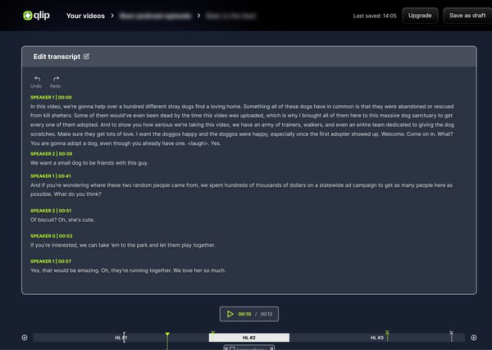
Qlip.ai offers a straightforward interface centered on simple file uploads, with the AI handling analysis and emailing notifications when highlights are ready. Users then review suggested clips in the studio dashboard, apply manual edits, templates, branding, or subtitles as needed. The learning curve is low for basic tasks, with an ease-of-use rating of 4.0/5 in independent assessments, though advanced API usage requires some technical familiarity.
Interface quality appears clean and functional based on available demonstrations, focusing on efficiency rather than flashy design. However, some early user feedback mentions cumbersome manual trimming or text adjustments in certain clips. Documentation is primarily available post-access via API guides and a contact form for support; there are no extensive public knowledge bases, though YouTube tutorials from users provide practical walkthroughs. Customer support relies on booking calls for custom needs, with limited transparency on response times due to sparse public reviews.
Performance & Reliability
Processing speed is generally described as efficient for highlight generation, with background analysis allowing users to upload and return later. The AI's effectiveness stems from training on extensive video data, though independent verification remains limited as of April 2026. Reliability appears solid for core clipping tasks, but common complaints from early adopters include occasional download issues and variable subtitle accuracy depending on audio quality.
Known issues are minimal in public discussions but include the platform's developmental phase, leading to occasional unpolished outputs or feature inconsistencies. With few aggregated user reviews on sites like G2 or Capterra (often zero or low-volume), broader reliability data is scarce. No major outages or security concerns were widely reported in available sources.
Pricing & Value
Qlip.ai follows a freemium model with a generous free trial offering the first 60 minutes (or up to 2 hours in some promotions) of upload time, including watermarks on exported clips. Paid plans provide varying levels of storage space and additional upload minutes, with custom pricing determined by booking a call to assess volume and use cases—making exact costs opaque without direct inquiry. Enterprise options are available for higher-volume or API-heavy needs.
Value proposition is strong for users seeking quick, AI-assisted repurposing without heavy manual editing, especially those integrating via API. However, compared to alternatives like Opus Clip (with transparent subscription tiers starting around $19–49/month) or SendShort, Qlip's custom model and early-stage status may reduce perceived value for budget-conscious creators. It excels for teams needing scalable automation but may feel premium-priced without proven scale advantages.
Practical Tutorial
A common task is generating and exporting social-ready clips from a long-form podcast or webinar video. Here is a step-by-step walkthrough based on official descriptions and user-shared tutorials (as of April 2026; access via request form on the site is typically required first):
-
Sign up and access the platform: Visit https://www.qlip.ai/, complete the access request form, and await approval (often quick for trials). Once granted, log into the studio playground GUI or API dashboard.
-
Upload your video: Click the upload button in the dashboard. Select a video or audio file (supported formats include common MP4, MOV, or MP3). Processing begins automatically in the background—no need to stay online.
-
Wait for AI analysis: The system emails you when highlights are ready (typically minutes to under an hour for standard-length videos). The AI identifies semantically strong moments using NLP and computer vision.
-
Review and select highlights: Open the results in the studio. View recommended clips with timestamps, full transcript (including speaker IDs), and preview thumbnails. Manually adjust selections, trim, or reorder as needed.
-
Customize with templates: Apply brand elements (logos, fonts, colors), animated subtitles, and aspect ratio reframing (e.g., vertical for TikTok). Use built-in templates for polished outputs.
-
Export and distribute: Download clips, post directly to supported platforms (YouTube/TikTok), embed on your website, or generate shareable links for email/SMS. For developers, use the API endpoint to automate this via code.
For visual guidance, refer to user tutorials such as "Create clips and repurpose LONG videos with Qlip.ai!" on YouTube. Results can vary by content type—talking-head videos perform best. Test with the free tier to evaluate AI accuracy before committing.
Final Verdict
Overall rating: 3.5/5 (balanced across features, usability, and maturity as of April 2026 research).
This tool suits content creators and marketers who produce frequent long-form videos and want fast, AI-assisted repurposing with branding consistency, or developers needing API-driven automation. It shines for hands-off highlight generation and multi-format exports. Avoid it if you prioritize transparent fixed pricing, proven long-term reliability with extensive user data, or deep integrations beyond basic social platforms—established competitors may offer more polished experiences.
One-sentence recommendation: Qlip.ai delivers efficient AI video clipping for social repurposing but remains best for early adopters comfortable with custom pricing and limited public validation.