Quartzite AI Review: The Ultimate Prompt Engineering IDE
Overview & Purpose
Quartzite AI is a Prompt Integrated Development Environment (IDE) designed to help users craft, iterate, optimize, and manage complex prompts for multiple large language models (LLMs) in a unified interface. Users bring their own API keys to access models from providers like OpenAI (including GPT variants and DALL-E 3 for image generation), Google (Gemini), Anthropic (Claude 3), and aggregators such as OpenRouter. Primary use cases include advanced prompt engineering, content generation, personalized batch outputs (e.g., via variables or CSV data), coding assistance, data analysis, and A/B testing of prompt variations to improve AI output quality and consistency.
It targets developers, prompt engineers, content creators, marketers, designers, and teams who rely heavily on AI models and seek structured workflows beyond basic chat interfaces like ChatGPT or the OpenAI Playground. The tool emphasizes productivity for anyone handling repetitive or sophisticated AI tasks, with built-in features for reusability and experimentation. Research conducted as of March 13, 2026, shows the platform has evolved from its 2024 launch to support modern models while maintaining a focus on prompt development as an IDE-like experience.

Key Features & Capabilities
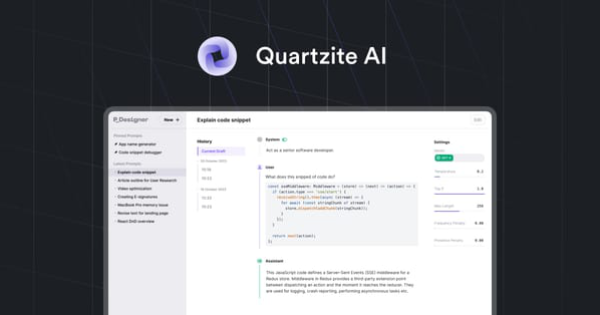
Core functionality revolves around an advanced Markdown editor with code snippet support, autosave drafts, and seamless submission to any connected model. Users can build a custom template repository (with defaults available), track every submission in version history for easy comparison of outputs, rollback, and iteration, define reusable prompt variables (using {{name}} syntax, supporting text or CSV imports for batch generation), access full model parameters (temperature, Top P, Top K, etc.), preview token usage and estimated costs before running, and export prompts/outputs in multiple formats. A built-in AI Prompt Optimizer automatically applies best prompt-engineering practices, with a free standalone version available separately.
Standout features that differentiate it from competitors include the unified multi-model access (no need for separate subscriptions or interfaces), IDE-style version control and comparison (absent in most chat tools), CSV-driven batch processing for scalable tasks, and strong privacy controls (API keys encrypted by default, with an option to disable cloud sync for local-only storage). These tools significantly boost efficiency for complex workflows compared to raw playgrounds or single-model apps.
Limitations include the requirement to provide and manage your own API keys (no hosted credits yet, though planned), a lack of deep real-time team collaboration beyond Discord chat for paid users, and no native mobile app. CSV handling is powerful but may require careful token management for large datasets. The platform remains somewhat niche with limited third-party integrations, and advanced features like full enterprise SSO are not yet detailed.

User Experience
The interface is clean, professional, and focused on the Markdown editor with intuitive sidebars for templates, variables, model settings, and history—making it highly accessible for users familiar with code editors or prompt tools. Ease of use is strong once set up, with a moderate learning curve primarily around initial API key configuration and mastering variables/templates (aided by clear docs). Draft mode and autosave reduce friction during writing, while the cost preview adds practical feedback before execution.
Documentation is concise and helpful, covering account setup, model addition, variables, few-shot prompting, and core features at https://www.quartzite.ai/docs/introduction and related pages. Support includes email assistance for setup, Discord community for paid users, and optional onboarding calls. Overall, the experience feels polished for its target technical audience, though beginners without API experience may need extra guidance.
Performance & Reliability
Editing and version management are fast and responsive, with execution speed tied directly to the underlying LLM APIs (no added latency reported). The cost estimator and version history provide reliable tools for optimization, helping users avoid wasteful runs and track improvements effectively. Privacy features (encrypted keys and optional local storage) enhance trustworthiness for sensitive work.
No widespread issues, bugs, or common complaints appear in user searches or reviews as of March 2026; the tool is described as stable for daily use. Sparse feedback (including a perfect 5.0/5 rating on G2 from limited reviews) highlights consistent cost savings and productivity gains, with performance praised for reducing API usage compared to subscription chat tools. Reliability depends on provider uptime, but the IDE layer itself is solid.
Pricing & Value
Quartzite AI uses a simple pay-per-use model for models (via your own API keys) combined with a single Early Supporter subscription plan at $3.99 per month (discounted from $7.99, with a lifetime price guarantee). This unlocks all features, including the full prompt optimizer, templates, history, and Discord support—no separate tiers or enterprise options are currently listed. A limited free Prompt Optimizer tool is available independently, but the full app has no free tier. Average model spend is reported as $2–3 per month for typical users, making total costs far lower than ChatGPT Plus or similar subscriptions.
Value is excellent for power users: the subscription pays for itself quickly through saved time on prompt management and reduced API waste, while multi-model access without multiple subs adds significant savings and flexibility. Compared to alternatives like PromptPerfect or basic playgrounds, Quartzite stands out for its comprehensive IDE features at a fraction of the cost. It is particularly strong for teams or individuals optimizing workflows long-term.
Practical Tutorial
Official documentation provides feature overviews but no complete video walkthroughs; a step-by-step example is available via the site’s free Prompt Optimizer at https://www.quartzite.ai/tools/free-ai-prompt-optimizer and full docs at https://www.quartzite.ai/docs/introduction. Below is a practical walkthrough for a common task—creating a reusable template with variables and CSV batch processing for personalized product descriptions (based directly on documented capabilities like templates, variables, and history).
-
Sign up at https://app.quartzite.ai/auth, claim the Early Supporter plan ($3.99/mo), and add your API key(s) via the sidebar Settings page (OpenRouter recommended for quick multi-model access; detailed steps at https://www.quartzite.ai/docs/account-setup/add-ai-models). Select a model like GPT-5 or Claude 3 Opus.
-
In the main editor, write a base prompt: “Write an engaging 150-word product description for {{product_name}} targeted at {{audience}}. Highlight key benefits: {{benefits}}. Use persuasive, benefit-focused language and include a call to action.”
-
Save this as a new template via the template library button (or use defaults and customize). Define variables in the Variables panel: create {{product_name}}, {{audience}}, and {{benefits}} (text or list format).
-
For batch processing, import a CSV file (e.g., columns: product_name, audience, benefits) via the data import tool—this auto-generates multiple prompt versions.
-
Load the template, auto-fill variables from CSV (or manually), preview token cost and usage in the sidebar, then click Optimize to apply AI best practices.
-
Submit to your chosen model. Review the output alongside previous versions in history—compare side-by-side, iterate by creating a new version, or roll back if needed.
-
Export results (prompts + outputs) for further use. Total time: under 5 minutes for setup and first batch.
This leverages the tool’s core strengths for scalable tasks; experiment with model settings for refinement. For advanced examples like few-shot prompting, see the docs advanced-use section.
Final Verdict
Overall rating: 4.5 out of 5. Quartzite AI excels for developers, prompt engineers, content creators, and teams who frequently build and iterate complex AI prompts across multiple models, offering professional-grade organization, cost control, and productivity tools that justify the low subscription fee through time and API savings. Avoid it if you are a complete beginner without API key experience, prefer zero-setup subscription chat tools like ChatGPT Plus, or need heavy real-time collaboration features.
One-sentence recommendation: If you treat prompt engineering as serious development work, Quartzite AI delivers the powerful, affordable IDE you’ve been missing.