Quiki.io Review: Turn Saved Social Videos Into AI Insights
Overview & Purpose
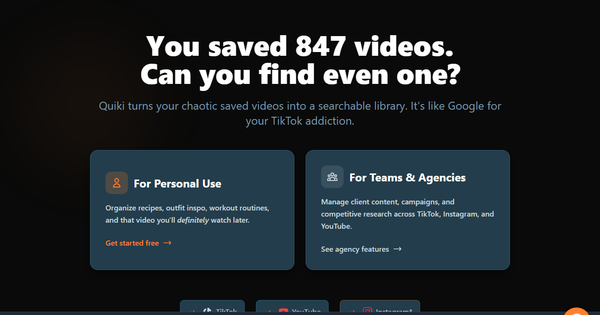
Quiki.io is an AI-powered video intelligence platform designed to centralize, organize, search, and analyze saved short-form videos from TikTok, YouTube, and Instagram (including Reels). Instead of losing track of inspiration in platform-specific libraries, users export their saved or liked video data and upload it to Quiki, where AI automatically indexes content, generates searchable summaries, extracts key insights like hooks, trends, and themes, and organizes everything into a unified, queryable knowledge base. Primary use cases include marketing intelligence gathering, competitive analysis, trend tracking, campaign strategy development, and extracting actionable tactics from user-generated or viral content. It transforms passive video saving into a strategic asset for uncovering patterns and planning data-driven content or ads.
The target audience is primarily social media marketers, marketing agencies, content strategists, and teams handling high volumes of inspirational or competitive video saves. It is particularly suited for professionals in digital marketing or agency environments who rely on short-form video for client work, UGC campaigns, or performance benchmarking—less ideal for casual personal users or non-marketing roles.

Key Features & Capabilities
Core functionality revolves around bulk data import from platform exports (via Google Takeout for YouTube, Meta/Instagram downloads, or TikTok data packages), AI-driven video analysis (including transcripts, semantic understanding of audio/visual elements, and auto-categorization into logical folders), instant semantic search across all platforms, an embedded video player with AI-generated descriptions and insights, and report generation for trends or performance patterns. Users can search natural-language queries like "strong product hooks in beauty tutorials" to surface relevant clips regardless of origin.
Standout features that differentiate it from competitors include its hyper-focus on personal saved video libraries (rather than public social listening or general video storage), cross-platform unification with transcript-level search, AI extraction of marketing-specific elements (hooks, trends, strategies), and the ability to turn thousands of scattered saves into a single command center for intelligence. Bulk import and auto-organization save hours compared to manual bookmarking or Notion databases, while deeper analysis tiers provide campaign-level reports unavailable in basic save folders.
Limitations and missing features include reliance on manual data exports and uploads (no direct API auto-sync or real-time saving from platforms), processing quotas and storage limits that scale with paid tiers, potential delays for large bulk imports, and occasional AI inaccuracies typical of short-form video analysis (e.g., context misreads). There are no seamless integrations with tools like Notion or Slack for export, nor advanced collaboration dashboards beyond Agency-tier options. As a relatively new tool (soft-launched around 2025), it lacks some enterprise polish like custom AI training or video editing exports.
User Experience
Quiki.io offers a clean, dashboard-focused interface centered on search, library browsing, and AI insights panels, making it visually modern and purpose-built for quick retrieval rather than overwhelming menus. The learning curve is low once initial imports are complete—most users can start searching and summarizing effectively within minutes—but the upfront step of exporting data from each platform (which can take hours to days depending on volume) adds a moderate setup hurdle for beginners.
Interface quality is intuitive with semantic search that feels responsive and an embedded player that overlays AI summaries directly. Documentation and support resources are strong for an indie tool: the dedicated help center at quiki.io/help includes a founder-led complete video walkthrough (TL;DR version in ~100 seconds plus 10-minute deep dive), platform-specific import guides (e.g., TikTok mobile export, YouTube Takeout, Instagram desktop), and troubleshooting tips. Founder support appears active via Reddit and X for early feedback, though formal live chat or dedicated account management is likely limited to higher tiers.
Performance & Reliability
Searches and basic AI summaries deliver near-instant results ("in seconds" as marketed), with efficient handling of semantic queries across large libraries. Bulk AI processing and indexing perform reliably for typical agency volumes once uploaded, though larger imports may require waiting for scans to complete depending on tier limits.
No widespread known issues or common user complaints appear in public directories or forums as of the research date (March 2026), likely due to the tool's niche and early-stage status. Reliability seems solid for its focused purpose, with AI outputs generally accurate for trend and hook identification; occasional processing hiccups or quota exceedances are the main reported edge cases in founder engagement threads rather than systemic failures.
Pricing & Value
Quiki.io follows a clear freemium structure with four tiers: Free ($0/month, limited scans and storage for testing), Play ($4.99/month or $3.99/month annual), Pro ($29.99/month or $23.99/month annual), and Agency ($249.99/month or $199.99/month annual for enterprise-grade team features and unlimited processing). Higher plans unlock deeper AI analysis, higher video limits, team collaboration, and priority support. A free start with no credit card required allows easy entry.
Value is excellent for the target audience—agencies or heavy savers can justify Pro or Agency quickly by saving time on manual organization and gaining competitive edges from insights that manual methods cannot match. Compared to alternatives (custom Notion setups, general bookmark managers, or broader social analytics tools like Hootsuite), Quiki offers specialized AI depth at a lower cost for video-specific intelligence, though the manual import workflow slightly reduces convenience versus fully automated platforms.
Practical Tutorial
Official video overviews and step-by-step guides are available at https://quiki.io/help (including a 10-minute complete system walkthrough and platform-specific import tutorials). Below is a practical, real-world walkthrough for a common task: importing saved videos and generating insights for a marketing campaign (e.g., a strategist analyzing skincare trend hooks across platforms). This mirrors the official process using data exports.
-
Sign up and access dashboard: Go to https://www.quiki.io/, click "Get started free," and create an account (no credit card needed). Log in to reach the main dashboard.
-
Export your saved video data from each platform (do this once per platform):
- For TikTok (mobile): Follow the in-app data request (Settings > Privacy > Download your data), wait for the email link, download the ZIP, and extract the saved videos file. See official guide: https://quiki.io/help/tiktok-mobile-download.
- For Instagram (desktop): Request data via Meta settings, download the file containing saved/Reels info. Guide: https://quiki.io/help/instagram-desktop-download.
- For YouTube: Use Google Takeout to export "Liked videos" or history, download the file. Guide: https://quiki.io/help/youtube-desktop-download.
(Note: Exports can include hundreds/thousands of videos; processing time on platform side varies.)
-
Bulk upload and AI processing: In Quiki dashboard, click the import/upload section, select your exported files (supports single URLs for quick tests or full bulk ZIPs), and start AI indexing. Videos are auto-organized into folders by themes/hooks; processing shows progress.
-
Search and analyze: Type a query like "skincare product launch hooks with strong CTAs" or "viral before-after transformations." Results appear instantly across all platforms with AI summaries, full transcripts, key insights (e.g., "Trend: User pain-point framing in first 3 seconds"), and embedded playback.
-
Generate reports and extract strategies: Select multiple clips or use the reports tool (higher tiers) to create a trend overview PDF or insight summary. Tag or export for campaign planning. Example outcome: Discover 15 videos using a specific hook style, compile performance patterns, and adapt for your next client brief.
This process typically takes 30–60 minutes for setup + AI scan time, delivering immediate value. For visual demos, watch the official "Complete Quiki.io Overview" on the help page.
Final Verdict
Overall rating: 4.2/5 (strong niche execution with room for auto-sync and more reviews to reach top marks).
This tool is ideal for social media marketers, agencies, and content teams who maintain large libraries of saved videos and need to convert them into trend intelligence or campaign fuel—its AI depth and search speed provide a genuine productivity leap. Avoid it if you prefer fully automated real-time integrations, have minimal saved content, or require mature enterprise support and extensive third-party reviews, as the manual import and early-stage ecosystem may frustrate power users seeking plug-and-play simplicity.
Quiki.io earns a strong recommendation for any marketer tired of "where did I save that video?" moments—start free and turn your saves into strategy gold.