Rabbitholes AI Review: The Ultimate Spatial Tool for Deep Research
Overview & Purpose
RabbitHoles AI is a desktop application that lets users conduct long, explorative conversations with multiple AI models on an infinite canvas. Each chat lives inside a draggable node, and nodes can branch into unlimited subtopics or tangents while preserving full conversational context across the entire workspace. This spatial, node-based structure eliminates the repetitive reprompting and context loss common in linear chat interfaces, while integrated Retrieval-Augmented Generation (RAG) via uploaded sources dramatically reduces hallucinations. Primary use cases include deep research synthesis, academic outlining, creative world-building, brainstorming complex projects, sermon or lesson preparation, and any knowledge work that benefits from multidirectional exploration rather than linear threads.
The tool is aimed squarely at advanced users—developers, students, researchers, lecturers, knowledge workers, polymaths, storytellers, and even ministry professionals—who already rely heavily on AI but need structure and visual organization to maximize productivity. It is explicitly not designed for casual one-off queries or mobile-first users.
Key Features & Capabilities
Core functionality centers on an infinite canvas where users create chat nodes, branch them freely, connect related nodes, and switch or run multiple AI models simultaneously. Standout capabilities include:
- Branching conversations and node grouping for parallel exploration.
- “Add Sources” RAG support for PDFs, DOCX, images, websites, YouTube videos, and more—grounding responses in user-provided data.
- Native support for Groq, Anthropic, Google, Perplexity, custom OpenAI-compatible endpoints, and fully local Ollama models.
- Advanced per-node controls (system prompt, temperature, top_p) and canvas-wide search.
- Local-only storage with Markdown or JSON export.
- Recent additions such as drag-and-drop file creation, copy-paste across canvases, image generation, and MCP tool-calling integration.
These features differentiate RabbitHoles from competitors like ChatGPT Canvas, Claude Projects, or NotebookLM by offering true spatial thinking, persistent multi-thread context, and the ability to cherry-pick context from any node without copy-pasting. Users report it complements rather than replaces linear tools, enabling faster discovery and more reliable outputs.
Limitations include the complete absence of a free tier or trial, the requirement to supply your own API keys (incurring separate usage costs), desktop-only availability (Windows, macOS, and Linux), no cloud sync or collaboration features, and minimal built-in documentation beyond a basic quickstart. Large canvases can become visually cluttered without careful organization, though recent updates have added groups, minimap navigation, and auto-layout tools.

User Experience
Installation is straightforward: download the installer from the official site, run it, paste the license key, add API keys, and you’re ready to create your first canvas. The interface feels modern and responsive—nodes are resizable, draggable, and support Markdown rendering, with keyboard shortcuts (e.g., Cmd/Ctrl+B for new branches, Cmd/Ctrl+C/V for copy-paste). Spatial thinkers will find the infinite canvas intuitive, akin to an advanced mind-mapping tool with AI superpowers; linear thinkers may face a moderate learning curve mastering branching and canvas navigation.
Documentation is minimal—only a concise quickstart guide exists on the site—though an active Discord community and in-app bug/feedback form provide responsive support. The changelog shows rapid, user-focused iteration (UI polish, performance tweaks, and new features almost monthly), which builds confidence. Overall, once past the initial setup, the experience is fluid and empowering for its target power-user audience.

Performance & Reliability
Response speed depends primarily on the chosen provider (Groq and local Ollama are notably fast), but canvas operations—pan/zoom, autosave, node rendering—remain smooth even with dozens of nodes. The app stores everything locally, so there is no latency from cloud syncing and full privacy for sensitive work. Recent versions (latest stable v6.1.1 as of January 2026) include significant performance improvements, debounced autosave fixes, crash prevention for large files, and better handling of Windows rendering and multi-part model outputs. Active development has addressed early issues such as FPS drops, node overlap, and context-limit errors; no widespread or persistent complaints appear in public forums or review aggregators. Users describe it as “fast,” “reliable,” and “incredibly fun to work with,” with hallucinations noticeably reduced once sources are attached.
Pricing & Value
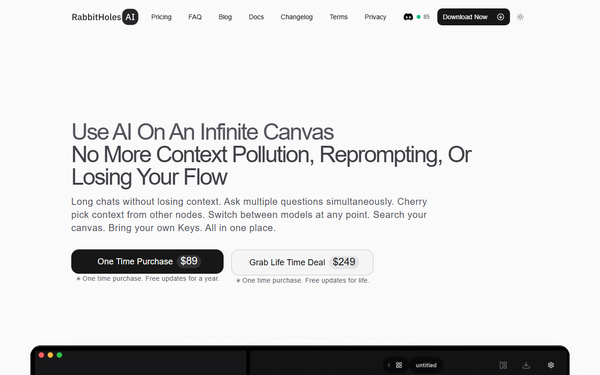
RabbitHoles offers a pure one-time purchase model with no subscriptions: $89 grants one year of free updates and two-device licensing; $249 delivers lifetime updates. There is no free tier, trial, or enterprise plan. Because users supply their own API keys, ongoing costs are limited to whatever the chosen providers charge for token usage.
Compared with subscription-heavy alternatives (ChatGPT Plus, Claude Pro, Perplexity, etc.), the lifetime option delivers outstanding long-term value for heavy users who conduct frequent deep explorations. The privacy of local storage and the elimination of context-management overhead further enhance the ROI for researchers and knowledge workers. Casual users may find the upfront cost and BYOK setup less appealing.
Practical Tutorial
Official documentation provides only a basic quickstart (install, add keys, double-click to create first node). Below is a complete step-by-step walkthrough for a common task—researching “AI agentic systems in 2026” with branching subtopics and grounded sources—created from the app’s documented features and interface behaviors as of March 2026.
- Download and install the latest version from https://www.rabbitholes.ai. Launch the app and paste your license key from the purchase email.
- Go to Settings → Providers, select your preferred model provider (e.g., Groq for speed or Ollama for local/privacy), paste your API key, and save. Choose a default model (e.g., Groq’s Llama-3.3-70B).
- Click “New Canvas” (or open the default Untitled Canvas). The infinite workspace appears.
- Double-click anywhere on the blank canvas (or right-click → Create Chat Node) to spawn your first node. In the chat box, type your main prompt: “Provide a comprehensive overview of agentic AI systems expected in 2026, including key architectures and real-world applications.” Press Cmd/Ctrl + Enter to generate.
- To branch: Hover over the node’s bottom edge or use Cmd/Ctrl + B to create a connected child node. Title it “Ethical considerations” and prompt: “What are the top three ethical risks of agentic systems and proposed mitigations?” Repeat for “Technical challenges” and “Industry adoption examples.”
- Add sources for grounding: Drag a PDF research paper or paste a YouTube URL/website link directly onto the canvas or into a specific node. The app automatically creates a source node; connect it to relevant chat nodes via the RAG toggle. Responses will now cite the attached material.
- Switch models mid-flow: In any node’s model dropdown, change to Claude-3.5-Sonnet for deeper reasoning or Perplexity for up-to-date web search. Run the same prompt in parallel nodes for multiple perspectives.
- Organize: Pan/zoom with trackpad or mouse wheel. Select multiple nodes (Shift-click or drag-select), right-click → Group to collapse them. Use the canvas search bar (top right) to jump to any keyword.
- Refine: Hover over any user prompt to edit and rerun (new in recent versions). Right-click responses for retry or copy.
- Export: Right-click the canvas background → Export → choose Markdown (for a linear report) or JSON (for backup). Save the entire canvas locally for later resumption.
This workflow typically takes under 10 minutes to set up and produces a visually organized, source-grounded research map far richer than any linear chat. For visual reference, explore the official changelog and Discord for community-shared canvases.
Final Verdict
RabbitHoles AI earns a strong 8.5/10. It excels as a specialized tool that genuinely advances how power users interact with AI by turning chaotic exploration into a structured, spatial superpower. Serious researchers, students, developers, and knowledge workers who frequently dive into long, branching topics will find it transformative—saving hours of context management and delivering more reliable outputs at a fair one-time price.
Avoid it if you prefer simple web-based chats, need mobile access, dislike managing API keys, or are unwilling to invest time learning a canvas interface; standard tools like ChatGPT or Claude will suffice for lighter needs.
RabbitHoles AI is the best investment you can make if you want AI to mirror the way your brain actually thinks—non-linear, interconnected, and endlessly explorable.