Rask AI Review: The Ultimate AI Tool for Video Localization
Overview & Purpose
Rask AI (rask.ai) is an AI-powered platform for video and audio localization, specializing in automated translation, dubbing, subtitling, and voice cloning. It enables users to adapt content into over 130 languages quickly and cost-effectively, handling transcription, translation, natural-sounding voiceovers, lip-sync, and captions in a single workflow. Primary use cases include creating multilingual marketing videos, localizing e-learning courses, dubbing podcasts or YouTube content, expanding reach for educational lectures, and supporting global entertainment or corporate communications without traditional production teams.
The tool targets content creators, marketers, educators, small businesses, enterprises, and media producers who need scalable localization. It appeals particularly to YouTube creators, edtech platforms, podcasters, and global teams seeking to boost audience engagement and revenue through localized content. As of April 2026, Rask AI positions itself as a democratizing solution that replaces expensive human translators and dubbing studios with AI that aims for human-like quality.
Key Features & Capabilities
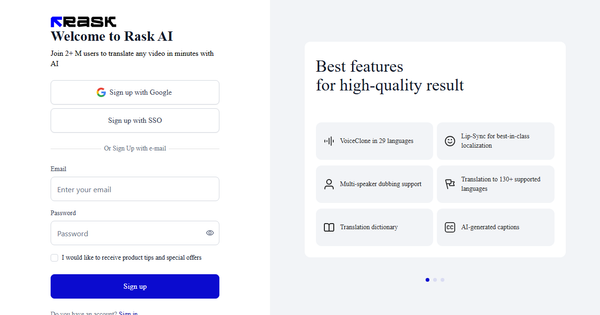
Core functionality revolves around an end-to-end video translator: upload a file (up to 1 GB, supporting videos up to ~5 hours), select source and target languages, and let AI handle transcription, translation, dubbing, and subtitle generation. Standout features include:
- Voice Cloning: Clone a speaker’s voice in 32 languages with adjustable similarity, expressiveness, and emotional range for natural, consistent dubbing.
- Lip-Sync Technology: Automatically aligns dubbed audio with on-screen lip movements for realistic results.
- Multi-Speaker Detection and Handling: Identifies and manages multiple voices in complex content like interviews or lectures.
- Advanced Editing Tools: Real-time control over transcripts, timestamps, translations, AI script rewriter, and a translation dictionary for terminology consistency.
- Subtitles and Captions: Auto-generated, editable, and embeddable subtitles with custom styling; SRT import/export.
- Additional Tools: Translation prompting for tone/style, teamspaces for collaboration, API for automation, and free utilities like subtitle generators or document translators.
- Security and Compliance: SOC 2 Type II certified with C2PA content authenticity support.
Differentiators from competitors include the integrated pipeline (no need to switch tools), high-quality voice cloning with lip-sync, and multi-language batch processing. It supports 135+ languages for translation (far beyond the user-provided list, including rare ones like Zulu, Mongolian, and Swahili). Limitations include Voice Clone availability in only 32 languages, occasional need for manual edits on lip-sync or complex accents, and restrictions on political/inappropriate content. Processing can be resource-intensive for very long videos, and lip-sync quality may vary by source material.
User Experience
Rask AI features an intuitive, user-friendly interface praised for its clean design and straightforward workflow, making it accessible even for non-technical users. The learning curve is minimal—most users report getting started in minutes via the drag-and-drop upload and guided translation process. Advanced options like editing tools and voice settings are well-organized without overwhelming beginners.
Interface quality is modern and responsive, with real-time previews, progress tracking, and collaboration via Teamspaces. Documentation includes a help center with guides on features like timestamps and voice cloning, plus 24/7 support (priority for higher plans). User feedback highlights responsive human support in positive cases, though some report delays or unresponsiveness. Overall, the platform earns high marks for ease of use on G2 (around 4.7/5) and Product Hunt (4.8/5).
Performance & Reliability
Processing speed is generally efficient, with many users noting quick transcription and translation for short-to-medium videos, often completing in minutes to hours depending on length and features like lip-sync. Multi-language outputs and API scaling support high-volume needs. Reliability is strong for core tasks, with accurate translations and natural voices in major languages; voice cloning and lip-sync deliver “pixel-perfect” results in ideal conditions.
Known issues include occasional processing delays or freezes (reported on long videos), inconsistent lip-sync on dynamic footage, and variable voice quality in less-supported languages. Some users experience transcription errors requiring edits or rendering issues. Trustpilot reviews (2.2/5 average) frequently cite slow finalization, random errors, and degradation over time, contrasting with higher ratings on G2. As of April 2026, performance is reliable for professional short-form content but may require patience or edits for enterprise-scale projects.
Pricing & Value
Rask AI offers a limited free trial (3 minutes of translation credit, plus one free lip-sync test minute) with no credit card required initially; users can upgrade anytime. Paid plans are subscription-based (monthly or annual, with up to 40% savings annually):
- Creator: From $33/month (25 minutes included).
- Creator Pro: From $78/month (higher minutes available).
- Business: From $600/month (from 100–500 minutes, 1 Teamspace).
- Enterprise: Custom (from 2,000 minutes, dedicated support, human proofreading).
Extra minutes cost $3 each across plans. Unused minutes roll over. Higher tiers unlock more Voice Clone slots, team collaboration, and priority features.
Value is strong for occasional users or small teams, delivering professional results at 10x lower cost than traditional localization. It excels for creators needing quick multi-language output. However, heavy users may find per-minute costs add up quickly, and billing complaints (unexpected charges, cancellation issues) appear in some reviews. Compared to alternatives like VEED.io or HeyGen, Rask stands out for voice cloning depth but may feel pricier for basic subtitling.
Practical Tutorial
A common task is localizing a marketing video from English to Spanish with voice cloning and subtitles. Here’s a step-by-step walkthrough based on the official video translator workflow (as of April 2026):
- Sign Up and Access the Tool: Go to https://www.rask.ai/ or directly to the app at https://app.rask.ai/. Create a free account and start with the 3-minute trial or demo project.
- Upload Your Video: Navigate to the Video Translator tool. Drag and drop your MP4/MOV file (or paste a YouTube link). No format conversion needed; supported up to 1 GB.
- Select Languages: Choose English as the source and Spanish as the target (or multiple targets at once). Enable Voice Clone if you have a sample of the original speaker’s voice.
- Configure Options: Turn on lip-sync, auto-captions, and translation dictionary (add brand terms for accuracy). Use AI prompting for tone (e.g., “professional and energetic”).
- Process the Video: Click “Translate.” AI transcribes, translates, and generates dubbed audio/subtitles. Monitor progress in the dashboard.
- Review and Edit: In the advanced editor, adjust timestamps, fix any transcription errors, tweak voice expressiveness, or refine subtitles. Preview the dubbed version with lip-sync.
- Export: Download the final video with embedded Spanish voiceover and subtitles, SRT files, or separate audio tracks. Repurpose for YouTube, social media, or other platforms.
For official guidance, check Rask’s help center or blog tutorials on features like multi-speaker handling. Real-world example: A 2-minute English product demo can be localized to Spanish in under 10 minutes of processing, yielding ready-to-publish content.
Final Verdict
Overall Rating: 4.2/5
Rask AI is an excellent choice for content creators, marketers, educators, and small-to-medium businesses needing fast, high-quality video localization to reach global audiences—especially those valuing voice cloning and lip-sync for professional results. Its intuitive interface, comprehensive feature set, and API make it scalable and time-saving.
Avoid it if you require flawless lip-sync on every frame, handle very high volumes on a tight budget, or need ironclad support without occasional billing/process hiccups—enterprise users with strict deadlines may prefer more mature alternatives.
One-sentence recommendation: Rask AI delivers powerful AI-driven video localization that punches above its weight for most creators, making global content expansion accessible and affordable—as long as you start with the free trial to verify fit for your specific videos. (Research conducted April 2026.)