Ready To Send Review: Automate Your Gmail Replies with AI

Overview & Purpose
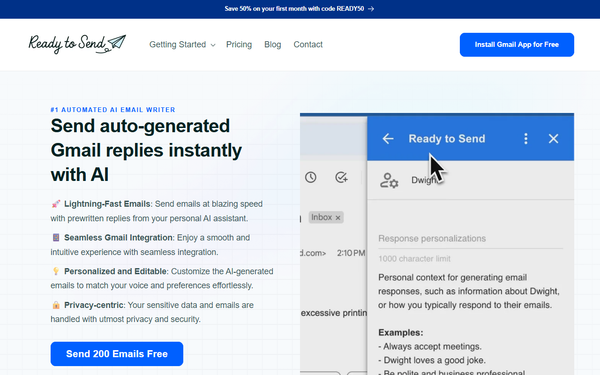
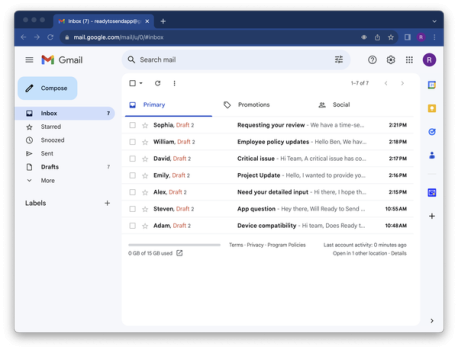
Ready to Send is an AI-powered Gmail add-on that automatically generates personalized draft replies for new and unread emails in your inbox. It scans incoming messages, crafts contextual responses in your unique voice and style, and places editable drafts directly in Gmail for quick review and sending. The primary use cases include clearing high-volume inboxes, accelerating customer support replies with FAQs and policies, overcoming writer’s block for routine correspondence, and maintaining consistent personal or brand tone across threads.
It targets busy professionals (executives, salespeople, freelancers), teams handling customer support or internal comms, and anyone using Gmail who wants Inbox Zero without losing the human touch. It works seamlessly on desktop and mobile Gmail apps (Android/iOS) and even supports non-Google accounts added to Gmail. Research conducted as of March 2026.
Key Features & Capabilities
Core functionality revolves around proactive AI draft generation: emails appear moments after arrival, ready to edit, regenerate, or delete. Standout features include:
- Intelligent personalization — Global instructions plus contact-specific profiles (e.g., “Tom loves novels and works remotely”) that influence tone and content without any model training.
- Intelligent Snippets — Reusable knowledge base for inserting policies, product details, or onboarding info automatically.
- Smart filtering & labels — Skips newsletters/promotions; use Gmail labels to trigger or block generation.
- Multi-LLM support — Default OpenAI; bring your own keys for Google Gemini or Anthropic; works in 100+ languages.
- Full Gmail ecosystem — Sidebar integration, mobile compose “Insert from Ready to Send,” new-email drafting, and third-party clients via Gmail forwarding.
- Enterprise-grade security — Google-audited (CAS Tier 2), no emails stored, no training on user data, strict limited-use policy.
Differentiators versus competitors (Gemini for Gmail, Shortwave, Superhuman, Fyxer AI): Ready to Send is truly proactive (drafts appear automatically), offers deeper personalization via contact profiles and snippets, and lets users control the underlying LLM—without forcing you to leave Gmail or copy-paste threads.
Limitations: Gmail-centric (non-Gmail accounts must be added to Gmail); drafts only—no one-click auto-send (intentional for control); free tier ends at 200 emails; advanced LLM customization requires a paid plan. Missing features noted by some users: deeper team collaboration tools or native Outlook integration.
User Experience
Installation takes under two minutes via the Google Workspace Marketplace—no coding or complex setup. The learning curve is minimal: open the sidebar once to activate monitoring, then tweak a few instructions. The interface is clean and native to Gmail—drafts appear exactly where you expect them, with one-click regenerate/edit/send. Mobile experience mirrors desktop via Gmail’s add-on support.
Documentation is excellent: concise blog guides with video walkthroughs cover installation, personalization, snippets, labels, and edge cases. Support feels responsive through in-app channels and the active blog. Users consistently praise how “the replies are ready the moment you open your inbox,” making daily email feel effortless.

Performance & Reliability
Drafts generate in minutes (often seconds) with impressive contextual accuracy and tone-matching right out of the box. Reliability is high: it runs 24/7 in the background, filters junk correctly, and handles long threads without losing context. No widespread outages or bugs reported in 2026 reviews; Google Marketplace rating sits at 5/5 from verified users. Common feedback: “remarkably close to what I want to send” and “saves me a lot of time.”
Rare complaints are minor (occasional regeneration needed for very nuanced requests) and no security incidents or data leaks have surfaced—thanks to the strict privacy architecture.
Pricing & Value
- Free tier: 200 auto-generated replies to test the full product.
- Paid plans: Subscription required after trial (exact pricing listed on the site; annual plans include 2 months free). Use code READY50 for 50% off your first month. Team/enterprise seats available with volume licensing.
- Also accessible via Setapp AI+ subscription (credits-based).
Value is exceptional for anyone processing 50+ meaningful emails weekly: the time saved quickly outweighs the cost compared with manual writing or less integrated alternatives like Gemini (which requires prompting) or premium clients like Superhuman. The generous trial and privacy focus make it low-risk to evaluate.
Practical Tutorial
Common task: Install Ready to Send and generate + personalize your first reply
Official guides: Install, Personalize, Snippets.
- Go to the Google Workspace Marketplace and search “Ready to Send for Gmail.” Click Install → select your account → grant Gmail permissions (security-audited by Google).
- Open Gmail (refresh if needed) → find the Ready to Send sidebar icon → open it once to activate inbox monitoring.
- (Optional but recommended) Set up personalization: In the sidebar, add global instructions (“Always be concise and friendly”) and create contact profiles (e.g., for client “Sarah” add “She prefers bullet-point updates and signs off with emojis”).
- Create a Snippet for reusable info (e.g., “Refund Policy: Full refund within 30 days…”).
- Wait for a new email (or label an existing one). Within minutes a draft appears in the email view.
- Review → click “Regenerate” if needed → edit inline → insert Snippet if relevant → Send.
Real example: Incoming email: “Hi, can I get a refund for my order #123?”
Generated draft (with Snippet): “Hi Sarah, Thanks for reaching out! I’ve processed your refund for order #123—full amount back within 3-5 business days per our policy. Anything else I can help with? 😊”
You tweak two words and send. Total time: under 30 seconds.
Repeat for new emails or use the Compose window’s “Insert from Ready to Send” button for fresh messages.
Final Verdict
Overall rating: 4.5/5
Ready to Send is ideal for Gmail power users, sales teams, and support professionals who reply to dozens of emails daily and want to reclaim hours while keeping every response authentically theirs. It shines for those prioritizing privacy, seamless integration, and proactive automation.
Avoid it if you need full auto-send without review, work primarily outside Gmail, or prefer completely free built-in tools like Gemini with less personalization depth.
One-sentence recommendation: If Gmail is your main workspace and you’re tired of typing the same replies, install Ready to Send today—your inbox will thank you.