Recast Studio Review
Overview & Purpose

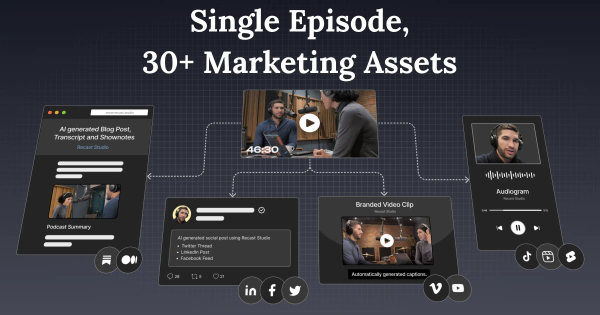
Recast Studio is an AI-powered video editor designed specifically for marketing teams and content creators. It automates the repurposing of long-form video or audio content—such as podcasts, webinars, interviews, and Zoom recordings—into a full suite of marketing assets including short social-ready video clips, audiograms, automatic captions, show notes, blog posts, social media copy, and more. The core purpose is to eliminate manual editing bottlenecks by using AI to detect highlights, generate transcripts, remove filler words, and produce platform-optimized outputs in minutes rather than days.
Primary use cases include turning a single podcast episode into dozens of shareable clips for LinkedIn, Instagram, YouTube Shorts, and TikTok; creating written promotional content like SEO-optimized show notes or blog drafts; and enabling team collaboration on content pipelines without hiring external editors or video specialists. This aligns closely with the provided description while extending beyond pure podcasts to any long-form recording.
The target audience is primarily marketing teams at podcasts, SaaS companies, or agencies, as well as solo podcast creators and video podcasters who lack advanced editing skills or budgets for traditional production. Testimonials highlight users from SquadCast.fm, Ad Reform, and PRECISE Selling—content marketers and founders focused on growth through repurposed assets rather than developers or designers.
Key Features & Capabilities
Core functionality revolves around a transcript-based workflow: upload a video or audio file, receive accurate AI transcription (in 20+ languages), and edit by simply highlighting or deleting text to trim the video automatically—no complex timelines required. AI then generates clip suggestions, animated captions, audiograms, auto-reframed videos, and filler/silence removal. Additional outputs include AI-written show notes, social posts, email copy, blog drafts, and summaries from the same transcript.
Standout features that differentiate it from competitors (such as Opus Clip, Descript, or Munch) include:
- One-stop repurposing: Generate clips + written content (blogs, posts) in a single platform, unlike clip-only tools.
- Marketer-friendly editing: “Edit video by editing text” with custom templates, layer animations (B-roll, soundwaves, progress bars), custom fonts, and one-click exports for multiple platforms.
- Team workspaces for collaboration, feedback, and project management.
- Advanced automation like AI highlight detection, custom prompts, and SEO-friendly outputs.
These make it faster and more affordable than hiring editors (users report reducing $2,000–$5,000 traditional costs to ~$20).
Limitations include a strict credit system (1 credit = 1 upload minute), export caps per tier, and single-clip length restrictions. No advanced pro-level timeline editing for filmmakers, limited third-party integrations mentioned, and storage durations (7 days on free tier). AI-generated written content and clips often require manual tweaks for brand voice or accuracy, as noted in user feedback. Enterprise options or unlimited plans are not prominently featured.
User Experience
Recast Studio boasts a low learning curve, explicitly marketed as “If you can edit a text doc, you can edit a video in Recast.” The interface is clean and transcript-centric, with sidebar tools for highlights, templates, and exports—ideal for non-technical marketers. Upload-to-first-clip typically takes under 10 minutes once familiar.
Interface quality is intuitive with visual previews, animated caption options, and drag-and-drop layer tools. Documentation includes official YouTube tutorials (e.g., “How To Edit Videos On Recast Studio”), blog guides, and a third-party interactive demo. Support appears responsive via live chat per some reviews, though comprehensive help-center articles are limited compared to larger platforms.
Performance & Reliability
Processing is efficient: AI highlight detection, transcription, and clip generation complete in minutes, with full workflows (upload + customize + export) averaging ~10 minutes per episode. Accuracy for English transcription and highlight selection receives praise in testimonials for producing “professional-looking” results quickly.
Known issues from user reports include occasional billing confusion (e.g., free-tier export limits stricter than advertised, shown vs. billable durations), upload times varying by file size, and the need for post-AI editing on captions or copy. Trustpilot reviews (overall mixed, with some 1-star complaints about credits and downloads) highlight upgrade friction, but no widespread outages or reliability failures reported. Third-party review volume remains low (sparse G2/Capterra entries), suggesting a newer or niche tool.
Pricing & Value
Recast Studio uses a freemium credit-based model with annual billing encouraged for savings (up to 30%):
- Free Trial: $0 – 60 credits (one-time, 1 credit = 1 upload minute), 5 export minutes/month, max 1-minute single clips, 3GB storage (7 days).
- Starter: ~$14/month ($170/year) – higher credits (e.g., 1,800 upfront in yearly equivalent), 300 export minutes/month, max 15-minute clips, 15GB storage (ongoing).
- Professional: ~$26/month ($310/year) – 600 export minutes/month, max 60-minute clips, 50GB storage, plus full features like custom templates and advanced animations.
All paid tiers include AI clip generation, text editing, repurposing tools, and 20+ language transcription. No credit-card required for trial; overages not detailed publicly.
Value is strong for the target audience: users report replacing $1,200/month editor costs or multi-day workflows with affordable, high-output results. Compared to alternatives, it offers broader asset generation (clips + writing) at lower entry pricing, making it cost-effective for consistent weekly repurposing. However, heavy users may hit export/storage caps quickly, and free tier is very limited.
Practical Tutorial
A common task—generating and editing podcast clips—is well-supported. Here is a step-by-step walkthrough (based on official workflow and verified third-party demo; link to interactive guide: https://www.storylane.io/tutorials/how-to-clip-podcasts-with-ai-using-recast-studio). Real example: Repurposing a 30-minute marketing podcast episode into 10 LinkedIn/Instagram clips.
- Sign up for a free account at app.recast.studio and upload your podcast audio or video file (supports direct import or Google Drive).
- Select the spoken language for accurate transcription (e.g., English).
- Choose a clip style/template from the library (e.g., “Podcast Clip,” “YouTube Short,” or audiogram with soundwave).
- Click Create Project. Upload processes in ~1 minute; a full transcript appears.
- Go to Highlights in the left sidebar, select desired number/duration of clips (e.g., 10 clips of 30–60 seconds), and submit. AI (powered by models like AskReti) auto-detects engaging moments.
- Review AI suggestions, save preferred ones, then select clips on the transcription board and click Create Clip.
- Edit via text: Highlight/delete transcript sections to trim, add captions/animations, layers (B-roll, images), or custom prompts for show notes/social posts. Preview in real-time.
- Export all formats with one click (social-ready files with captions). Download or share directly.
Total time: Under 10 minutes for 10+ clips. Official YouTube channel (@recaststudiohq) offers supplementary videos on adding intros/outros or Drive imports for deeper customization.
Final Verdict
Overall rating: 4.2/5. Strengths in speed, ease, and all-in-one repurposing outweigh limitations for the right users, though sparse third-party reviews and occasional billing hiccups temper the score (research conducted March 2026).
Who should use this tool: Marketing teams, podcast creators, and content marketers who regularly repurpose long episodes into social/video/written assets and want an affordable, no-editing-skills-required workflow—especially those tired of fragmented tools or high editor costs.
Who should avoid this tool: Advanced video editors needing precise timeline control, teams with massive monthly export volumes (credit caps apply), or users sensitive to strict free-tier limits and minor AI refinement needs.
One-sentence recommendation: Recast Studio is a time-saving powerhouse for podcast marketers seeking fast, professional clips and content from existing recordings—start with the free trial to test your workflow today.