Recast Studio Review: The Ultimate AI Tool for Content Repurposing
Overview & Purpose
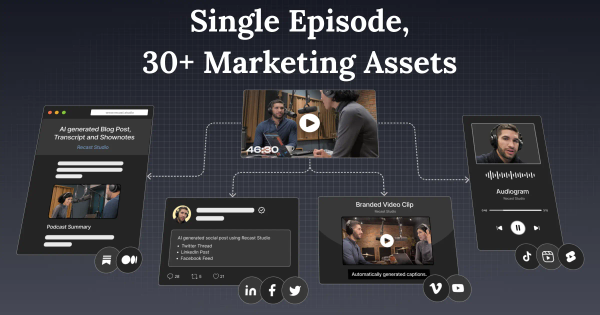
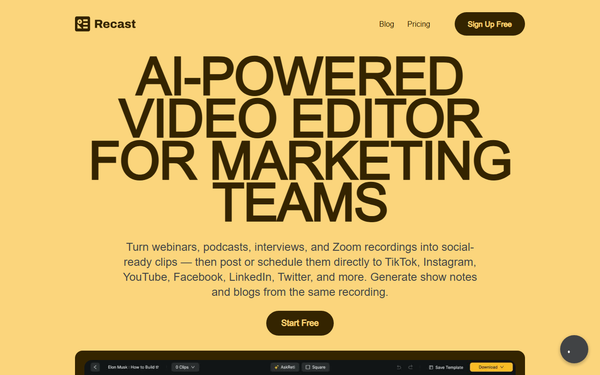
Recast Studio is an AI-powered video editor and content repurposing platform designed specifically for marketing teams, podcasters, and content creators. It automates the transformation of long-form audio or video content—such as podcast episodes, webinars, Zoom recordings, or interviews—into a full suite of marketing assets. This includes short-form video clips optimized for social media, audiograms with animated waveforms, captions, show notes, SEO-optimized blog posts, social media captions, email summaries, and more. The tool then enables direct publishing or scheduling to platforms like TikTok, Instagram, YouTube, LinkedIn, Facebook, and X (Twitter).
Primary use cases center on content repurposing: turning one recording into dozens of platform-ready pieces to maximize reach without manual editing or multiple tools. It addresses the common challenge of post-production overload by handling transcription, clip selection, editing, writing, and distribution in one workflow. Target audience includes podcasters, social media managers, digital marketers, small business owners, and marketing teams at SMBs who lack dedicated video editors or designers but need professional-looking promotional content quickly. It is particularly suited for non-technical users focused on growth through consistent social presence rather than advanced cinematic editing.
Key Features & Capabilities
Core functionality revolves around a streamlined upload-to-publish pipeline. Users upload a file, and AI automatically generates a transcript (supporting 20+ languages), identifies engaging “Magic Clips,” removes filler words and pauses, applies auto-reframing for different aspect ratios, and adds synchronized animated captions. Editing is uniquely text-based: highlight or delete sections of the transcript to trim the video instantly, with captions and timing staying perfectly synced—described as “if you can edit a Google Doc, you can edit a video here.”
Standout features that differentiate it from competitors like Opus Clip or Munch include:
- Integrated AI writing tools that generate show notes, full blog drafts, LinkedIn posts, email newsletters, and social copy directly from the same transcript.
- Customizable templates with branding options (logos, fonts, colors, B-roll, shapes, soundwaves, progress bars) and layer animations.
- Direct social publishing and scheduling across multiple platforms without leaving the app.
- Team workspaces for collaboration, cloud storage, and advanced options like custom prompts.
The platform also offers dedicated tools such as a podcast audiogram generator and podcast-to-video converter.
Limitations include a very restricted free tier (one-time 60 credits with just 5 minutes of total video output per month and 1-minute max clip length), advanced AI features (clip generator, auto-reframe, filler removal, full text editing, and publishing) locked behind the Professional plan, and occasional template variety complaints. It excels at repurposing but lacks deep manual timeline scrubbing or effects for professional video editors.
User Experience
Recast Studio earns consistent praise for its intuitive, modern interface with a clean dark-mode design and quick animations that make navigation feel responsive. The learning curve is minimal—most users report being productive within minutes thanks to the familiar text-editing metaphor and guided workflows. Gifs and tooltips on the site further reduce onboarding friction.
Interface quality stands out for its focus on simplicity: no complex timelines or professional editing software knowledge required. Users highlight accurate transcription that minimizes manual fixes and professional results in under a minute for basic clips. Support resources include responsive customer service (frequently noted as quick and helpful), a blog with workflow guides, and tool-specific pages with clear 3-step instructions. Documentation is practical rather than exhaustive, with in-app prompts and example clips aiding self-service.
Performance & Reliability
Processing speed is a strong point once files are uploaded: the full workflow—from upload to multiple ready clips and written assets—typically takes around 10 minutes, dramatically faster than traditional methods (4–6 days and thousands in costs). AI clip detection, transcription accuracy, and caption syncing perform reliably for most users, with positive feedback on multi-speaker handling and language support.
Known issues include variable upload times for larger files (sometimes lengthy depending on internet and file size) and occasional billing/credit confusion after upgrades. Trustpilot reviews (3.6/5 average from 86 reviews as of April 2026) note these alongside strong results in clip quality and time savings. Reliability is solid for the target use case, with no widespread reports of frequent crashes, though some users request more template variety and smoother payment flows. Overall efficiency makes it highly dependable for regular podcast marketers.
Pricing & Value
Recast Studio uses a credit-based freemium model where 1 credit equals 1 minute of upload time. Plans (as of April 2026, with up to 30% savings on annual billing):
- Free: $0 – One-time 60 credits; limited to 5 minutes total video output per month and 1-minute max clips.
- Starter: $14/month (billed annually ~$170/year) – 1,800 credits upfront; basic transcription and limited exports (5 minutes output/month, 15-minute max clips in some configurations).
- Professional: $26/month (billed annually ~$310/year) – Higher credits, 300–600 minutes video output/month, 60-minute max clips, full AI features, advanced editing, social publishing, and 50GB indefinite storage.
No separate enterprise tier is prominently listed, though custom options may be available via contact. Value is excellent for the price: users frequently compare it favorably to hiring editors ($1,200+/month) or juggling multiple tools, noting a year’s worth of content in hours for roughly the cost of one traditional clip. It sits competitively between free watermarked alternatives and higher-end options, delivering strong ROI for consistent creators through time savings and direct distribution. Free tier suits light testing, while Professional unlocks the complete workflow.
Practical Tutorial
Recast Studio provides clear guidance via its tool pages and in-app flows. Below is a step-by-step walkthrough for a common task—creating and publishing short video clips from a podcast episode (based on official 3-step process and user-tested workflows as of April 2026). This example uses a 30-minute episode titled “AI in Marketing 2026.”
-
Sign up and upload: Create a free account at recast.studio and go to the Podcast Clip Maker tool (or dashboard). Click “Upload your episode” and select your MP3/MP4 file (or paste a link). Choose the episode language (auto-detect works for 20+ languages). Processing begins immediately; larger files may take several minutes.
-
Find and shape the best moments: Once transcribed, review the full transcript. AI auto-suggests “Magic Clips” with timestamps for engaging highlights. Select preferred templates (e.g., Vertical Podcast Clip for TikTok/Reels, Podcast Audiogram with waveform, or Square Testimonial). Edit directly in the transcript: highlight strong sections, delete fillers or weak parts—the video and captions update live. Enable AI filler word/pause removal and auto-reframe for platform-specific sizing.
-
Add captions, branding, and export/publish: Customize with animated captions, your logo, fonts, colors, B-roll layers, or soundwave visuals. Preview the clip. Simultaneously, use the built-in AI writer to generate matching show notes, a blog draft, or social posts. Click “Export” for download or connect your social accounts to “Post now” or schedule directly to LinkedIn, Instagram, etc. Repeat for multiple clips from the same episode.
Official examples and templates are shown on https://recast.studio/tools/podcast-clip-maker. For video demos, search their YouTube channel or blog. The entire process typically yields 10–30 ready assets in under 15 minutes.
Final Verdict
Recast Studio earns a solid 4.2 out of 5. It shines for podcasters, marketers, and content creators who want an all-in-one AI assistant to effortlessly repurpose long-form episodes into high-quality, branded marketing assets and distribute them instantly—saving dozens of hours per month while maintaining professional polish. The text-based editing, integrated writing tools, and direct publishing set it apart from pure clip generators.
Who should avoid it: Large enterprises needing advanced collaborative editing suites, users requiring highly customized manual effects, or those frustrated by credit limits and occasional upload delays—stick to specialized video editors or free alternatives for very low-volume needs.
In one sentence: Recast Studio is a time-saving powerhouse for podcast marketers who prioritize speed, simplicity, and multi-platform reach over traditional video editing control.