RecCloud Review: The Ultimate All-in-One AI Video & Audio Tool

Overview & Purpose
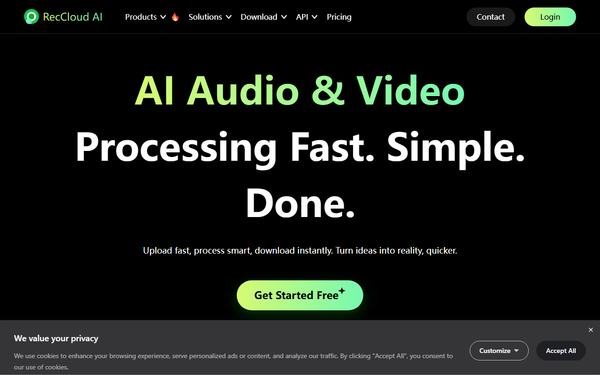
RecCloud is an AI-powered online multimedia platform that provides a suite of browser-based tools for processing video and audio content without requiring software downloads. It transforms spoken audio into text, generates and translates subtitles, converts text to natural speech, summarizes videos (with interactive AI chat capabilities), creates videos from text prompts, translates entire videos with dubbing, and includes basic recording and editing functions. Primary use cases include creating accessible educational content, transcribing meetings or lectures (including specialized Zoom and medical options), generating multilingual social media or marketing videos, summarizing long-form YouTube content for quick insights, and screen recording for tutorials, gaming clips, or webinars.
The target audience spans educators and students seeking efficient note-taking and course localization, content creators and marketers needing fast subtitle/voiceover tools for global reach, professionals in finance or medical fields for accurate transcriptions, and casual users wanting an all-in-one solution for personal projects. It appeals particularly to those prioritizing convenience, cloud-based workflows, and AI automation over desktop software.
Research conducted as of March 13, 2026.
Key Features & Capabilities
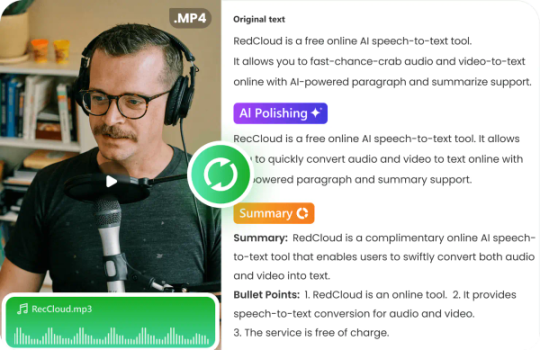
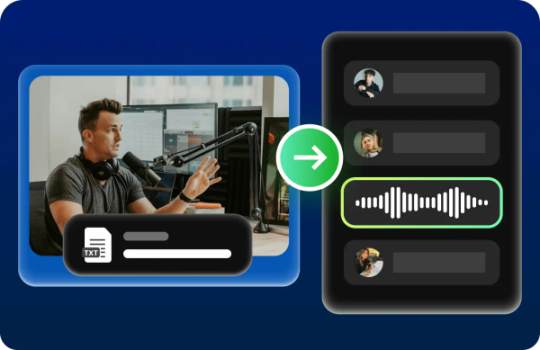
Core functionality revolves around AI-driven audio/video processing: AI Speech-to-Text (with automatic polishing and summarization), AI Subtitle Generator (original language detection plus translation into 100+ languages), AI Voice Generator (TTS with multilingual and voice cloning support), AI Video/Audio Summarization (including YouTube links and interactive chat/Q&A with video content), AI Video Translator (voiceover dubbing and subtitles), AI Video Generator (text-to-video in multiple resolutions), AI Vocal Remover, and online tools for screen recording, trimming, cropping, and merging videos. All processing happens in-browser with optional cloud storage for files and sharing.
Standout features differentiating it from competitors like Descript, HeyGen, or Riverside include fully online operation (no install), integrated AI video chat for querying summarized content, rival-Sora-level text-to-video generation, specialized solutions (medical/Zoom transcription), and seamless combination of recording + AI enhancement in one platform. Security features like encryption, ISO 27001/27701 compliance, and GDPR adherence add appeal for professional use. Cloud storage enables easy collaboration and access across devices.
Limitations include credit-based consumption (e.g., 1 credit per minute for basic transcription), strict free-tier caps (limited minutes/files, e.g., 1-minute recordings or 5-minute translations), occasional accuracy drops with fast/accents-heavy speech or complex translations, no advanced desktop-style editing in the online recorder, and expiration of unused credits. Missing features noted in reviews: robust noise removal templates or unlimited offline access.
User Experience
The platform boasts a clean, intuitive browser interface with drag-and-drop uploads, one-click “Start for Free” buttons per tool, and minimal learning curve—most users can begin productive work in minutes. Mobile apps (iOS/Android) extend access but receive mixed feedback on stability. Cloud saves and cross-device syncing enhance convenience.
Interface quality is modern and responsive (Chrome recommended), though some users report occasional upload stalls or confusing credit tracking. Documentation consists of a blog with practical guides and an FAQ section rather than exhaustive manuals; support is available via contact form with responsive replies in tested cases. Community resources are limited, relying on YouTube tutorials and official blog posts.

Performance & Reliability
Processing is generally fast—transcriptions often complete in under a minute for typical files—and AI accuracy is strong for clear audio in supported languages. Screen recording works smoothly in-browser with system audio and webcam options, while cloud uploads enable quick sharing.
Known issues from user reports include failed SRT exports in translations, upload progress stuck at 0% for longer videos, inconsistent free-tier downloads requiring paid credits, and occasional cultural nuance misses in dubbing. Reliability is solid for light use but can frustrate heavy users due to credit limits and internet dependency. Overall complaint volume is low given the platform’s niche status, with developer responses addressing issues promptly on review sites.
Pricing & Value
RecCloud operates on a freemium credit-based model. The free tier offers limited access (e.g., a few minutes of processing daily, basic file sizes up to 4 GB, and short recordings) with no credits initially. Paid plans include Weekly membership (~$9 for 100 credits/week plus 10 GB cloud storage), Pro and Business tiers (annual equivalents reported around $4–6/month with higher credits and commercial rights for Business), plus pay-as-you-go credit purchases. All plans grant unlimited file storage duration and access to every AI tool; credits cover usage (e.g., 1 credit/min transcription, higher for dubbing or video generation). Student discounts and a 7-day money-back guarantee are available.
Value is strong for occasional or medium-volume users seeking an all-in-one online solution cheaper than premium alternatives like ElevenLabs or HeyGen for similar AI features, especially with built-in recording and storage. Heavy commercial users may find credits add up quickly, making it less competitive against unlimited desktop tools. The convenience and AI innovation deliver excellent ROI for target audiences.
Practical Tutorial
Official tutorials and user guides are available on the site and YouTube. Below is a step-by-step walkthrough for a common task—summarizing a YouTube video and interacting via AI chat (leveraging the video chatting feature)—based on the official process and verified in 2026 resources.
-
Go to the RecCloud AI YouTube Video Summarizer page (https://reccloud.com/ai-video-summarizer or via the homepage Products section) in any modern browser.
-
Open YouTube in another tab, copy the URL of the video you want to summarize (e.g., a 30-minute lecture or tutorial).
-
Paste the URL into the designated box on RecCloud and click “Summarize.” The AI processes the video (costs 6 credits for YouTube links) and generates a concise summary with key timestamps and highlights.
-
Once summarized, use the built-in AI chat interface (ChatVideo feature) to ask questions like “What are the main action steps?” or “Explain the second point in simpler terms.” The AI responds based on the video content.
-
Edit or export the summary text, add subtitles if needed, or download as a shorter clip. For free-tier testing, keep videos under limits; paid users enjoy full cloud save and sharing.
This task typically takes 1–3 minutes and is ideal for students or educators. For more examples, see the official guide at https://reccloud.com/how-to-use-reccloud-ai-youtube-summarizer.html or YouTube tutorials like “How to Use RecCloud to Automatically Transcribe Audio to Text.”
Final Verdict
Overall rating: 4.0/5. RecCloud excels as a convenient, innovative all-in-one AI multimedia platform for light-to-medium users who value browser accessibility and integrated tools.
Who should use it: Educators, content creators, students, and professionals in education, marketing, or medical fields who want fast, multilingual AI processing and cloud collaboration without installing software.
Who should avoid it: Heavy commercial users needing unlimited processing, advanced offline editing, or enterprise-grade support, or anyone frustrated by credit tracking and occasional AI inaccuracies.
One-sentence recommendation: Try RecCloud’s free tier today if you need an effortless online hub for AI-powered video and audio creation—its speed and feature breadth make it a standout time-saver for most multimedia projects.