Receiptor AI Review: Automate Your Bookkeeping and Expense Tracking
Overview & Purpose
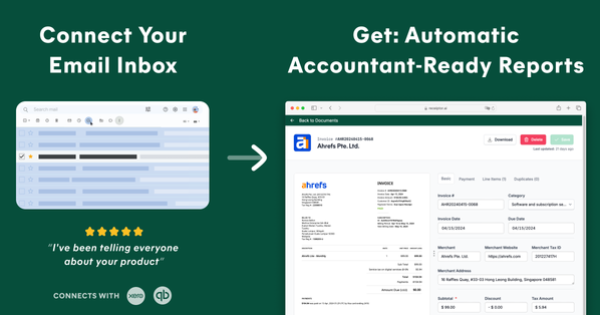
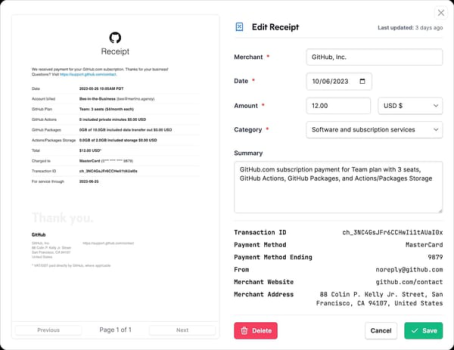
Receiptor AI is an AI-powered bookkeeping automation platform that scans email inboxes (Gmail, Outlook, Yahoo, or any IMAP), WhatsApp messages, and manual uploads to automatically detect, extract, organize, and categorize receipts, invoices, and bills. It pulls key data such as amounts, merchants, dates, tax breakdowns, payment methods, and itemized details from PDFs, images, or embedded text, then applies context-aware machine learning for smart tagging and categorization before syncing directly to accounting software like QuickBooks Online and Xero with attached PDFs.
Primary use cases include eliminating manual data entry for expense tracking, recovering missed past receipts via retroactive email scans, managing unpaid bills with reminders, detecting recurring subscriptions, and generating audit-ready reports or analytics dashboards. It targets business owners, freelancers, contractors, accountants, bookkeepers, digital nomads, e-commerce operators, real estate investors, and other professionals who receive financial documents via email or messaging apps rather than dedicated expense apps.
Key Features & Capabilities
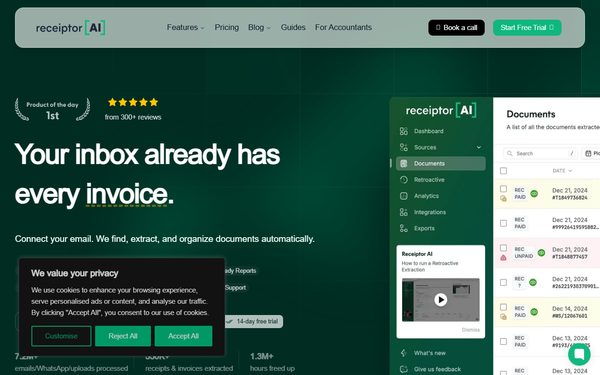
Core functionality revolves around 24/7 inbox monitoring, real-time or retroactive extraction, AI-driven contextual categorization (beyond simple keywords), vendor analytics, recurring expense projections, bills-to-pay tracking with due-date alerts, automation rules for custom workflows, team collaboration with role-based permissions, and multi-format exports (CSV, PDF, ZIP) or Google Drive storage.
Standout differentiators include full retroactive scanning of years of email history in minutes, WhatsApp integration for mobile receipts, support for any language or currency, and seamless pre-filled syncing to QuickBooks or Xero—features that go beyond basic receipt scanners by handling both incoming and historical documents without user intervention. It also offers real-time spending visualizations and organization-level management.
Limitations include usage-based overage fees for documents or entities beyond plan allowances, no dedicated mobile app (reliance on WhatsApp/email), and potential need for occasional manual review on poorly formatted or complex documents where OCR accuracy may vary. Missing features compared to full-suite expense tools include built-in receipt photography, mileage tracking, or credit card integrations.
User Experience
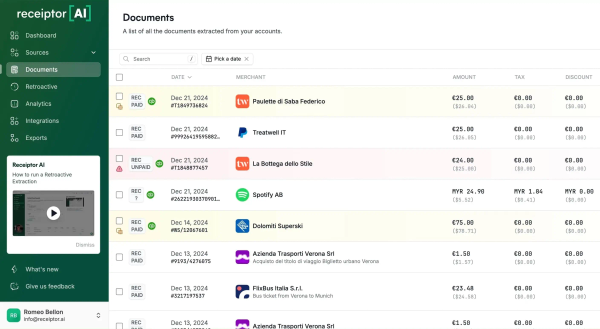
Setup involves a quick OAuth-style connection for email and accounting apps, plus optional WhatsApp linking, with most users reporting completion in under 15 minutes and retroactive backfills happening automatically. The interface is described as clean, intuitive, and dashboard-focused, with minimal learning curve even for non-technical users.
Documentation includes a help center (help.receiptor.ai) with setup guides and automation articles, plus responsive chat and WhatsApp support praised for speed and bug fixes. No extensive video library on-site, but official YouTube demos and Product Hunt feedback highlight the “plug-and-play” nature.
Performance & Reliability
Processing is fast—real-time for new documents and under 15–30 minutes for full inbox retroactive scans—handling thousands of items efficiently with high accuracy reported across testimonials. The system runs in the background without performance drag on user inboxes.
Known issues are minimal; searches across Product Hunt, Trustpilot, and external sites reveal no widespread complaints about downtime, sync failures, or data loss. Users consistently note reliable categorization and seamless accounting syncs, with security validated via CASA Tier 2 assessment. Rare edge cases involve very low-quality images or non-standard formats requiring minor corrections.
Pricing & Value
Receiptor AI offers tiered subscriptions with no ongoing free plan beyond a potential one-time retroactive scan quote:
- Starter: $29/month (1 email account included, then $29 each; basic PDF/CSV exports).
- Growth: $79/month (3 email accounts + organizations + full QuickBooks/Xero integrations; most popular for small teams).
- Scale: $199/month (10 email accounts + higher volume limits).
- Enterprise: Custom (advanced security, SLAs, custom integrations).
Add-ons apply for extra WhatsApp numbers ($10 each), documents/entities analyzed, and agents. Annual billing is not explicitly discounted in current listings; one-time full-history scans are available via quote. A short free trial or limited retroactive option is referenced in some sources.
Value is strong for users processing 50+ documents monthly, with claimed ROI of 691% and net savings of thousands annually through 3–5+ hours weekly freed up. Compared to manual bookkeeping or hiring help, it delivers superior automation at a fraction of the cost; alternatives like generic receipt apps lack the email/WhatsApp depth and accounting sync polish.
Practical Tutorial
A common task—setting up automatic receipt extraction and QuickBooks syncing—takes about 10 minutes and runs hands-free thereafter. Official guidance is available at /how-it-works and help.receiptor.ai; here is a real-world walkthrough based on the platform’s four-step process (tested conceptually via public demos and user reports as of March 2026):
-
Sign up and connect sources: Go to receiptor.ai, create an account, and click “Connect Email.” Authorize Gmail (or Outlook/IMAP) via secure OAuth. Optionally link a WhatsApp number for mobile receipts. No coding required.
-
Enable retroactive scan (optional but powerful): During setup or via dashboard, request a full inbox history scan. The AI instantly pulls years of past emails, extracts receipts (e.g., a 2024 Uber ride or vendor invoice), and populates your library—users report recovering hundreds of documents in under 15 minutes.
-
Set up QuickBooks/Xero sync and rules: In settings, connect your QuickBooks Online or Xero account. Enable auto-sync; Receiptor pre-fills expenses with extracted data + attached PDF. Add automation rules, e.g., “Tag anything from Amazon as ‘Office Supplies’ and export immediately.”
-
Review dashboard and export: Visit the analytics tab to see categorized spending charts, vendor lists, and recurring bills. Approve or edit any flagged items (rare), then let it push data live or download a CSV/PDF report for tax season. Example: Forward a WhatsApp image of a client lunch receipt → AI extracts $87.50 + tax → categorizes as “Meals & Entertainment” → syncs to QuickBooks in seconds.
For visual demos, watch the official 60-second “Bookkeeping on Autopilot” video on the homepage or YouTube channel. Support chat assists with first connection if needed.
Final Verdict
Overall rating: 4.5/5. Receiptor AI excels at turning passive email/WhatsApp chaos into structured, accountant-ready data with minimal effort, making it highly recommended for solopreneurs, small businesses, and accounting professionals who rely on email-based transactions and want to reclaim hours weekly while minimizing tax deduction oversights. Users with very low volume, no email receipts, or preference for fully manual control should avoid it due to the $29+ monthly commitment and usage-based scaling. In one sentence: Receiptor AI is the effortless AI co-pilot every busy professional needs to make bookkeeping disappear into the background.