Record Once Review
Overview & Purpose
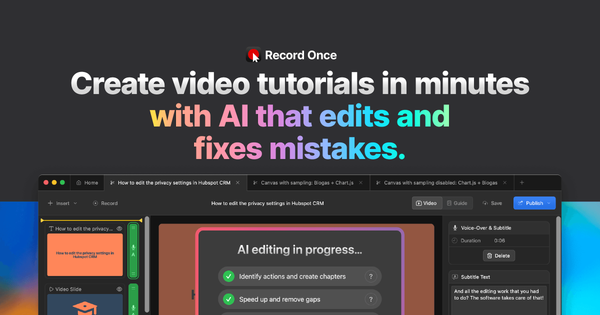
Record Once is an AI-powered screen recording and video creation tool that transforms raw demos into professional, polished video tutorials and product demonstrations in minutes. Unlike traditional pixel-based screen recorders, it uses a built-in browser to capture the underlying HTML, CSS, and user interactions of web applications, enabling structural editing, automatic enhancements, and seamless updates long after publication. Its primary use cases include creating onboarding videos, customer support documentation, marketing demos, internal training materials, and self-service product guides. It also generates companion text-based guides with screenshots and supports instant multilingual versions via AI translation.
The tool targets product teams, marketers, customer success professionals, developers, and non-technical users at startups and enterprises—anyone who needs to produce high-quality video content quickly without traditional editing skills. Customers include organizations like the State of Michigan, AppSignal, Cloudflare, and DC, where it has dramatically reduced creation time (e.g., from 20 hours to 30 minutes per video). It is cross-platform (Windows, Mac, Linux) and emphasizes team collaboration with centralized branding.
Key Features & Capabilities
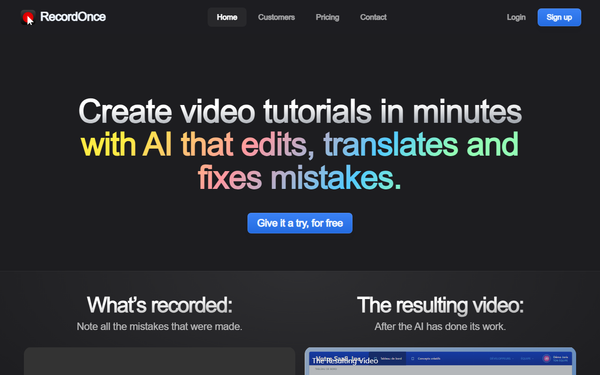
Core functionality revolves around a simple three-step workflow: record quickly (even with mistakes), let AI auto-edit, and publish instantly. Standout capabilities include automatic removal of mistakes, typos, filler words, and loading delays; AI-generated voice-overs (or your own recording) with consistent voice across languages; drag-and-drop step reordering or hiding; automatic text guides complete with screenshots; and post-publication updates via partial re-recording that sync everywhere without re-rendering. Videos output as resolution-independent animated HTML/CSS content at 4K resolution and 120+ FPS with tiny file sizes, plus built-in hosting, embeds, background music, and dark mode.
What differentiates Record Once from competitors like Loom (basic screen recording with manual edits) or Synthesia (avatar-based talking heads) is its HTML/CSS structural capture. This enables true step-level editing, perfect AI translations of both voice-over and on-screen text, and effortless long-term maintenance—features unavailable in pixel-based tools. It also auto-generates text guides and supports adding slides, other videos, or images.
Limitations include a primary focus on web/SaaS applications (not general desktop or mobile screen recording), publish quotas that restrict free and entry-level plans, watermarks on lower tiers, and no video file exports until the Professional plan. Advanced features like custom AI voices, SSO, and data masking are Business-only. No deep integrations are available except via custom enterprise requests.

User Experience
Record Once is designed to be “dummy-proof” with an extremely low learning curve—users can produce their first professional video within minutes of signing up. The interface emphasizes speed and simplicity: a built-in recording browser, one-click AI processing, intuitive drag-and-drop editing, and instant publishing. Testimonials highlight how non-native speakers and non-designers create polished results without transcripts or retakes.
Documentation is minimal; the site provides clear “how it works” visuals and use-case pages but lacks extensive written guides or video tutorials. Support is available via email or scheduled Zoom calls (mentioned on error pages). No dedicated knowledge base or community forum was found as of research. Overall interface quality feels modern and focused, prioritizing results over complex options.
Performance & Reliability
The tool delivers on its promise of speed: recordings process and publish instantly with no rendering or upload delays. Videos are buttery-smooth, small in file size, and maintain consistency even years later thanks to the structural format. Cross-platform reliability is strong, and AI editing reliably handles common issues like typos, pauses, and slow loads.
As a relatively niche tool, public independent reviews are sparse (Product Hunt rating of 3.7/5 based on limited feedback). No widespread complaints, bugs, or reliability issues surfaced in searches across Reddit, tech forums, or review sites. Site testimonials and customer stories consistently praise performance and time savings. Minor updates appear via the blog for feature polish. Overall, it feels stable and production-ready for its intended web-app use cases.
Pricing & Value
Record Once offers a generous free tier and clear paid progression (all monthly unless noted):
- Free Forever: Unlimited recordings, publish up to 3 videos.
- Startup ($49/mo): Unlimited recordings, publish up to 10 videos.
- Professional ($99/mo): Unlimited recordings, publish up to 25 videos, video file exports.
- Business (custom annual): Everything in Professional plus video translation, watermark removal, data masking, custom AI voices, centralized branding, SSO, custom analytics, SLA, and integrations.
- Add-on: $25 per additional 10 publishes (applies to Startup/Professional).
No credit card is required to start. Value is exceptional for teams creating frequent web tutorials—the time savings alone (hours to minutes) justify the cost compared to hiring editors or using manual tools like Camtasia or Loom Pro. Lower tiers suit light use, while scaling teams benefit from Business features. Compared to alternatives, it offers unique maintenance and translation capabilities at competitive pricing.
Practical Tutorial
No detailed official video tutorials were located on the site or external sources beyond high-level “how it works” pages, so here is a complete step-by-step walkthrough for a common task: creating and publishing a product demo video (e.g., onboarding users to a SaaS dashboard). This is based directly on the tool’s documented workflow and can be completed in under 10 minutes.
- Sign up and launch: Go to recordonce.com, click “Start for free” (no credit card needed), create an account, and download the desktop app (Windows/Mac/Linux).
- Record your demo: Open the app, start a new recording. It launches an embedded browser—navigate to your web app (e.g., your SaaS dashboard). Click through features quickly as if demoing live (mistakes are fine). Stop recording.
- Let AI edit: The AI instantly processes the capture: removes mistakes/typos, skips filler words and load delays, and speeds up pacing. Review the timeline—drag and drop to reorder or hide steps, or click to remove anything.
- Add polish and voice-over: Choose AI-generated voice-over (select language/dialect for automatic translation) or record your own. Optionally add background music, slides, or images. Generate the automatic text guide with screenshots in one click.
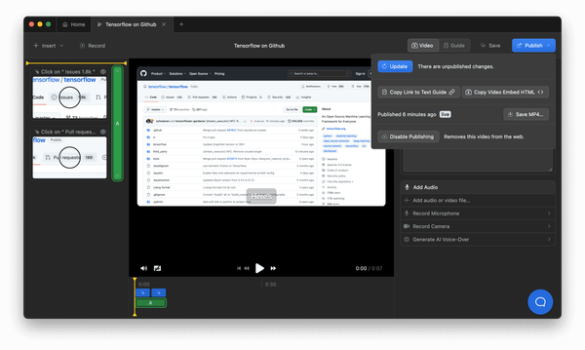
- Publish and share: Click publish—videos host instantly with a shareable link and embed code. For updates later (e.g., UI change), re-record only the affected steps and apply the update; it syncs everywhere without re-publishing.
Example outcome: A 2-minute dashboard walkthrough video with AI narration, embedded on your help center, plus a matching text guide. For advanced updates or translations, upgrade to Business. Official starting point: https://recordonce.com/.
Final Verdict
Overall rating: 4.3/5. Record Once excels for SaaS and web-app teams needing fast, maintainable video tutorials and demos—its HTML-based capture and AI automation deliver unmatched speed and longevity that traditional tools cannot match. Users who create or update documentation regularly will see massive productivity gains and should adopt it immediately. Those focused on general desktop/mobile recording, heavy creative editing control, or very limited budgets (beyond the free tier’s 3 videos) should consider alternatives like Loom or GuideJar instead. In one sentence: Record Once turns anyone into a video pro for web tutorials—start free today if your team ships product content.