RecordsKeeper AI Review: Secure AI-Powered Document Management
Overview & Purpose

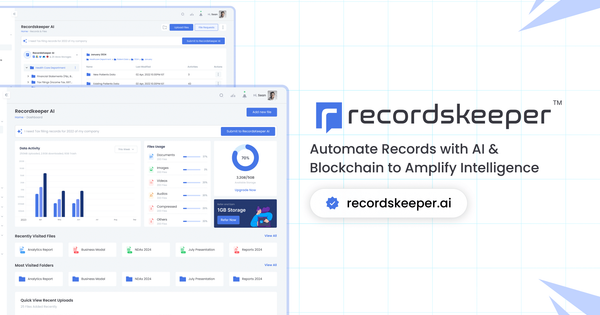
RecordsKeeper.AI is an AI-first enterprise document management platform that combines artificial intelligence and blockchain technology to transform scattered records into a unified intelligent system. It automates document collection from multiple sources, organizes files through precise AI classification and tagging, delivers instant natural language search with source citations, enforces compliance with real-time alerts, and generates business intelligence via analytics dashboards and reports. Primary use cases include centralizing chaotic document repositories, streamlining regulatory compliance processes, enabling secure collaboration through data rooms, automating workflows like digital signing, and extracting insights for faster decision-making.
The target audience encompasses small to medium businesses (SMBs), enterprises, government agencies, and professionals in regulated industries such as healthcare, finance, legal, and accounting—particularly compliance officers, records managers, and teams handling sensitive data who require automation, security, and auditability. It is not primarily aimed at developers, marketers, or designers but at organizations dealing with complex record-keeping and regulatory demands.

Key Features & Capabilities
Core functionality centers on AI-driven automation for document ingestion, categorization, metadata enrichment, and retrieval, paired with blockchain for creating immutable cryptographic audit trails on every action. Users connect storage (Google Drive, Dropbox, AWS, emails, local devices), let AI organize and tag files, query via a ChatGPT-like natural language interface, and access features such as secure data rooms with granular controls and time-limited access, multi-party digital signing, real-time compliance monitoring (GDPR, HIPAA alerts), bulk processing, and custom BI dashboards with predictive analysis.
Standout features differentiating it from competitors include the unified AI agent that turns records into a conversational knowledge base (no complex syntax or folder hunting required) and blockchain-backed tamper-proof integrity that provides verifiable audit trails beyond standard encryption—capabilities not commonly combined in traditional DMS tools like Box, SharePoint, or even AI-enhanced alternatives like M-Files.
Limitations include strict tier-based caps on storage (starting at 1GB), file processing volume, AI queries, and team members, which can constrain larger organizations quickly. Some compliance certifications (GDPR and HIPAA) remain in progress, advanced features like data rooms show occasional bugs in user tests, and integrations (particularly OneDrive) can be unreliable. The platform also lacks deeply sophisticated OCR for heavily scanned archives or fully seamless enterprise workflow orchestration compared to more mature competitors.
User Experience
Ease of use is a highlight with a low learning curve: the four-step onboarding (connect storage → AI organizes → search and collaborate → stay compliant) requires minimal technical expertise, and the conversational chat interface feels familiar to anyone using modern AI tools. Mobile apps on iOS and Android extend accessibility for on-the-go use.
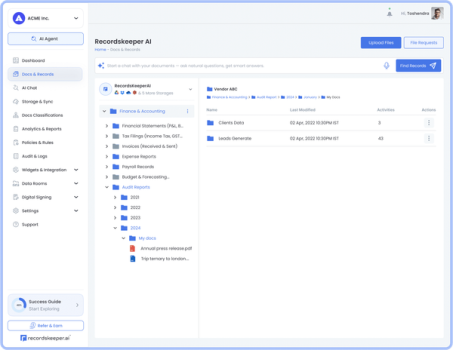
The interface quality is modern and clean, featuring intuitive dashboards, smart folder structures, activity monitoring, and a prominent AI search bar that prioritizes speed and clarity over cluttered menus. Documentation consists of a helpful help center with articles on core tasks, plus YouTube tutorials for visual guidance; support scales by plan (email/chat on lower tiers, video calls on higher). However, users have reported slower-than-expected response times from support, particularly for integration or bug-related issues. Overall, the experience prioritizes simplicity while scaling to professional needs.

Performance & Reliability
Search and retrieval perform quickly and accurately once documents are processed, with AI providing context-aware answers and citations in seconds. Automation reduces manual effort dramatically for categorization and compliance tracking, and blockchain ensures high reliability for audit trails and data integrity.
Known issues and common complaints center on AI processing speeds—bulk uploads or multi-page files can take hours rather than minutes—and integration glitches (e.g., incomplete OneDrive syncs or Google Drive view/storage limitations). Some reviewers describe certain advanced features like data rooms as “not ready for prime time” with permission or upload bugs. Reliability is solid for core AI organization and search in small-to-medium volumes, backed by SOC 2 and ISO 27001 certifications, but heavy users or those needing flawless large-scale collaboration may encounter bottlenecks. No widespread outages reported, though the platform’s relative newness means ongoing improvements are expected.

Pricing & Value
RecordsKeeper.AI uses a tiered subscription model with Silver (best for small teams), Gold (startups), Platinum (corporations), and custom Enterprise plans. Limits scale accordingly: Silver offers 1GB storage, 1,000 file processings, 500 AI searches, 2 team members, and basic support; higher tiers increase capacity and add features like data export and video support. Exact monthly prices are not publicly displayed on the site (contact required for quotes), but external reports and historical deals indicate entry-level paid plans start around $49/month, with annual billing providing two months free. A free trial and basic plan options exist, plus occasional lifetime deals via marketplaces like AppSumo.
The value proposition shines for compliance-focused organizations where time savings on search and risk reduction from automated alerts and blockchain security deliver clear ROI compared to generic cloud storage or basic DMS tools. It outperforms alternatives lacking combined AI intelligence and immutable auditing, especially for moderate-scale needs, though users may need to upgrade quickly due to storage/processing caps. The free trial lowers entry barriers for testing fit.
Practical Tutorial
Official resources include a help center and YouTube videos covering setup and reporting. Here is a step-by-step walkthrough for a common task—uploading documents for AI organization and performing natural language search—based on the platform’s documented “how it works” flow and user guides (verify current UI in-app as features evolve; links below).
-
Sign Up and Onboard: Visit https://app.recordskeeper.ai/auth/registration, create a free account with your email, and log in. Complete basic profile setup if prompted (e.g., company compliance preferences).
-
Connect Sources or Upload Files: From the dashboard, select “Connect Storage” and authorize integrations (Google Drive, Dropbox, AWS, etc.) or use bulk upload/drag-and-drop for local files. Example: Upload a folder containing invoices and contracts.
-
Let AI Process: Documents auto-categorize, get tagged (e.g., by type, date, vendor), and receive blockchain hashing for security. Monitor progress in the dashboard—processing may take minutes to hours depending on volume. Adjust rules manually if needed.
-
Search and Retrieve: Open the AI chat or smart search bar and enter a natural language query such as “Summarize all active contracts expiring in 2026 with total value over $10,000.” Receive instant results with document links, excerpts, and citations.
-
Extend with Reports or Sharing: Generate an audit-ready compliance report from the analytics section showing blockchain-verified activity logs, or create a secure data room for client sharing with time-limited access and monitoring.
For video guidance, watch “Complete Guide to Generate Document Upload & Activity Reports” on YouTube or explore help articles at https://help.recordskeeper.ai. Book a demo via the site for personalized assistance.
Final Verdict
Overall rating: 7/10. RecordsKeeper.AI delivers strong innovation through its AI automation and blockchain security but is held back by processing delays, integration quirks, and tier limitations noted in early user feedback.
It is best suited for SMBs, regulated professionals, and compliance teams seeking to eliminate manual record chaos and gain intelligent insights—especially those who can start small and scale. Organizations needing massive storage, flawless multi-cloud syncs right away, or extensive proven enterprise support from legacy vendors should avoid it or wait for further maturity.
One-sentence recommendation: RecordsKeeper.AI is a compelling AI-and-blockchain-powered records solution worth trialing today for efficiency and compliance gains if your needs fit its current tier capabilities.