Recraft Review: The Ultimate AI Tool for Professional Vector Art
Overview & Purpose

Recraft (https://www.recraft.ai/) is an AI-powered design platform that generates high-quality images, vector art, illustrations, photorealistic visuals, and 3D-style assets directly from text prompts. Unlike many general-purpose AI image generators, it emphasizes production-ready outputs with native vector (SVG) capabilities, making it suitable for scalable, editable graphics. Primary use cases include creating logos, icons, brand assets, ads, characters, mockups, stock illustrations, and consistent visual libraries for marketing or product design. It positions itself as a complete workflow tool where users can generate, edit, vectorize, and refine assets in one browser-based canvas—ideal for professional design iteration without switching between multiple apps like Adobe Illustrator or separate raster tools.
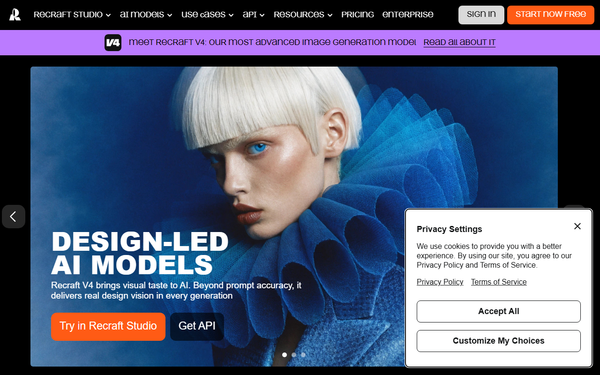
The target audience includes professional designers, creatives, marketers, e-commerce sellers (e.g., print-on-demand), and teams at innovative companies who need brand-consistent, high-quality visuals quickly. It appeals to those who value "design taste" and scalability over pure artistic experimentation. As of April 9, 2026, Recraft V4 is its flagship model, trusted for workflows requiring precise control and commercial viability.
Key Features & Capabilities
Core functionality revolves around text-to-image generation with exceptional support for vectors. Users prompt for images in various styles (vector art, illustration, photoreal, 3D), then refine them on an infinite canvas. Standout features include:
- Best-in-class AI Vectorizer and Vector Generator: Converts any raster image (JPG/PNG) to clean, editable SVG with minimal anchor points and high fidelity. Text-to-vector generation produces native SVGs directly, scalable without quality loss— a major differentiator from raster-only tools like Midjourney or DALL-E.
- Custom Styles and Brand Consistency: Upload 3-5 reference images to create reusable, editable styles instantly (no training required). Supports precise color palettes, recoloring, and style locking for brand assets.
- Advanced Editing Tools: Lasso/modify area for fixing anatomy, inpainting/outpainting, AI eraser, background remover, and magic wand. Precise palette controls and fine-tune options keep everything within the platform.
- Additional Tools: Mockup generator, image upscaler, creative upscale, photo editor, and (in Pro plans) video generation models like Kling or Sora.
- Canvas Workflow: Infinite artboard for arranging, editing, and iterating multiple generations seamlessly, with export to SVG, EPS, PDF, etc.
These features set Recraft apart for design professionals needing editable, production-ready files rather than just inspirational renders.
Limitations include occasional inconsistency in complex prompts or fine details (e.g., text rendering or intricate anatomy without edits), credit-based generation limits that can feel restrictive for heavy users, and less emphasis on ultra-photorealistic or highly artistic outputs compared to specialized competitors. It also lacks deep multi-layer support or advanced typography precision for some print workflows.
User Experience
Recraft offers a low learning curve for users familiar with design tools like Figma or Illustrator, thanks to its intuitive infinite canvas and browser-based interface. The UI is clean, professional, and responsive, with quick access to generation controls, style selectors, and editing tools. Prompt understanding is strong, and features like one-click vectorization or style creation feel seamless.
Documentation includes an official blog with practical guides, quick-start resources, and feature explanations. Support varies by plan (premium 24/7 for Teams), with community feedback noting helpful but sometimes slow responses on free tiers. Overall, it's praised for speeding up workflows—many reviewers highlight how the integrated tools eliminate app-switching. Minor complaints involve occasional lag on lower-end devices or a slight learning curve for non-designers mastering advanced editing.
Performance & Reliability
Generation speed is generally fast, with parallel processing (up to 5-10 images depending on plan) and quick vectorization. Recraft V4 delivers high-quality results with good prompt adherence, especially for vectors and styled illustrations. Reliability is solid for brand-consistent outputs, though users report occasional variability in results (e.g., "random" photoreal faces or detail inconsistencies) that may require regeneration or lasso fixes.
Common complaints from reviews (Product Hunt, Reddit, Trustpilot as of early 2026) include credit deductions on failed generations, export bugs in some updates, and server-side delays during peak times. Free-tier limits and past pricing changes have frustrated some early users. Despite this, it scores highly (4.8/5 on Product Hunt from 37+ reviews) for professional reliability in vector and design tasks.
Pricing & Value
Recraft uses a credit-based system with clear tiers (as of April 2026):
- Free: 30 credits/day (limited generations). Personal use only; images are public and owned by Recraft. Good for exploration but restricted commercial rights.
- Basic: $10/month (billed annually, $120/year) or $12/month. 1,000 credits/month. Adds commercial rights, private generations, unlimited uploads, custom styles, advanced editing.
- Pro: $16/month (billed annually, $192/year). 2,000 credits/month + video generation, priority processing, more parallel generations.
- Teams: $18/seat/month (billed annually). Shared workspaces, custom styles, SSO, premium support.
- Enterprise: Contact sales for custom needs. API access available separately.
Credits don't roll over; image generation uses 1-2 credits (vector/SVG similar), with upscale tools costing more. Value is strong for designers: native vectors and brand tools often replace multiple subscriptions (e.g., Midjourney + Illustrator). Paid plans unlock full commercial ownership and workflow efficiency, making it cost-effective versus hourly freelance design or time lost in raster post-processing. Free tier suits casual testing, but professionals quickly upgrade.
Practical Tutorial
Recraft provides official tutorials via its blog and YouTube channel. Below is a step-by-step walkthrough for a common task: Vectorizing a raster illustration and refining it into a brand-consistent vector asset (based on official guidance as of 2026).
-
Sign up and upload your image: Log into Recraft (free tier works for testing). Go to your canvas or the dedicated AI Image Vectorizer tool. Upload a clean, high-resolution PNG or JPG illustration (e.g., a simple logo or character sketch). Simpler images with clear lines vectorize best.
-
One-click vectorization: Select the uploaded image on the canvas. Click the "Vectorize" icon (or use the AI Vectorizer page). Recraft converts it to editable SVG automatically, preserving shapes with minimal points for clean lines.
-
Apply or create a custom style: For brand consistency, drop 3-5 reference images of your desired aesthetic into the style creator. Recraft generates a reusable style. Apply it to the vectorized image via the style selector to match colors, line weights, or illustration vibe.
-
Edit with precision tools: Use the lasso/modify area tool to select and fix any anatomy issues, adjust curves, or simplify paths. Fine-tune colors via the precise palette editor (no external apps needed). Add bevels, round corners, or use AI eraser for unwanted elements.
-
Refine and upscale if needed: Apply creative upscale for higher detail or test different style variations on the infinite canvas. Generate variations by tweaking the prompt while keeping the vector base.
-
Export: Download as SVG (scalable for web/print), EPS, PDF, or other formats. The file remains fully editable in vector software.
Example: Vectorizing a hand-drawn icon into a scalable logo set took under 2 minutes in tests, with clean output ready for merchandise. For full official guide, see Recraft's blog: "How to Vectorize a File" (https://www.recraft.ai/blog/how-to-vectorize-file). YouTube tutorials like "How to Vectorize Any Image in Recraft" provide video walkthroughs.
Final Verdict
Recraft earns a strong 4.7/5 rating for its specialized strengths in vector-first AI design. Designers and teams needing scalable, brand-consistent graphics (logos, icons, illustrations) should use it—its native SVG output, style consistency engine, and all-in-one editing canvas deliver unmatched workflow efficiency and professional results at a reasonable price. Avoid it if you primarily need unlimited free generations, hyper-photorealistic art without edits, or highly complex multi-layer print work, as credit limits and occasional prompt variability may frustrate casual or ultra-specialized users.
Recraft is the go-to AI tool for turning ideas into editable, production-ready vector designs faster than traditional methods.