Relay App Review: The Best AI Automation with Human Control

Overview & Purpose

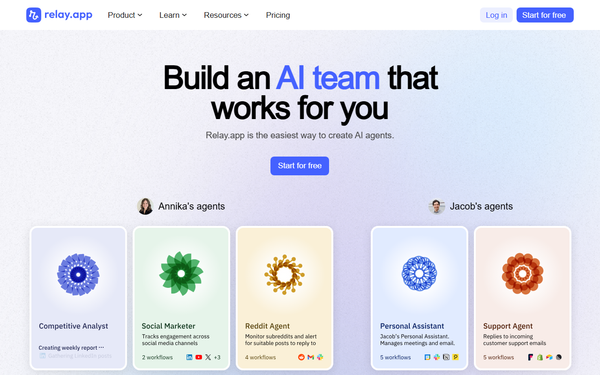
Relay.app is an AI-powered automation platform that enables users to build custom AI agents and multi-step workflows integrating with over 100 popular apps and services, such as Gmail, Notion, HubSpot, Slack, Google Drive, and Airtable. Its primary purpose is to automate repetitive business tasks while incorporating a unique Human-in-the-Loop (HITL) system that inserts checkpoints for human approvals, manual data inputs, or feedback—ensuring accuracy, context, and control in AI-driven processes. Core use cases include summarizing content, translating text, extracting data from documents or emails, classifying leads, transcribing audio, generating reports, and handling approvals for high-stakes actions like customer emails or payments. Agents act as “AI teammates” that users name, teach skills to, and refine over time through natural feedback loops.
The target audience spans non-technical professionals such as small business owners, marketers, consultants, product managers, operations teams, founders, and automation engineers at work-focused organizations. It is optimized for teams rather than purely personal or academic use, making it especially valuable for SMBs and departments seeking to enhance productivity without coding expertise or losing oversight of AI outputs.
Key Features & Capabilities
Core functionality revolves around a visual no-code editor where users create workflows starting with triggers (e.g., new email, form submission, scheduled time), followed by actions including 100+ native app integrations, flow control (conditions, loops, merging paths), utilities (web scraping, custom JavaScript, PDF conversion, data formatters), and built-in AI steps. AI capabilities allow prompting any major model (OpenAI GPT, Anthropic Claude, Google Gemini, Groq, Mistral, etc.) for summarization, classification, extraction, translation, audio transcription, text-to-speech, or image generation.
Standout features that differentiate Relay.app from competitors like Zapier or Make include native AI agent building (agents own grouped workflows and improve iteratively with feedback), seamless Human-in-the-Loop steps (approvals, manual tasks, path selection via email/Slack notifications), and an emphasis on reliability—“agents work proactively day and night” while pausing for human judgment on high-impact actions. All plans unlock every feature, including multiplayer collaboration on the Team tier and advanced utilities.
Limitations include a smaller integration library (~100+ apps) compared to platforms with thousands of connectors, potentially requiring webhooks for niche tools. Advanced conditional logic or high-volume branching can involve a modest learning curve and troubleshooting time. Approvals are limited to internal Relay users (no external client assignment), and detailed public documentation on enterprise-scale retry handling or HIPAA compliance is limited. AI outputs may still require prompt tuning to avoid occasional hallucinations, though HITL mitigates this effectively.
User Experience
Relay.app earns consistently high marks for ease of use and a remarkably low learning curve, with users calling it “by far the easiest to learn and use” among automation platforms and “the BEST UI in the market currently.” The intuitive visual builder feels approachable even for non-programmers, allowing rapid workflow creation via drag-and-drop, AI-assisted prompting, and clear variable mapping. Interface quality is clean, modern, and collaborative, supporting real-time team editing on higher plans.
Documentation is solid, with a dedicated docs site (docs.relay.app), a gallery of how-to guides, workflow templates, and an active YouTube channel featuring over 100 tutorial videos. Support is responsive via email and includes personal assistance noted in reviews. Overall, the experience prioritizes speed to value without sacrificing depth.
Performance & Reliability
Workflows execute efficiently for typical business volumes, with users reporting significant time savings—“countless hours” automated in office processes, content creation, and CRM tasks. Agents run proactively and reliably, behaving “like computers” once trained. The platform maintains high uptime, with a public system status page available.
Known issues are minor and infrequent: some users note step/credit limits on lower plans can constrain complex or high-volume runs, occasional prompt refinement is needed for optimal AI results, and complex branching may require debugging. No widespread reliability complaints appear in 2026 reviews; ratings remain excellent (4.9/5 on G2 across 77+ reviews and 5.0/5 on Product Hunt). Performance scales well for SMB use cases but may require Enterprise custom limits for extreme enterprise demands.
Pricing & Value
Relay.app uses a transparent, inclusive pricing model where every plan includes the full feature set (multi-step workflows, all AI models, HITL, 100+ integrations, agents, etc.). Plans are billed monthly or annually (50% savings on annual):
- Free: $0 – 1 user, 200 steps/month, 500 AI credits/month (connect your own keys for more).
- Professional: $19/user/month (billed annually) – 1 user, 2,000 AI credits/month.
- Team: $69/month (billed annually) – 10 users, shared workflows and connections, 2,000 AI credits/month.
- Enterprise: Custom – unlimited usage, SOC 2/GDPR, priority support, training workshops.
Extra AI credit bundles are affordable (e.g., 5,000 credits ~$11/month annually). No per-task or per-integration upcharges.
Value proposition is strong compared to alternatives: lower entry cost than Zapier’s paid tiers for similar AI depth, full features unlocked early, and HITL adds unique reliability that reduces error-related rework. Teams report excellent ROI through time savings and error reduction; it punches above its weight for SMBs and growing teams needing controlled AI automation.
Practical Tutorial
Official tutorials and a rich blog/YouTube library are available (see docs.relay.app, relay.app/blog/topic/tutorials, and their YouTube channel). Below is a real, production-used walkthrough adapted directly from Relay.app’s official blog post for a common task: automatically turning video/audio recordings into polished blog posts using AI transcription, generation, and Human-in-the-Loop review. This exact workflow powers content on the Relay.app site itself.
Step-by-step: Turn a Video into a Blog Post (two linked workflows)
Prerequisites: Relay.app account (free tier sufficient to start), Google Drive with two folders (“Audio Files” and “Transcripts”), an MP3 audio file for testing.
Workflow 1 – Audio to Transcript
- Create a new workflow and add Trigger: Google Drive → “File added to folder” (select your “Audio Files” folder).
- Add AI Step: “Transcribe Audio” (select OpenAI Whisper; point to the file from the trigger—no separate OpenAI account needed, uses Relay credits).
- Add Action: Google Docs → “Create Document” (write the transcription output into a new doc in your “Transcripts” folder).
Workflow 2 – Transcript to Blog Post (with HITL)
- Create a second workflow with Trigger: Google Drive → “File added to folder” (select your “Transcripts” folder).
- Add AI Step: Custom Prompt with Claude 3.5 Sonnet (or GPT). Use a detailed prompt specifying tone, length, structure, and formatting—include examples for best results (e.g., “Write an engaging blog post from this transcript, include headings, bullet points, and a call-to-action”).
- Add Action: Google Docs → “Create Document” (save the generated blog post).
- Add Human-in-the-Loop Task: Create a manual task or approval step (notifies you via email/Slack). Edit the Google Doc as needed, then publish to your CMS (or add further actions like WordPress post creation).
Tips: Be explicit in prompts about style and length; test and iterate (agents improve with feedback). The full workflow runs automatically when you upload audio—human review ensures quality before publishing.
Full original tutorial with screenshots and demo video: https://www.relay.app/blog/how-to-turn-a-video-into-a-blog-post-using-ai. Similar agentic examples (e.g., unique code generation in a Notion CRM) are available on the blog.
Final Verdict
Overall rating: 4.8 out of 5. Relay.app excels as an accessible, powerful platform that combines sophisticated AI automation with essential human oversight, delivering exceptional ease of use and value for most teams.
Who should use this tool: SMBs, marketing/ops/sales teams, consultants, and non-technical professionals who want to automate repetitive work (content, leads, support, data processing) while keeping humans in control for accuracy and judgment—especially those frustrated by rigid or overly technical alternatives.
Who should avoid this tool: Large enterprises requiring HIPAA compliance, thousands of niche integrations, or highly custom code-level control; or users with extremely high-volume needs who would quickly exhaust free/Professional step limits without upgrading.
One-sentence recommendation: If you’re ready to build an AI team that actually works with you—not around you—Relay.app is one of the smartest and most enjoyable automation investments available in 2026.