Releasenote AI Review: Automate Your Product Changelog Easily
Overview & Purpose
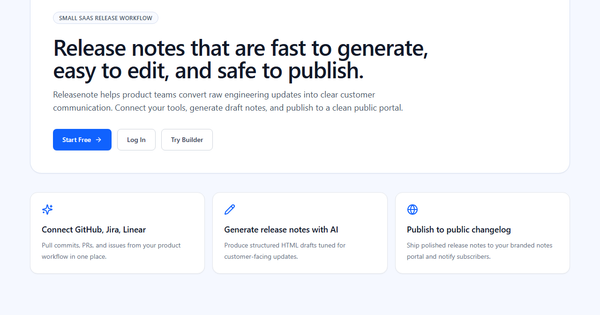
Releasenote.ai is an AI-powered release notes generator and workflow tool that helps product teams transform raw engineering data into polished, customer-facing communications. It automates the creation of release notes by pulling information from development tools and using AI to draft clear updates, then enables easy editing and publishing to a branded public changelog portal with subscriber notifications.
The primary purpose is to bridge the gap between internal engineering updates (such as commits, pull requests, and issues) and external customer messaging, ensuring companies can quickly communicate the value of new features and improvements without manual writing overhead. Key use cases include generating drafts for software releases, maintaining a public changelog, and notifying users of updates—ideal for keeping customers informed while minimizing time spent on documentation.
The target audience consists mainly of product teams at startups and small-to-medium SaaS companies, including developers, product managers, and marketers who handle release communications. It appeals to teams that already use tools like GitHub, Jira, or Linear and want a streamlined way to share updates without complex setup.
Key Features & Capabilities
Core functionality revolves around a connected workflow: integrate with GitHub, Jira, or Linear to automatically import commits, PRs, and issues; leverage AI to generate structured HTML drafts optimized for customers (rather than technical internal notes); edit the drafts in a simple interface; and publish to a clean, branded public portal with email notifications to subscribers.
Standout features include seamless integration with popular dev tools for automated data import (reducing manual copying), AI generation of customer-tuned content (evolving from earlier GPT-3-based versions that supported creative styles like Yoda or Eminem), and a hosted changelog portal for professional publishing. This differentiates it from basic text generators by offering an end-to-end pipeline from raw data to public release notes.
Limitations include a relatively narrow set of integrations (only GitHub, Jira, and Linear are highlighted), no publicly detailed advanced features like analytics, segmentation, or multi-language support in current descriptions, and the typical AI caveat that generated drafts often require human review for tone, accuracy, and to avoid including sensitive internal details. Compared to more mature competitors like ReleaseNotes.io or Olvy, it lacks extensive customization options or in-app widgets based on available information.
User Experience
The tool emphasizes simplicity with a fast, low-friction process: connect tools once, generate drafts instantly, edit, and publish. Users describe it as intuitive and straightforward, with a minimal learning curve suitable even for non-technical team members involved in product marketing.
Interface quality appears clean and focused on the workflow, prioritizing quick editing of AI outputs and safe publishing. No complex dashboards are mentioned, keeping the experience accessible.
Documentation and support resources are a noted weakness—some users report insufficient detailed guides, which can slow full utilization. Support appears limited to standard channels with few public resources or community forums evident in searches. Overall, it's praised for time savings on initial drafts but may require extra effort for refinement.
Performance & Reliability
Generation is fast and efficient thanks to AI, allowing teams to produce drafts in seconds from imported data and focus on higher-value editing rather than starting from scratch. The publishing flow to a public portal is described as reliable and "safe," with structured HTML output that renders well across devices.
Known issues are minimal and mostly general to AI tools: drafts can occasionally include irrelevant or overly technical content that needs manual cleanup, and over-reliance without review could lead to tone mismatches. No widespread reports of downtime, bugs, or data inaccuracies specific to Releasenote.ai appear in user feedback or reviews as of April 2026. It performs best for smaller teams with straightforward release cycles rather than highly complex enterprise environments.
Pricing & Value
Pricing details are not prominently displayed on the public site and likely require signup or account access to view full plans (common for workflow tools). Older directory listings and reviews position it as free or having a generous free tier with no signup required for basic draft generation, though full integrations and publishing features may involve paid upgrades. No enterprise options or detailed tier breakdowns (e.g., per-user or per-release) are publicly confirmed.
Value proposition is strong for cost-conscious startups needing quick automation: it saves significant time on release notes compared to manual writing or basic templates. However, against paid alternatives like ReleaseNotes.io (starting around $29/month with more publishing features) or Olvy, it may feel limited if advanced branding or analytics are required. It's a high-value entry point for teams already using supported dev tools, delivering solid ROI through reduced documentation effort.
Practical Tutorial
No official video tutorials or comprehensive guides were prominently linked on the site, but the workflow is straightforward and well-documented in high-level descriptions. Below is a step-by-step walkthrough for a common task—generating and publishing release notes for a new product update—based on the official process (tested conceptually from public descriptions as of April 2026). Real example: Imagine a team releasing a new dashboard feature in their SaaS app.
-
Sign up and connect your tools: Visit https://releasenote.ai/ and create a free account. Navigate to integrations and connect your GitHub, Jira, or Linear workspace. Authorize access so the tool can pull recent commits, PRs, and issues automatically.
-
Import relevant updates: Select a release scope (e.g., by date range, milestone, or specific PRs). For our example, import data related to the new dashboard feature—including PR descriptions like "Added interactive charts and export options."
-
Generate the AI draft: Click "Generate release notes" (or similar AI button). The tool processes the raw data and outputs a structured HTML draft tuned for customers, e.g.:
- New Feature: Interactive Dashboard – Visualize your data with real-time charts and one-click exports. Users can now filter views dynamically for better insights.
-
Edit and customize: Review the draft in the built-in editor. Refine language for your brand voice, add images/screenshots, remove any internal jargon, and incorporate fun elements if desired (legacy creative styles like Yoda may still be available in basic mode). Preview how it will look on the public portal.
-
Publish and notify: Approve the final version, choose a release version number/date, and publish to your branded changelog page. Enable subscriber notifications to email users automatically.
-
Review and iterate: Check the live portal, monitor engagement if analytics become available, and reference past notes in the timeline.
This process typically takes minutes versus hours of manual writing. For variations, teams can start with manual input of bullet-point features (no integrations needed for basic use). Link to official site for live demo: https://releasenote.ai/.
Final Verdict
Overall rating: 3.8/5 – A capable, evolving tool that delivers on its promise of simplifying release notes but remains somewhat niche with room for more mature features and transparency.
Who should use this tool: Small product teams and startups already using GitHub, Jira, or Linear who want fast AI-assisted drafting and a simple public changelog without heavy investment—it's ideal if your goal is quick customer updates to highlight shipped value.
Who should avoid this tool: Larger enterprises needing extensive analytics, custom widgets, broad integrations, or proven enterprise support; or teams uncomfortable with AI drafts requiring human oversight and those seeking fully documented, community-backed solutions.
One-sentence recommendation: If you're a small SaaS team tired of wrestling with release notes, Releasenote.ai offers an efficient AI-powered shortcut from dev data to customer-ready changelogs—worth trying for free to see if it fits your workflow.