Replit iOS App Review: Build and Deploy Apps on the Go
Overview & Purpose
The Replit iOS App transforms your iPhone or iPad into a full-featured coding environment, allowing users to create, edit, collaborate on, and deploy software projects directly from their mobile device. Powered by Replit's cloud-based platform, it supports building everything from simple scripts to complex web and even mobile apps using its standout Replit Agent AI. Primary use cases include rapid prototyping and MVP development, learning to code on the go, making quick edits or fixes to live projects, real-time team collaboration, and turning natural language ideas into functional applications without traditional setup.
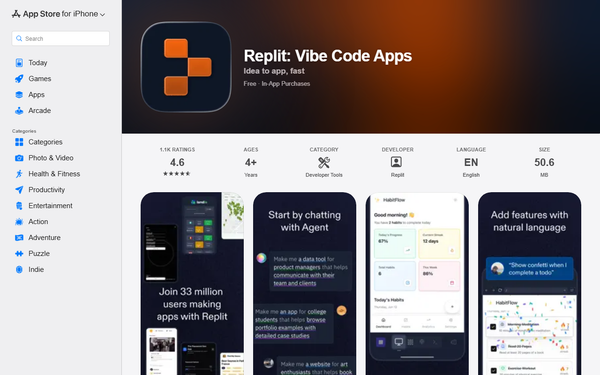
Target audience spans beginners and students learning programming, professional developers needing mobility for quick tasks or travel, entrepreneurs and product managers prototyping ideas swiftly, hobbyists building personal projects, and even non-coders leveraging AI to create apps and websites. As of March 2026, the app has received a strong 4.6/5 rating on the App Store with over 1,000 reviews, reflecting its appeal for accessible development.
Key Features & Capabilities
Core functionality revolves around a cloud IDE supporting dozens of programming languages and frameworks, real-time multiplayer collaboration where multiple users can edit code simultaneously, instant deployment with public URLs and custom domains, integrated database (ReplDB), authentication (replAuth), and project remixing from a community of over 33 million creations.
Standout features include the Replit Agent, an AI assistant that builds complete apps and websites from natural language prompts ('vibe coding'), recently expanded to support building native-feeling mobile apps with React Native and Expo for iOS/Android preview and App Store submission. Other differentiators are seamless syncing between web and mobile interfaces, zero-setup hosting, and tools for full-stack development including backend support. The iOS app provides near-parity with the desktop experience, making it one of the more capable mobile coding platforms available.
Limitations include dependence on a stable internet connection (no robust offline mode), constraints of mobile screen real estate and virtual keyboard for extensive coding sessions (best with Bluetooth keyboard or iPad), and the AI Agent's occasional need for multiple iterations on complex requirements. Free tier projects have resource and runtime limits, and advanced mobile app publishing requires an Apple Developer account. Complex, performance-intensive applications may still benefit more from desktop tools.
User Experience
The app boasts a low learning curve for its target users, particularly those using the AI Agent which abstracts much of the traditional coding complexity. New users can start building functional projects within minutes. The interface is clean, modern, and well-adapted for touch interactions with features like an on-screen editor, preview pane, and chat-based AI assistance, though productivity soars with an external keyboard on larger devices like iPads.
Documentation is excellent through the official Replit website, detailed guides, community forums, and numerous YouTube tutorials. In-app support resources and responsive developer feedback (noted positively in some App Store reviews) enhance the experience. Overall interface quality is high, earning praise for mirroring the web platform reliably.
Performance & Reliability
Performance is generally strong with fast project loading and execution thanks to cloud computing, especially on paid plans with higher resource allocation. AI Agent builds can complete prototypes in minutes to tens of minutes. Deployment is near-instantaneous for sharing.
However, common complaints from users include occasional app glitches such as timeouts or scrolling issues (though many have been addressed via updates), AI inconsistencies that lead to repeated attempts and credit consumption, and throttling during peak usage or on free tiers. Some reviews mention deployment bugs or challenges fixing AI-generated code for production readiness. Reliability has improved significantly with 2025-2026 updates, positioning the mobile app as production-ready, but it still shines brightest for prototyping and lighter development rather than mission-critical 24/7 hosting without monitoring.
Pricing & Value
Replit offers a tiered pricing structure accessible via the iOS app's in-app purchases. The Starter plan is free, suitable for exploration with limited public apps, basic compute, and trial AI usage. Replit Core (approximately $20 per month billed annually) unlocks private projects, more collaborators, higher resources (e.g., better CPUs/RAM), and monthly credits for AI and compute usage. Higher tiers like Pro ($95+ per month) cater to teams with advanced Agent modes, more credits, and priority support; Enterprise offers custom solutions.
The value proposition is compelling for rapid development and learning compared to setting up local environments or hiring developers for prototypes. It democratizes app building effectively. However, heavy reliance on the AI Agent can lead to unpredictable credit burn rates, making it less economical for very iterative or large-scale projects without careful management. Alternatives like local IDEs with AI extensions (e.g., VS Code + Copilot) may suit power users preferring no usage fees, but Replit excels in collaboration, hosting, and mobile accessibility.
Practical Tutorial
Building a Native Mobile To-Do List App with Replit Agent on iOS
This walkthrough demonstrates creating and previewing a native mobile to-do list app (using React Native and Expo) directly in the Replit iOS app—ready for testing on your device and potential App Store submission. No prior coding experience required thanks to the Agent.
-
Get Started: Open the Replit iOS app and sign in (free account works). Tap the prominent "Create" or Agent prompt area on the home screen and select a mobile/React Native template or start fresh.
-
Initiate with AI: Enter a natural language prompt such as: "Build a clean, responsive to-do list mobile app with React Native and Expo. Users should add tasks, mark them complete with checkboxes, delete items, and persist data. Include a modern UI with dark mode toggle and reminders."
-
Review and Build: The Agent outlines the plan and generates files, code, and Expo setup automatically. Monitor progress with live updates.
-
Preview and Test on Device: Once generated, tap Preview to generate a QR code. Install the free Expo Go app on your iPhone, scan the QR, and see the native app running live on your device. Test adding/completing/deleting tasks in real time.
-
Iterate if Needed: Reply in the Agent chat with refinements (e.g., "Add priority levels and sort by priority"). Changes apply instantly; use version history to revert if needed.
-
Deploy and Share: For web sharing, hit Run for an instant public URL. For native distribution, follow Expo's guided flow to build for TestFlight (requires free Apple Developer account) or submit to the App Store.
-
Enhance Further: Connect ReplDB for cloud sync or remix community projects for advanced features.
This process typically takes 5–15 minutes for a functional prototype. For full details and App Store publishing steps, see the official guide at https://docs.replit.com/tutorials/expo-on-replit.
Final Verdict
Overall rating: 4.5 out of 5 stars.
The Replit iOS app is highly recommended for beginners, mobile developers, entrepreneurs, and anyone valuing speed and AI assistance in turning ideas into reality quickly and collaboratively. It's particularly strong if you work across devices or need instant deployment. Users should avoid it if they require full offline capabilities, are building highly complex systems demanding fine-grained control and optimization, or are sensitive to potential variable costs from AI usage.
In one sentence: The Replit iOS app is an impressive mobile powerhouse that brings AI-powered app creation to your fingertips, making it one of the best tools for on-the-go innovation in 2026.