RetroTeam Review: Automate Your Agile Retrospectives with AI
Overview & Purpose

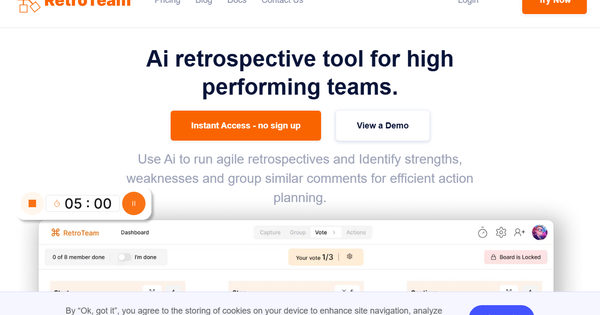
RetroTeam.ai is an AI-powered online retrospective tool built to help agile teams run more effective retrospectives by automating key parts of the process. It allows teams to capture feedback, automatically group similar comments into themes, facilitate voting, generate actionable items, perform sentiment analysis, and produce meeting summaries and insights. Primary use cases include sprint or project retrospectives, team health checks, and continuous improvement sessions—whether teams are fully remote, hybrid, or in-person. It emphasizes real-time collaboration, asynchronous contributions, and seamless integration with tools like Jira for pushing action items directly into backlogs.
The target audience is primarily software development teams, Scrum Masters, product owners, UX designers, agile coaches, and engineering leads who already follow agile or Scrum methodologies. It also appeals to product management and design teams seeking structured reflection and data-driven improvements, making it versatile for any group focused on team performance and process optimization.
Research conducted as of March 2026.
Key Features & Capabilities
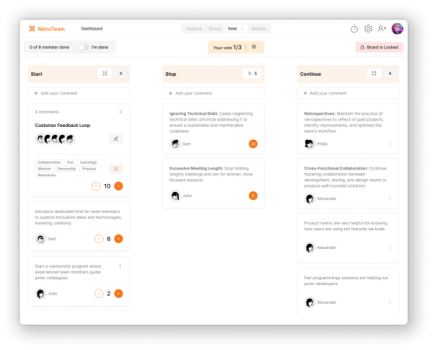
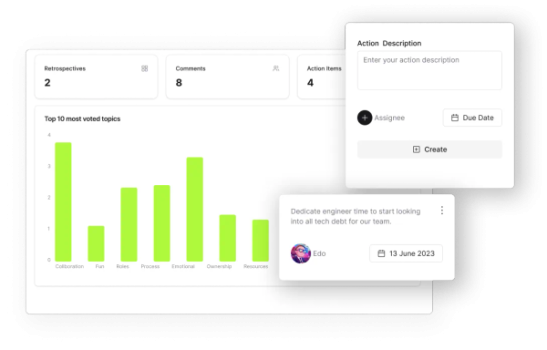
Core functionality revolves around a structured retrospective flow: Capture (team members add feedback cards anonymously or named), AI Group (automatic clustering of similar items with theme identification and sentiment analysis), Vote (configurable voting to prioritize issues), AI Actions (AI-suggested improvement items with assignment options), and AI Insights (summaries, performance suggestions, and team health reports for leads). Additional capabilities include customizable templates (e.g., 4Ls, Start/Stop/Continue, Mad/Sad/Glad), real-time collaboration, board locking, progress tracking across multiple retros, and PDF/export options.
Standout features that differentiate RetroTeam.ai include its deeply integrated generative AI for instant grouping, sentiment detection, and smart action recommendations—reducing manual facilitation time dramatically compared to traditional tools like Miro or basic boards. The ability for participants to join via shared link without an account (anonymous or named) and seamless Jira sync further set it apart, especially for remote-first or hybrid teams. It also offers icebreakers and visualizations for engagement.
Limitations include metered AI usage (limited “AI Insights, Actions, and Groupings” credits per plan, which can run out for heavy users), only one prominent integration (Jira), and relatively basic action tracking/follow-up compared to more enterprise-focused alternatives like TeamRetro or Retrium. No mobile app, advanced SSO, or extensive reporting dashboard is highlighted, and documentation remains lightweight.
User Experience
RetroTeam.ai boasts a clean, intuitive interface with a low learning curve—described as “user-centric” and “a joy to use” in testimonials and independent articles. New users can start a board quickly via social/email login or even join anonymously, and the guided phases (plus pre-made templates) make facilitation straightforward even for first-timers. Real-time updates and drag-and-drop grouping feel fast and responsive.
Interface quality is modern and focused, avoiding clutter so teams spend more time discussing than navigating. Documentation is minimal (basic page with links to YouTube product walkthroughs and blog articles), but the blog provides practical guides on formats and best practices. Support resources include in-app contact options and responsive email/help via the contact form; no dedicated knowledge base or live chat was evident. Overall, the experience prioritizes speed and simplicity for facilitators and participants alike.

Performance & Reliability
Performance is consistently praised for speed: AI grouping and insights appear near-instantly, real-time collaboration works smoothly for distributed teams, and board exports are quick. The tool handles both synchronous live sessions and asynchronous feedback collection reliably, with no major latency reported in available sources.
Known issues or common complaints are minimal—likely because the tool is still emerging (active development noted in 2025 blog updates). No widespread reliability complaints surfaced on G2, Reddit, or review aggregators; users and articles highlight consistent AI accuracy for theme detection and the stability of the real-time board. Occasional credit exhaustion for AI features in lower tiers is the main practical limitation rather than technical downtime. Security for private boards and data privacy appear standard.
Pricing & Value
Pricing is flat-rate monthly and highly accessible:
- Free: $0 (1 team, 10 users, 10 boards, 10 AI credits/month)
- Premium (recommended): $10/month (2 teams, 20 users, unlimited boards, 50 AI credits)
- Pro: $30/month (5 teams, 50 users, unlimited boards, 150 AI credits)
- Enterprise: Custom (contact sales for advanced needs)
No per-user overages or long-term contracts; AI features are included in all plans but capped by monthly credits. There is no free trial beyond the Free tier, but users can test core AI immediately.
Value proposition is strong for small-to-medium teams: significantly cheaper than many competitors while delivering powerful AI that saves hours per retrospective. Compared to alternatives like TeamRetro or Reetro, RetroTeam.ai offers better out-of-the-box AI automation at a lower entry price, though teams needing unlimited AI or broader integrations may find the credit system restrictive. The free tier alone makes it worthwhile for occasional use or startups.
Practical Tutorial
A step-by-step walkthrough for a common task—running a 4Ls retrospective (Liked, Learned, Lacked, Longed For)—is available directly from the tool’s flow and detailed in official guidance. Here is a practical example based on an actual sprint review for a 12-person development team (as of March 2026; official demo and YouTube videos provide visual walkthroughs at retroteam.ai and linked channels).
-
Create Account & Board: Go to https://www.retroteam.ai/, sign up with Google/email (or join anonymously). Click “Create a Retrospective,” select the 4Ls template, name the board (e.g., “Q1 Sprint 4Ls”), add an optional icebreaker question, set voting limit (e.g., 5 votes per person), and choose private or team visibility.
-
Invite Team: Share the link or send invites via email. Participants join instantly—no account required for guests.
-
Capture Feedback (5–10 min): Each person clicks the + button and adds sticky notes under the four columns (e.g., “Liked: fast deployments,” “Lacked: clearer requirements”). AI instantly begins suggesting groupings and sentiment tags in the background.
-
AI Group & Refine (5 min): The board auto-clusters similar cards (e.g., all “deployment” comments group together). Facilitator drags any outliers or merges groups; AI highlights dominant themes like “positive velocity” or “negative on requirements clarity.”
-
Vote (3–5 min): Team votes on grouped topics. Highest-voted items rise to the top automatically.
-
Discuss & Generate Actions (10–15 min): Open discussion on top items. Click AI Actions to generate suggestions (e.g., “Implement weekly requirements grooming session—assign to PO”). Edit, assign owners, set due dates, and sync directly to Jira backlog with one click.
-
AI Insights & Close: Review the auto-generated summary and team-health insights (sentiment trends, lead recommendations). Lock the board, export full PDF report, and share.
This entire process typically takes 30–45 minutes instead of 60+ with manual tools. For video guidance, see the official YouTube walkthroughs linked from https://www.retroteam.ai/docs or the detailed Scrum Expert tutorial.
Final Verdict
Overall rating: 4.5/5. RetroTeam.ai excels at delivering time-saving AI automation and actionable insights in an affordable, easy-to-use package that genuinely improves retrospective quality and follow-through. Agile software development teams (especially small-to-medium remote or hybrid groups) should use it to replace manual whiteboards or basic tools and gain deeper team-health visibility without extra effort. Larger enterprises or teams needing unlimited AI credits, multiple integrations, or advanced enterprise security features should avoid it until the roadmap expands (or contact for Enterprise). One-sentence recommendation: If you want smarter, faster retrospectives without breaking the bank, RetroTeam.ai is an excellent AI-first choice worth trying today.