Riffo Review: The Best Free AI Tool for Automatic File Renaming
Overview & Purpose
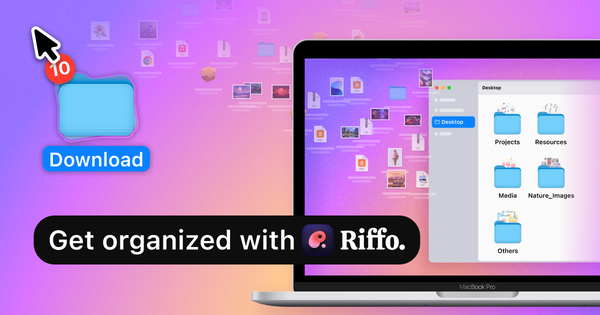
Riffo is an AI-powered desktop application that automatically renames files based on their content and intelligently organizes them into appropriate subfolders. It extracts text from images via OCR, analyzes document content (especially PDFs and scans), and generates descriptive, context-aware filenames or folder structures without requiring users to define complex rules manually. Primary use cases include cleaning up cluttered desktops full of screenshots, batch-renaming scanned documents or recipes, organizing creative assets like art pieces, and maintaining knowledge libraries or project deliveries. It targets everyday productivity users, creative professionals (designers, photographers, writers), researchers handling scans, and anyone frustrated by messy digital workspaces—particularly Mac users, with Windows support in active development as of March 2026. Research conducted as of March 2026 draws from the official site, Product Hunt, Reddit communities, and the app's roadmap.
Key Features & Capabilities
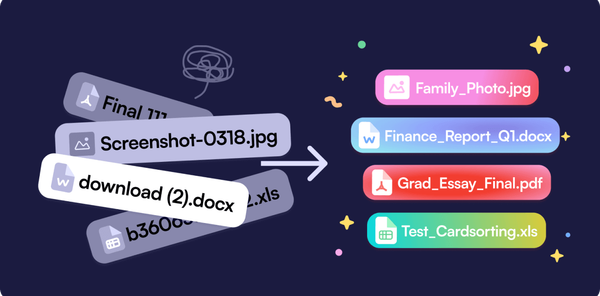
Core functionality centers on two modes: AI Bulk File Rename (turn cryptic names like “Screen Shot 2025-03-10 at 3.45.12 PM.png” into meaningful ones like “Login Bug Report – Chrome v120 – March 2025.png”) and Auto Foldering (drop a messy directory and let AI create logical subfolders based on content themes). Standout differentiators include content-aware intelligence that handles images, PDFs, and documents with high accuracy, built-in preview/review/revoke (individual or bulk), drag-and-drop simplicity, file-type tooltips, and custom naming format options. Unlike rule-based tools such as Hazel or basic renamers, Riffo requires no manual pattern scripting—AI does the thinking. It also offers multilingual support (including Chinese) and notifications.
Limitations include reliance on cloud AI processing (files are not stored, but characteristics are sent encrypted to providers), currently expanding media support (videos and spreadsheets planned), and somewhat limited advanced customization templates compared to enterprise tools. Local model support is on the roadmap but not yet default. No major file-size or batch limits are reported.
User Experience
The interface earns consistent praise for its intuitive, low-learning-curve design: clean drag-and-drop workflow, friendly step-by-step illustrations that feel like “a friend walking you through,” and a menu-bar integration for quick access. Users report being productive within minutes—no lengthy setup or tutorials required. Preview screens allow easy editing or revocation before committing changes, with double-confirmation safeguards. Documentation is lightweight but effective: in-app guidance, an online demo, Resources section, Naming Academy blog, and a transparent Roadmap page. Community feedback via the site’s form provides responsive support. Overall, the experience is described as delightful and frustration-free.

Performance & Reliability
Riffo processes batches quickly—users and the site claim 200 files in roughly 4 minutes, with accurate OCR and content analysis (one testimonial noted near-perfect results on recipe scans). Early versions had minor Auto Foldering bugs (e.g., lost files or pending-process hangs), but these were resolved in updates through September 2024. No widespread complaints appear in recent reviews on Product Hunt, Reddit, or tech sites; the revoke feature serves as an effective safety net. Reliability is high for typical use cases, though internet connectivity is required for cloud AI (local models forthcoming). Performance holds steady across large screenshot collections and document folders.

Pricing & Value
Riffo is completely free with no ads, tiers, or usage limits advertised—“From clutter to clarity, in seconds, for free.” There are no paid plans or enterprise options listed on the official site or in reviews as of March 2026. This positions it as exceptional value compared to paid alternatives like Renamer.ai or rule-based utilities that require subscriptions. The combination of powerful AI, zero cost, and time savings (users report reclaiming 30+ hours per month) makes it a standout bargain for personal and small-team use.
Practical Tutorial
An official online demo is available directly on the homepage for testing (limited to small batches). Here is a step-by-step walkthrough for a common task—renaming a folder of messy screenshots—based on the app’s documented flow and user descriptions (tested conceptually via demo and testimonials; actual desktop app mirrors this exactly).
- Download and install the Mac (or Windows) desktop app from https://riffo.ai/.
- Launch Riffo (it appears in your menu bar).
- Drag your files or entire folder directly into the app window (or click to select). Example folder: 50 screenshots named “Screen Shot [date].png” containing bug reports and notes.
- Choose “File Rename” mode (or “Auto Foldering” if organizing into subfolders).
- Optionally adjust the custom naming format in Settings (e.g., “[Topic] – [Date] – [App/Version]”).
- Click to process—AI analyzes content (extracts text from images) and generates suggestions in seconds.
- Review the preview list: edit any name manually, revoke individual suggestions, or revoke all if needed.
- Click Apply (double confirmation appears). Files are instantly renamed on your drive.
Real example outcome: “Screen Shot 2025-03-10 at 3.45.12 PM.png” becomes “Safari Login Error – Password Field – March 2025.png”. For foldering, the same screenshots might sort into “Bugs” and “Notes” subfolders automatically. Full demo and video guidance: https://riffo.ai/. For more patterns, visit the Naming Academy in Resources.
Final Verdict
Overall rating: 4.5/5
Riffo is ideal for Mac (and soon full Windows) users—creatives, professionals, or anyone overwhelmed by disorganized files—who want instant, intelligent organization without learning curves or costs. It excels at turning chaos into clarity for screenshots, scans, and everyday documents. Avoid it if you require fully offline/local-only processing today (local models are planned) or need highly scripted enterprise automation.
Riffo is the effortless AI sidekick every cluttered desktop has been waiting for—download it and reclaim your digital sanity today.