Right Click Prompt Review

Overview & Purpose
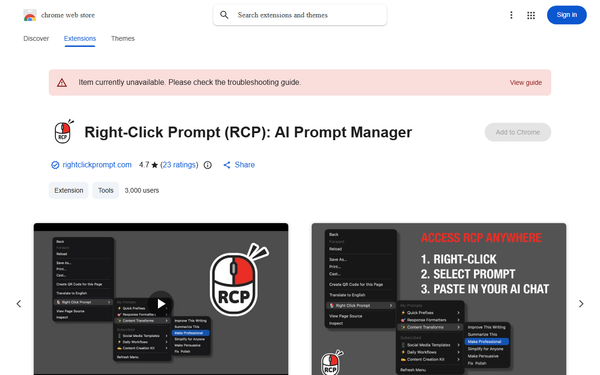
Right Click Prompt (RCP) is a Chrome extension and web-based prompt management platform that lets users save, organize, and instantly insert custom AI prompts via the browser’s right-click context menu in any text field. Instead of copying prompts from notes, tabs, or chat history, users highlight text (or start fresh), right-click, select a saved prompt, and have it auto-inserted—complete with dynamic variables like {{selection}} for highlighted content. It works seamlessly across ChatGPT, Claude, Gemini, Perplexity, Gmail, Notion, Slack, and any other web-based text input. A central web dashboard at rightclickprompt.com handles creation, editing, folder organization, and cross-device sync, while optional cloud features enable team sharing via subscription links that automatically push updates to every subscriber.
Primary use cases include eliminating repetitive prompt rewriting for content creation, code generation, email drafting, research summarization, and consistent team workflows. The target audience spans power users of AI tools—developers, marketers, writers, designers, students, consultants, and entire teams—who spend hours daily switching contexts or standardizing outputs. It appeals especially to anyone frustrated by lost “perfect prompts” or inconsistent team results.
Key Features & Capabilities
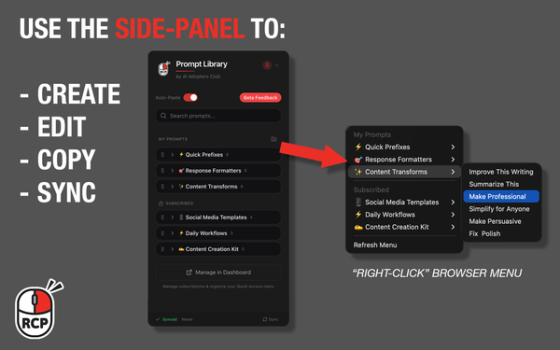
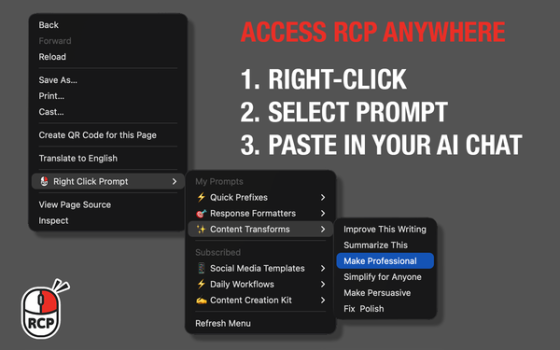
Core functionality revolves around the right-click menu: prompts appear directly under “Right Click Prompt,” with top prompts pinned for one-click access. Users create unlimited prompts (subject to plan limits), organize them into folders, add version history for rollbacks, and use full-text search. The web dashboard provides mobile-friendly management, usage analytics (prompt frequency, time saved, streaks), import/export (JSON), trash/recovery, and optional auto-paste. Cloud sync keeps everything consistent across devices and browsers.
Standout differentiators versus competitors like AIPRM (primarily ChatGPT-focused marketplace) or manual note-taking include:
- Universal access in any text field on the web, not just inside one AI platform.
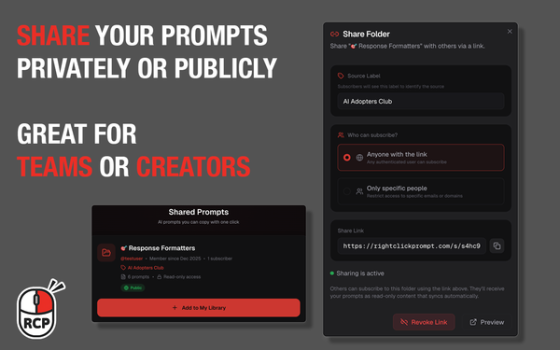
- Team distribution: publish a folder with a share code; teammates subscribe and receive automatic updates—no manual copying or outdated versions.
- Privacy-first design with optional secure cloud sync (prompts can stay fully local).
- Dynamic variables and clean insertion that preserve workflow state.
Limitations include Chromium-only support (Chrome, Edge, Brave, etc.—no Firefox or Safari), potential context-menu conflicts on heavily customized sites (e.g., some Google Workspace pages), and the absence of a built-in community prompt library (users must create or import their own). Free-tier restrictions on folders and prompts per folder also exist. No native desktop or mobile apps beyond the web dashboard.
User Experience
Setup takes under two minutes: install from the Chrome Web Store, optionally sign up for cloud sync, and you’re ready. The learning curve is minimal—most users are productive within the first prompt creation. The interface is deliberately simple and bloat-free: clean dashboard, intuitive drag-and-drop for Quick Access, and a polished right-click menu that feels native. Testimonials repeatedly praise its “elegant,” “no-nonsense” design.
Documentation lives on rightclickprompt.com (how-to guides, migration instructions, changelog) with helpful onboarding videos and a live demo where users can test right-click insertion directly on the site. Support is responsive via the site’s contact form; no dedicated helpdesk or extensive knowledge base yet, but the small, active community and indie developer (Kamil Banc) respond quickly to feedback.
Performance & Reliability
Insertion is near-instantaneous, with minimal overhead even on complex pages. Cloud sync is reliable and automatic; local-first storage ensures offline functionality. As of the January 31, 2026 update, performance improvements and SSL fixes have resolved earlier connectivity hiccups for some users. No widespread bugs, crashes, or data-loss reports appear in reviews or forums. The only occasional complaints involve rare context-menu overlaps on specific sites and the need to re-pin prompts after major updates—minor issues easily worked around. With just 23 ratings but consistently 4.7/5 praise for speed and stability, the tool feels mature despite its relatively new status.
Pricing & Value
As of March 2026 research, RCP operates on a freemium model. The free tier provides basic functionality (limited folders and prompts per folder) with full right-click access and local storage. The Pro plan unlocks 100 folders, 30 prompts per folder, team sharing, full analytics, unlimited sync, and priority features for approximately $6/month or $4.83/month billed annually. A 7-day free trial of Pro is available with no credit card required. The Chrome extension itself remains free to install.
Value is excellent for anyone using AI more than a few times daily: the time saved quickly outweighs the modest subscription. Compared with AIPRM’s higher-tier plans or Notion-based workarounds, RCP delivers superior workflow integration and team consistency at a lower ongoing cost. Privacy-conscious users appreciate the local-first option that many competitors lack.
Practical Tutorial
A common task—creating a reusable “professional summarizer” prompt and using it instantly in ChatGPT or Gmail—takes about 90 seconds end-to-end. Here’s a step-by-step walkthrough (tested on current version as of March 2026):
- Install the extension from the Chrome Web Store. Pin the RCP icon for quick access.
- Click the RCP toolbar icon (or visit rightclickprompt.com and sign up/log in for cloud sync).
- In the dashboard or extension panel, click “+ Add New Prompt.”
- Name: “Professional Summarizer”
- Prompt text:
Summarize the following text into 3-5 concise bullet points. Use professional yet engaging language, highlight key takeaways, and end with one actionable recommendation. Text: {{selection}} - (The
{{selection}}variable automatically inserts any highlighted text.)
- Save, then drag the new prompt into your Quick Access section so it appears at the top of the right-click menu.
- Test it: Open ChatGPT, Claude, or Gmail. Highlight any paragraph or email draft. Right-click → hover “Right Click Prompt” → click “Professional Summarizer.” The full prompt + selected text appears instantly in the input field.
- For teams: In the dashboard, create a shared folder, click “Publish,” generate a share code, and send it to colleagues. They subscribe once; any future edits you make propagate automatically.
For visual walkthroughs, the official site offers a live demo, and the developer’s YouTube video provides an 8-minute guided tour.
Final Verdict
4.6/5 — A polished, genuinely useful tool that solves a daily friction point most AI users didn’t realize was costing them hours per week.
Use this tool if you rely on AI across multiple platforms and want instant, consistent prompts without breaking flow—especially valuable for individuals and teams who value speed, standardization, and privacy.
Avoid it if you only use one AI tool occasionally, prefer community-curated prompt marketplaces, or need native support outside Chromium browsers.
One-sentence recommendation: Right Click Prompt turns your best AI instructions into a two-click superpower available everywhere you type—install it today and never retype a perfect prompt again.