Rootly Review: Automate Incident Management with AI in Slack
Overview & Purpose
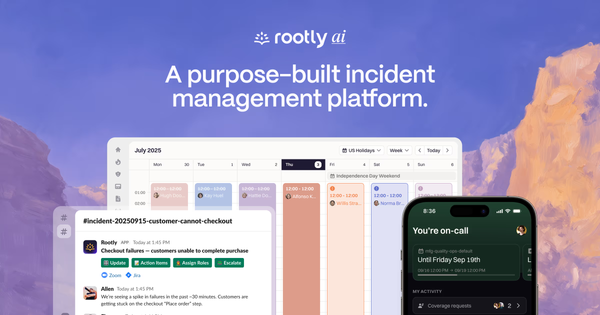
Rootly is an AI-native incident management platform that automates the full incident response lifecycle, embedding directly into Slack (and Microsoft Teams) to eliminate context-switching and manual toil. It handles automated incident declaration and channels, real-time team coordination, stakeholder communications, AI-powered root cause analysis, on-call scheduling and paging, collaborative retrospectives (postmortems), and automated status pages. Primary use cases include responding to production outages, reducing mean time to resolution (MTTR), preventing engineer burnout through smarter on-call practices, standardizing processes across growing teams, and learning from incidents to avoid repeats. It targets SRE, DevOps, and engineering teams at fast-growing startups through Fortune 500 companies—particularly those already living in Slack or Teams—who cannot afford downtime. Organizations like Upstart, Motive, Achievers, ROLLER, and Clay use it to maintain high availability and shift culture toward prevention. Research conducted as of March 2026.
Key Features & Capabilities
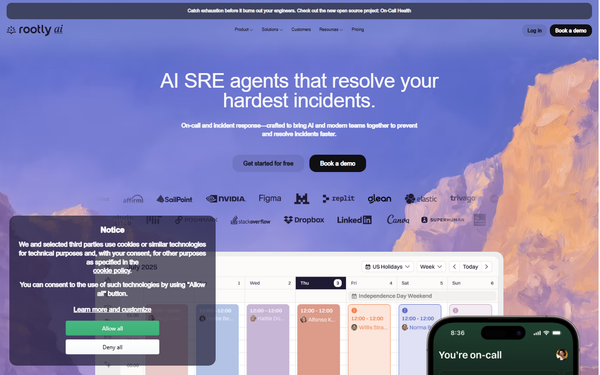
Core functionality revolves around Slack-native workflows: declare incidents with a slash command, auto-create dedicated channels with timelines, integrate alerts from tools like Datadog or PagerDuty, and trigger no-code automations for notifications, runbooks, and data collection. Standout features include AI SRE for automated root cause analysis with evidence and remediation suggestions (including draft PRs), AI Scribe meeting bot for real-time note-taking and summarization, intelligent on-call scheduling with noise reduction, shadow rotations, and coverage requests, plus AI-assisted retrospectives that generate drafts and action items synced to Jira. Additional capabilities cover customizable status pages, advanced metrics/insights, and extensibility via API, Terraform provider, and 50+ integrations (Jira, Zoom, GitHub, etc.).
These differentiate Rootly from competitors like PagerDuty (primarily alerting-focused) or incident.io (simpler but less AI/on-call depth) by offering an opinionated, full-lifecycle platform codified from millions of real incidents, with AI preventing exhaustion via open-source On-Call Health tools. Limitations include heavy reliance on Slack/Teams (less ideal outside those ecosystems), AI SRE and advanced features (SSO, custom forms, audit logs, unlimited policies) available only in higher tiers or as add-ons, and no comprehensive standalone monitoring or full ITSM capabilities. Some users note initial flexibility can feel overwhelming without guided setup. Mobile app support exists but receives mixed feedback for notifications and reliability.

User Experience
Rootly earns high marks for ease of use, with a low learning curve for teams familiar with Slack—most users are productive within hours thanks to intuitive slash commands, forms, and AI chat assistance (@Rootly AI). The interface blends seamlessly into chat for daily operations while offering a clean web dashboard for oversight, analytics, and configuration. Documentation at docs.rootly.com is comprehensive, featuring a searchable structure, quick-start guides, API references, and sections on everything from incident lifecycles to workflow automation. Support resources include responsive email/chat ([email protected] or /rootly support in Slack), a blog, events, and high customer satisfaction scores for dedicated channels and training in paid plans. G2 users consistently praise the modern, reliable experience and excellent support, though advanced custom workflows may require a short ramp-up.

Performance & Reliability
Users report significant efficiency gains, with resolution times often cut in half, reduced repeat incidents, and maintained 99.99% availability through automated data collection and AI insights. Automations run reliably, timelines populate accurately from integrations, and on-call routing minimizes noise. Known issues are minor and infrequent: occasional notification overload in large teams, integration hiccups during initial setup (e.g., Terraform provider edges), and mobile app complaints around crashes or delayed alerts (lower ratings on app stores). No widespread outages or major reliability complaints appear in reviews; instead, feedback highlights fast performance and strong ROI from time saved on manual tasks. Overall, the platform scales well from startups to enterprises without performance degradation.
Pricing & Value
Rootly offers a transparent per-user model with no free tier beyond a 2-week trial (extendable). The Essentials plan starts at $20 per user per month (billed monthly or annually) and includes core incident response in Slack, AI chat/similar incidents, retrospectives, status pages, on-call scheduling/escalation, and mobile app. On-call and incident management can be purchased separately or bundled; AI SRE is a standalone or add-on product (contact for pricing). Enterprise adds custom forms, private incidents, SSO/SAML/SCIM, advanced security, and unlimited policies at custom rates. Startup discounts reach 50% off (or "pay what you can" for teams under 25 employees), with bundling savings and AWS Marketplace availability. Compared to PagerDuty or Opsgenie, Rootly delivers better value for many teams through included automation and AI (often at lower effective cost without add-on surprises), especially when factoring in MTTR reductions and prevented downtime. Migration support from competitors adds further appeal.
Practical Tutorial
A common task is declaring and managing an incident directly in Slack—the quickest way to experience Rootly's automation. This walkthrough is based on the official 15-minute quick-start guide and incident management documentation (full details at https://docs.rootly.com/quick-start-guide and https://docs.rootly.com/incidents/incidents).
-
Sign up and connect Slack: Go to rootly.com, create an account (free trial), and install/authorize the Rootly Slack app in your workspace via OAuth. This takes under 5 minutes and enables all chat features.
-
Declare the incident: In any Slack channel, type
/rootly new(or/incident) and press Enter. A modal form appears—enter a clear title (e.g., "API latency spike affecting checkout"), select severity (SEV-1 to SEV-4), impacted services/components from your catalog, add a description, and fill any custom fields. -
Auto-setup completes: Submit the form. Rootly instantly creates a dedicated channel (e.g., #inc-123-api-latency), invites on-call responders and stakeholders, starts a live timeline, pulls relevant metrics/alerts from integrations (Datadog, Jira, etc.), and enables @Rootly AI chat for suggestions or similar past incidents.
-
Collaborate and respond: Inside the channel, use slash commands (/rootly update status, /rootly assign) or AI queries to log actions, run playbooks, attach evidence, or start a Zoom call. The timeline auto-populates; update the public status page with one click. For a real example, during a hypothetical database outage, the AI might suggest checks based on correlated deploys.
-
Resolve and retrospect: Mark the incident resolved via command or button. Trigger a retrospective—AI Scribe summarizes notes or a linked Zoom recording, generates a draft postmortem with action items (syncable to Jira), and schedules the collaborative review session.
This process standardizes response while saving hours on setup. Explore further with official playbooks or the web UI for workflows.
Final Verdict
Rootly earns a strong 4.8 out of 5 rating, reflecting excellent G2 scores (4.8/5 from 65+ reviews), high customer testimonials on time savings and ease, and balanced feedback on its AI depth despite minor mobile and scaling notes. Engineering and SRE teams using Slack or Teams who want to slash MTTR, automate toil, and build a prevention-focused culture should adopt it—especially growing startups or enterprises tired of fragmented tools. Avoid it if your organization avoids Slack entirely, needs pure standalone alerting without chat integration, or prefers ultra-simple setups without AI customization. Rootly is the modern, AI-powered choice that turns incident chaos into reliable, repeatable processes worth every dollar for Slack-centric reliability teams.