Runway Review: The Ultimate AI Video Creation & Editing Suite
Overview & Purpose

Runway (runwayml.com) is a comprehensive AI-powered content creation platform that combines generative models with professional video and image editing tools to enable faster, more creative production workflows. It allows users to generate high-fidelity videos and images from text or reference images, apply advanced AI effects, and collaborate in real time—all within a browser-based suite. Primary use cases include pre-visualization for film and advertising, social media and marketing video creation, concept art development, storyboarding, and even emerging applications in world simulation or robotics via its General World Models. As of March 2026 research, Runway has evolved from early machine-learning editing tools into a full generative ecosystem led by its Gen-4.5 video model, while retaining practical post-production capabilities.
The target audience spans filmmakers, video editors, marketers, graphic designers, and creative agencies who need to accelerate content pipelines. It also appeals to larger studios (e.g., partnerships with Lionsgate), educators, and developers via API access, as well as forward-thinking teams in architecture or robotics seeking simulation tools.
Key Features & Capabilities
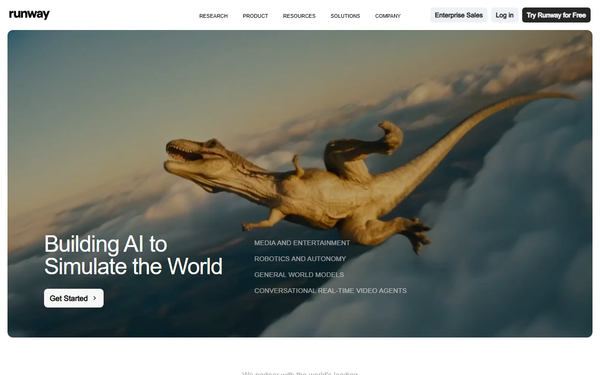
Core functionality centers on generative AI and intelligent editing. Users can create videos with Gen-4.5 (text-to-video or image-to-video) for cinematic motion, photorealistic results, and precise prompt adherence. Complementary tools include Gen-4 for text-to-image generation, generative audio (text-to-speech and apps), and a full video editor supporting projects with asset management.
Standout features that differentiate Runway include its “Magic Tools” suite—automated background removal, erase-and-replace (inpainting), motion tracking, green screen masking, and noise removal—integrated seamlessly with generative outputs. Additional differentiators are real-time collaboration via shared workspaces, an asset hub for organization and sharing, motion brush for directional control, super slow-motion effects, and cutting-edge additions like Runway Characters (real-time video agents) and GWM-1 General World Models for interactive simulations. These create an end-to-end pipeline unmatched by pure generation tools.
Limitations include maximum clip durations typically capped at 5–16 seconds (requiring stitching for longer content), no fully native synchronized audio generation in video outputs (users must layer separately), and heavy reliance on prompt engineering for consistent results. Complex scenes can still produce artifacts in fast motion or detailed text, and the platform lacks some specialized 3D modeling beyond texture generation.
User Experience
Runway offers a clean, modern web-based interface that feels professional and accessible. Drag-and-drop uploads, intuitive timelines, and contextual toolbars make core tasks straightforward, with a moderate learning curve primarily around effective prompting and advanced controls like motion brush or keyframes. Beginners can start generating quickly, while pros appreciate the depth without leaving the browser.
Documentation and support resources are strong: the official Runway Academy provides structured modules on prompting, camera techniques, and workflows; the help center includes detailed guides; and community forums plus priority support (for higher plans) round out assistance. Overall, the experience balances simplicity for rapid ideation with professional-grade precision.
Performance & Reliability
Generation speeds are impressive, especially in Turbo modes (often 30–90 seconds per clip), with Gen-4.5 delivering state-of-the-art motion quality, physics simulation, and visual fidelity that rivals or exceeds competitors. Real-time collaboration works smoothly for teams, and asset handling remains reliable up to storage limits.
Common user complaints include rapid credit consumption during iteration, occasional generation queues during peak times, and variability in output consistency—particularly with character consistency or complex actions across scenes. Some report platform instability or render failures, and support response times can be slow on lower tiers. Training-data controversies (scraped YouTube content) have also surfaced in discussions, though they do not directly impact day-to-day reliability.
Pricing & Value
Runway uses a credit-based system with the following structure (as of March 2026):
- Free: $0 forever, 125 one-time credits, basic Gen-4 Turbo access, limited projects and 5 GB storage.
- Standard: $12 per user per month (billed annually), 625 monthly credits (equivalent to roughly 25 seconds of Gen-4.5 video), expanded tools and exports (up to 5 users per workspace).
- Higher tiers include Pro plans (approximately $28–35/month with more credits and features) and Unlimited options (around $76–95/month), plus custom Enterprise plans with SSO, advanced security, analytics, and priority support.
Value is excellent for professionals: the integrated suite and superior cinematic quality can replace hours of traditional editing or stock footage costs, offering strong ROI for commercial work. Compared with alternatives like Kling AI or Pika Labs, Runway’s editing tools and collaboration provide a more complete workflow. However, heavy experimentation burns credits quickly, making it less economical for casual or high-volume hobbyist use.
Practical Tutorial
Runway provides official learning resources, including the Runway Academy (academy.runwayml.com) and a comprehensive Prompting Guide. Below is a step-by-step walkthrough for a common task—generating and editing an image-to-video product animation clip (realistic example based on current platform behavior as of March 2026).
- Log in or sign up at runwayml.com and navigate to the dashboard.
- Click “Create” or “New Video” to start a project (free users are limited to 3 projects).
- Upload a reference image (e.g., a product photo) or generate one first via Gen-4 text-to-image.
- Select the Gen-4.5 model and choose “Image to Video.”
- Craft a detailed prompt: “The wireless earbuds rotate smoothly on a sleek black table in a modern minimalist studio, soft cinematic lighting with subtle reflections, camera slowly orbits 360 degrees revealing every angle, high detail, 4K.”
- Adjust settings: set duration to 8–10 seconds, aspect ratio 16:9, and use the motion brush tool to paint directional arrows on the earbuds for controlled rotation.
- Click “Generate” (this consumes credits—monitor usage in the sidebar).
- Once complete, open the clip in the Video Editor timeline.
- Use Magic Tools: apply “Erase and Replace” to tweak any artifacts (e.g., inpaint a cleaner background), or add green-screen masking if layering elements.
- Enhance with generative audio (Text to Speech for voiceover) or motion tracking for attached graphics, then export in high resolution.
For best results, reference the official Prompt Guide at help.runwayml.com or Academy tutorials on camera movements and workflows. Experiment with variations—most users iterate 3–5 times for polished output.
Final Verdict
Runway earns a solid 4.5 out of 5 rating for its groundbreaking generative quality, integrated editing suite, and forward-looking innovations, balanced against credit economics and occasional inconsistencies.
Professional video creators, filmmakers, marketers, and design teams should use this tool because it dramatically accelerates high-quality cinematic content production while offering real-time collaboration and a complete creative pipeline unavailable in most competitors.
Budget-conscious hobbyists or users needing long-form videos with seamless native audio should avoid it, as the credit system and short-clip focus can become frustrating and expensive without careful planning.
Runway stands out as the leading all-in-one AI creative suite for professionals ready to push the boundaries of video production in 2026.