SaveDay Review: Transform Your Bookmarks Into an AI Second Brain
Overview & Purpose

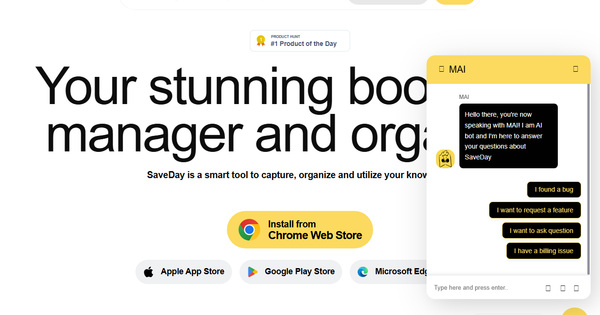
SaveDay is an AI-powered bookmark manager and personal knowledge repository that enables users to effortlessly capture, organize, and retrieve online content such as articles, videos (including YouTube with timestamp support), images, links, PDFs, and more. Serving as a "second brain," it goes beyond traditional bookmarking by automatically organizing saved items, providing smart search capabilities, and allowing users to interact with their knowledge base through AI-driven summarization and Q&A. Primary use cases include building a centralized hub for research notes, content curation, learning materials, marketing inspiration, design references, or business intelligence—replacing scattered browser bookmarks, chat app saves, or note-taking apps with a unified, searchable system.
The tool targets a broad audience of knowledge workers, including students, researchers, content creators, marketers, designers, business owners, and anyone who consumes high volumes of web content and needs quick retrieval and utilization. It appeals particularly to productivity enthusiasts and personal knowledge management (PKM) practitioners seeking an intuitive alternative to tools like Pocket, Raindrop.io, or Notion web clippers.
Key Features & Capabilities
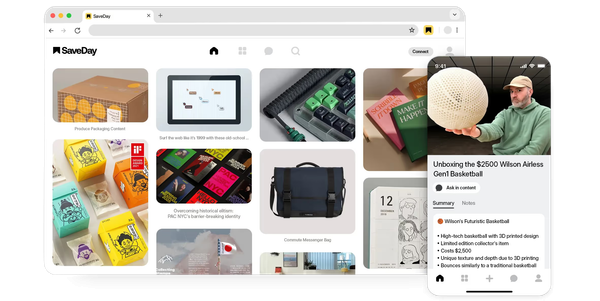
Core functionality revolves around one-click capture via Chrome/Edge extensions, Telegram bot, or web/mobile apps, followed by automatic tagging, collection organization (private and public), and unlimited highlights/notes (sticky, highlight, and timestamp notes for videos/articles). Standout AI features include meaning-based semantic search (supporting keywords, color, brand, date, or any words in any language), Canvas Q&A for chatting with your saved content (with citations), and "key points" generation for text or video summarization—complete with shareable image templates. Additional capabilities cover reminders, web annotations/highlighters, import from existing bookmark systems, and integrations for seamless multi-device access.
What differentiates SaveDay from competitors is its focus on utilizing saved knowledge rather than just storing it: AI turns passive bookmarks into an interactive database where you can ask natural-language questions and receive tailored answers drawn exclusively from your library, reducing hallucinations common in general AI tools. Video-specific tools (timestamp notes and summaries) and visual search elements further set it apart.
Limitations include credit-based restrictions on AI features (key points and Q&A) even in paid plans for lower tiers, occasional inaccuracies in AI responses, and a lack of full desktop app or native support for all browsers (primarily Chromium-based, though Edge and Telegram fill gaps). Some advanced integrations remain in request status rather than fully live.
User Experience
SaveDay offers a low learning curve thanks to its clean, intuitive interface and one-click saving workflows. The Chrome extension and Telegram bot make capture nearly effortless, while the web app provides a dashboard for management with natural navigation once familiar. Users praise the visual appeal and speed of saving/organizing, though the initial dashboard can feel overwhelming without using collections.
Interface quality is modern and responsive across devices (iOS/Android apps available), with strong mobile support. Documentation is solid via an official Help Center covering getting started, web app features, and specific tasks like notes or Canvas Q&A. Support includes priority options on paid plans, email, and community feedback channels; historical AppSumo users note responsive developer engagement. Minor UX friction exists, such as occasional popup timeouts or non-functional note indicators in some views.
Performance & Reliability
Capture and search are generally fast and efficient, with auto-tagging and semantic retrieval delivering relevant results quickly. AI features like key points generation and Q&A work in the background and provide citations for transparency. Sync across extensions, bot, web, and mobile is reliable for most users.
Known issues include occasional broken functionality around inline note viewing (e.g., clicking indicators may not display highlights properly on articles or YouTube pages) and limited visual feedback during AI processing. Some users report image handling gaps (no automatic Open Graph pulls) and the need for Chromium browsers. Overall complaints are minor and tied to the tool's evolving nature since its 2023 launch; no widespread outages noted in reviews as of April 2026. High ratings (4.9/5 on Product Hunt, 4.7+ on Chrome Store) reflect strong reliability for daily use.
Pricing & Value
SaveDay offers a generous free Basic plan (100 saved items per month, fewer than 5 key point credits, fewer than 5 Q&A credits, 1 integration, but unlimited search, highlights, notes, tags, and collections). Paid tiers—Standard (1,000 saves/month), Essential (10,000 saves, unlimited key points, more templates), and Elite (unlimited everything, no-questions-asked refund, early access)—unlock higher limits, unlimited integrations, priority support, and advanced AI/video features. Student discounts (50% off higher plans) and historical AppSumo lifetime deals enhance accessibility. Refunds are available for unused portions within 14 days.
Value is strong for users needing AI-powered retrieval; the free tier suffices for light use, while paid plans deliver excellent ROI compared to alternatives by turning storage into actionable intelligence. Heavy users may find lower-tier credits restrictive, but Elite provides unlimited flexibility at competitive SaaS pricing.
Practical Tutorial
Official tutorials and guides are available in the SaveDay Help Center (https://savedayhelpcenter.tawk.help/). Below is a step-by-step walkthrough for a common task—saving a YouTube video, adding notes, generating key points, and querying it via AI—based on real platform behavior as of April 2026.
-
Install and Set Up: Install the Chrome/Edge extension from the web store or connect the Telegram bot. Sign up/log in via Google or Apple on the web app (app.save.day) or mobile apps.
-
Save Content: Open a YouTube video (e.g., a 30-minute productivity podcast). Click the SaveDay extension icon (or send the link to the Telegram bot with /save). The item saves instantly with auto-tags.
-
Organize and Annotate: In the web app or Telegram (/library), locate the saved video. Open details, add custom tags (e.g., "productivity"), move to a collection (e.g., "Learning Resources"), and add timestamp notes (e.g., at 12:45: "Key framework explained here").
-
Generate Key Points: On the content details page, click "Get key points" under Notes. Wait briefly for AI summarization (available on higher plans for videos >1 hour). Customize and export as a shareable image template (branding removable on Essential+).
-
Query with AI (Canvas): Click the Canvas icon (whole library or specific collection). Ask a natural question like "What are the main takeaways on time management from this video?" or "Compare the framework to my saved article on habits." Receive cited answers drawn only from your saved items.
-
Share or Set Reminder: Export the key points image, share via social templates, or add a reminder to revisit. Search later using keywords, date, or even visual descriptors.
This process typically takes under a minute for capture and turns passive viewing into reusable knowledge.
Final Verdict
Overall rating: 8.2/10. SaveDay excels as an evolving AI bookmark manager that genuinely enhances knowledge retention and retrieval for active web users.
Who should use this tool: Students, researchers, marketers, designers, content creators, and business professionals who save large amounts of online material and want an interactive second brain—especially those frustrated with static bookmarks or basic note apps.
Who should avoid this tool: Casual bookmarkers needing only simple organization (try Raindrop.io or browser defaults), users on very tight budgets who exceed free-tier limits quickly, or those requiring flawless cross-browser support and zero tolerance for minor UX polish issues.
One-sentence recommendation: If you're ready to transform scattered web saves into a queryable, AI-powered knowledge base that grows with you, SaveDay is a standout choice worth trying for free today.