Scade Pro Review: Build Powerful AI Apps Without Any Coding

Overview & Purpose
Scade.pro is a no-code platform designed to let users integrate over 1,500 AI models for audio, image, text, and video processing into apps, workflows, and agents without writing code or managing infrastructure. It turns complex AI tasks into visual drag-and-drop flows, templates, and faceless agents that automate content creation, prototyping, marketing, and more—claiming up to 90% faster project timelines and cost savings by handling servers, APIs, GPUs, and multiple subscriptions in one place.
Primary use cases include generating images from sketches, creating virtual fitting rooms for e-commerce, summarizing YouTube videos or documents, building competitor analysis tools, producing short-form social content, and comparing AI models for optimal results. It also supports publishing AI apps or connecting outputs directly to messengers, websites, or products.
The target audience spans no-coders, startup founders, marketers, designers, small teams, and AI enthusiasts who want to prototype or launch AI features quickly. It’s especially useful for businesses seeking revenue from AI-powered tools without dedicated developers or IT resources, with over 20,000 users and companies already building 80% of their AI functionality on the platform.

Key Features & Capabilities
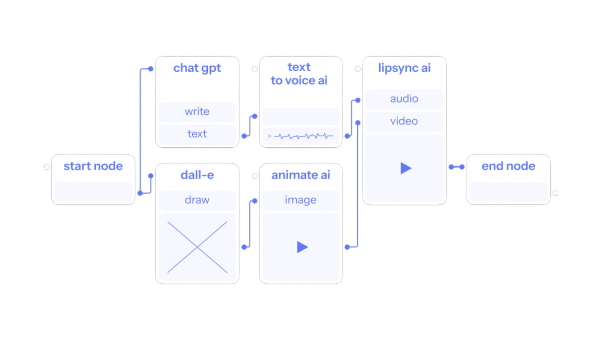
Core functionality revolves around a visual Workflow Builder where users drag-and-drop “nodes” (AI models, logic blocks, or connectors) to create flows. You get instant access to 1,500+ polished models—including ChatGPT, Claude, Stable Diffusion, Flux Pro, ElevenLabs, Whisper, Perplexity, and proprietary ones like PDF-to-text—plus private knowledge bases, LoRA fine-tuning, and Python customization for advanced users. One unified API handles everything, and you can publish web apps or trigger agents automatically.
Standout features include prebuilt templates (e.g., Sketch-to-Image, Video URL Summarization, Competitor Analysis) for instant launches, faceless AI agents that auto-generate viral shorts for TikTok/Instagram/YouTube, and a “Compare Top LLMs” template (and similar router-style tools) that lets you test multiple language models side-by-side on the same prompt to pick the best performer by speed, cost, and quality. All-in-one subscription covers top tools plus GPU/cloud resources, eliminating separate API keys and billing.
Limitations include credit-based consumption that can add up for heavy image/video use, no public enterprise SLAs or dedicated support tiers listed, and basic model filtering/categorization in the catalog (a common user suggestion). Complex custom logic still benefits from some trial-and-error, and there’s no built-in version control or team collaboration features beyond basic sharing.
User Experience
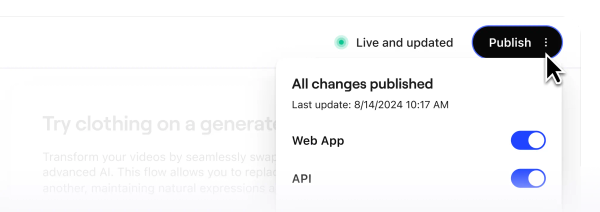
Scade.pro earns high marks for ease of use with a genuinely beginner-friendly interface—no coding required. The drag-and-drop canvas feels like “Lego for AI,” templates load in seconds, and users with zero technical background report building working prototypes in minutes.
The interface is clean, fast, and modern, with clear node previews and one-click runs. Learning curve is low: most people start productively after 10–15 minutes exploring templates. Documentation consists of a straightforward GitBook quick-start guide plus an Intercom help center with live chat support—adequate but not exhaustive (no deep video library or community forum yet). Users praise the “supafast” UX and hassle-free setup compared to juggling multiple AI services.
Performance & Reliability
Templates run efficiently—examples show 15 seconds and 4.5 credits for sketch-to-image or 2 minutes for virtual try-ons—thanks to optimized backend models and no local hosting required. Users consistently report reliable outputs, quick iterations, and significant time/cost reductions versus building from scratch.
No widespread outages or major complaints appear in Product Hunt reviews, Reddit threads, or recent discussions as of March 2026. Minor notes include occasional credit tracking adjustments and the need to monitor usage for image-heavy flows, but overall stability and speed impress reviewers who highlight “10x faster and cheaper” results.
Pricing & Value
Scade.pro uses a credit system where 1 credit ≈ $0.01. Free tier provides starter credits (enough to test templates); once exhausted, you can view/export flows but not run them. Paid subscriptions deliver monthly credits that reset (unused credits expire), with options to top up bundles (up to 20,000 credits per transaction). Current tiers (per third-party listings) include Pro at approximately $49.90/month (5,000 credits, more workflows, API access) and Team at $199.90/month (20,000 credits). Promo codes like “PRODUCTHUNT” often give 50% off the first payment. Enterprise options exist via custom contact but aren’t detailed publicly.
Value shines against alternatives: instead of separate OpenAI, Anthropic, ElevenLabs, and cloud GPU bills plus dev time, you pay one low subscription for everything. Heavy users save dramatically on infrastructure, and rapid prototyping justifies the cost for startups and agencies. Compared to Zapier/Make.com (workflow-focused) or Langflow (more dev-oriented), Scade.pro’s depth of AI models and agents offers superior all-in-one convenience at competitive pay-per-use pricing.
Practical Tutorial
Official documentation provides a solid quick-start, and dozens of ready templates make getting results immediate. Here’s a real-world walkthrough for a common task—comparing top LLMs on the same prompt (a standout feature for choosing the best model without multiple subscriptions). This uses the official “Compare Top LLMs” template, available in the Explore section after signup.
-
Go to https://www.scade.pro/ and sign up (free, no credit card required). Log into the dashboard at app.scade.pro.
-
Click “Explore” in the top menu and search for or browse to the “Compare Top LLMs” template. Click to open it.
-
The template loads in the Workflow Builder with a Start node, several LLM nodes (e.g., Claude, GPT, others), and an End node already connected. Rename the workflow for your use case.
-
Click the Claude node (or any model node), open the model selector dropdown, and choose “claude-3-5-sonnet” (or your preferred latest model). For broader testing, duplicate the node (right-click > duplicate), connect the copy to the Start node, and switch it to another model like GPT-4o.
-
In the Start node, enter your test prompt (e.g., “Write a 200-word product description for a wireless earbud that emphasizes battery life and sound quality”).
-
Click the Run button at the top. The flow executes in seconds, displaying side-by-side outputs with timing and estimated cost.
-
Review results directly in the canvas or export to your app via the unified API. Tweak parameters (temperature, max tokens) or add nodes (e.g., Perplexity for research) and re-run instantly.
For full official guidance, see the Quick Start in the Scade Knowledge Base: https://scade.gitbook.io/scade-knowledge-base/quick-start. Other popular templates (Video Summarization, Sketch to Image) follow the exact same open → customize → run pattern.
Final Verdict
Overall rating: 4.6/5. Scade.pro excels for no-coders and rapid prototypers who want instant access to 1,500+ AI models, ready templates, and visual agents without infrastructure headaches.
Who should use it: Founders, marketers, designers, and small teams looking to validate AI ideas, automate content, or ship features in hours instead of weeks—especially if you value cost predictability and one-stop model comparison.
Who should avoid it: Advanced developers needing deep custom code, version control, or heavy enterprise governance (docs and collaboration features are still maturing), or anyone uncomfortable with credit-based billing for very high-volume production use.
One-sentence recommendation: If you want to turn powerful AI models into working features without coding or DevOps overhead, Scade.pro is one of the smartest and fastest no-code platforms available today.