Scout by Asseter AI Review: The Ultimate 3D Asset Search Tool
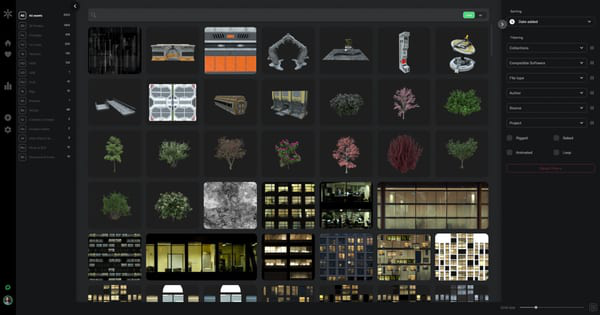
Overview & Purpose

Scout by Asseter.AI is an AI-powered visual search engine that lets users find matching or similar 3D models and assets across multiple stock marketplaces simply by uploading a picture—whether a photo, sketch, or rendering. It leverages computer vision and object detection to identify objects, forms, and styles, then surfaces direct links to purchasable or free 3D assets. In “Picture Assembler” mode, it breaks down complex images into individual components (models, textures, shaders) to help recreate scenes in 3D. Primary use cases include rapid asset sourcing for game development, architectural visualization, interior design, motion graphics, VFX, and any workflow requiring quick access to 3D content without manual keyword hunting.
The tool targets 3D artists, game developers, game environment artists, interior architects and designers, architectural visualizers and renderers, CAD engineers, AR engineers, and motion designers—essentially any digital content creator who spends time hunting for the right model. It is positioned as a free or low-cost community tool from the Asseter.AI team (makers of a separate paid digital-asset-management platform), making professional-grade asset discovery accessible without a steep budget.

Key Features & Capabilities
Core functionality revolves around drag-and-drop image upload and instant AI matching across supported marketplaces. Results appear with previews, direct links to the asset pages, and options to filter by free or paid assets. The standout “Picture Assembler” mode uses built-in computer vision to detect multiple objects in a single image and recommend complementary 3D elements, textures, and shaders—ideal for scene reconstruction. Additional conveniences include one-click access to asset pages and the ability to switch between free/paid views instantly.
What differentiates Scout from competitors (Sketchfab, TurboSquid, or even Google-based searches) is its true cross-marketplace aggregation combined with visual-first AI rather than text keywords, plus the unique assembler workflow. No other free tool currently offers this level of visual reverse-image search specifically tuned for 3D stock libraries while preserving form, style, and scale.
Limitations include no official public list of indexed marketplaces (community reports cite CGTrader, 3dsky.org, Quixel Megascans, and 3ddd.ru), occasional irrelevant matches when images are complex or low-resolution, and dependence on libraries that meet the 10,000-asset indexing threshold for partnership inclusion. There is no native mobile app, offline mode, or integrated download/purchase flow—users still complete transactions on the original marketplace. Text-based search is also absent.
User Experience
Scout is exceptionally easy to use with virtually no learning curve. The interface is a clean, minimalist web app (accessible at scout.asseter.ai) dominated by a large drop zone for images. Users simply drag a file or browse, select a mode, and results populate in seconds. Filters and one-click links keep the flow frictionless. It works equally well with real photos, hand sketches, or rendered previews, making it artist-friendly for non-technical users.
Documentation is light—primarily the official demo video and an email support channel ([email protected])—but the tool’s intuitive design means most users never need more. No extensive help center or knowledge base exists, which is typical for a focused utility rather than enterprise software. Community feedback on Reddit and tech directories consistently praises the “amazingly fast” and “completely visual” experience.
Performance & Reliability
Search results typically appear in under five seconds, even on complex images, thanks to optimized computer vision models. Users and testimonials repeatedly call it “the fastest way of searching models,” eliminating hours of manual browsing. Reliability is high for supported assets; direct links always resolve to the correct marketplace page.
Known issues are minor: the free tier imposes search quotas (typically 5–10 per month depending on plan), occasional irrelevant results when source images are blurry or artistic, and coverage gaps for smaller or niche marketplaces. No widespread outages or accuracy complaints appear in user forums as of March 2026; the tool has maintained steady positive sentiment since launch.
Pricing & Value
Scout follows a freemium model separate from the parent Asseter.AI asset-management platform. Plans (as listed on third-party directories and consistent with user reports) include:
- Basic: $0/month — up to 10 searches per month
- Daily: $1 per day — unlimited searches for 24 hours
- Supporter: $5/month — higher or unlimited usage
- Annual options and a Pro tier (~$10/month unlimited) also exist for heavy users.
Value is outstanding: even the free tier delivers immediate productivity gains for occasional users, while paid tiers remain cheaper than a single premium 3D model on most marketplaces. Compared with alternatives that require subscriptions to individual stores or manual searching, Scout’s time savings quickly justify the low cost. The broader Asseter platform (cloud hosting, AI tagging) starts at $20/user/month for teams but is not required for Scout.
Practical Tutorial
A common task—finding and assembling 3D assets to recreate a reference photo—is straightforward and takes under a minute. Here is a step-by-step walkthrough (verified against the official demo video):
- Open your browser and navigate to https://scout.asseter.ai/. No account is required for basic searches (free tier applies).
- Drag and drop your reference image (e.g., a photo of a modern office chair or an entire living-room interior) into the central upload area, or click to browse.
- Choose the mode: “Search assets by picture” for single-object matches or “Picture Assembler” to break the image into multiple components.
- Apply the “Free assets” filter if budget-constrained, or leave it open for all results.
- Review the grid of matching 3D models with previews, similarity scores, and marketplace tags. Hover for quick details.
- Click any result to open the original asset page on the stock site (CGTrader, Megascans, etc.) where you can purchase, download, or license instantly.
Example in action: Upload a smartphone photo of a rustic wooden table. In Assembler mode, Scout detects the table, nearby chairs, and even suggests a matching shader for the wood grain—returning ready-to-use assets you can drop straight into Blender or Unreal Engine.
Official tutorial video (2+ minutes, narrated walkthrough): https://youtu.be/QnNtkDZZXvE. No additional software installation is needed.
Final Verdict
Scout by Asseter.AI earns a strong 4.5 out of 5. It excels as a lightweight, visual-first productivity booster that genuinely reduces asset-hunting time from hours to seconds.
Who should use this tool: 3D artists, game developers, architects, and visualizers who frequently source models from stock libraries and want an intuitive, picture-based workflow without learning new software or paying high subscription fees.
Who should avoid this tool: Heavy daily users who exceed free-tier limits without wanting to upgrade, or professionals needing exhaustive coverage of every niche marketplace or integrated asset management (consider the full Asseter platform instead).
One-sentence recommendation: If you create in 3D and hate wasting time on keyword searches, Scout is the fastest, smartest free (or nearly free) upgrade you can add to your workflow today.
(Research conducted as of March 10, 2026 using the official website, demo video, user forums, and reputable tech directories.)