ScreenshotMagic Review: AI-Powered Batch Renaming for Mac Users
Overview & Purpose
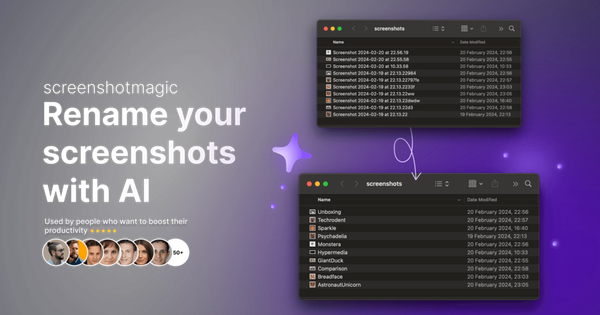
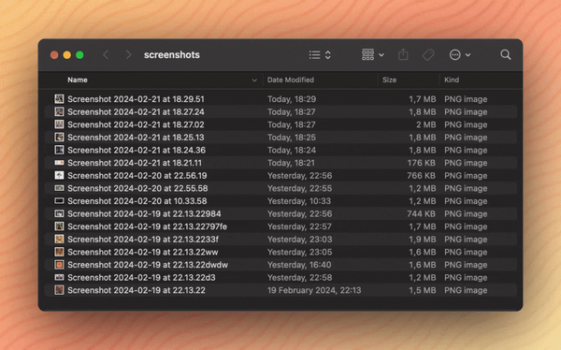
ScreenshotMagic is a lightweight Mac-only application that uses AI to automatically generate descriptive, human-readable names for screenshot files and other images, replacing generic defaults like "Screenshot 2024-03-12 at 14.30.45.png" with meaningful labels such as "Mac-Desktop-Setup-with-ChatGPT-2024.png." The primary purpose is to eliminate manual renaming and reduce desktop clutter for users who capture dozens or hundreds of screenshots daily. It scans selected images or folders, analyzes visual content via AI, and applies custom naming rules in a single batch operation.
Key use cases include organizing workflow screenshots for developers debugging code, marketing teams capturing campaign assets, designers documenting UI iterations, and content creators archiving tutorial visuals. The tool targets Mac users—specifically power users, freelancers, and teams handling high screenshot volumes—who value a tidy file system but dislike repetitive manual tasks. It claims to serve over 1,000 creators daily, though independent verification of this figure is limited.
Research for this review was conducted as of March 12, 2026, drawing from the official website, Gumroad sales page references, AlternativeTo listings, and sparse third-party mentions; the app has seen no updates since its March 2024 launch.
Key Features & Capabilities
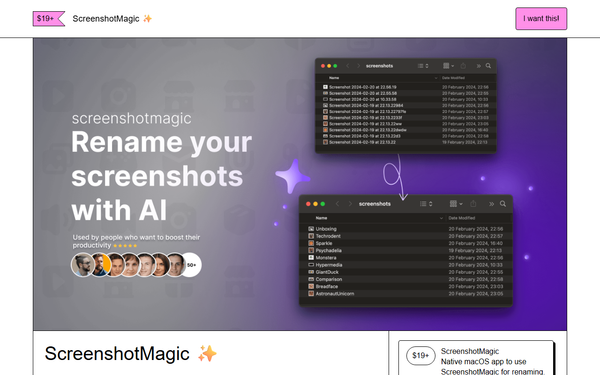
Core functionality centers on AI-powered descriptive renaming: the app processes image content to infer context (e.g., detecting open apps, text, or layouts) and generates filenames accordingly. Standout features include one-click batch renaming of entire folders or selections and user-defined preferences for tailoring output—such as appending dates, project tags, or specific formatting styles. It is ad-free, requires no subscriptions, and runs locally on macOS without cloud dependency.
Differentiation from competitors (e.g., generic bulk-renamers or screenshot tools like Shottr or CleanShot X) lies in its screenshot-specific AI focus and zero-effort batch workflow, avoiding complex regex or manual scripting. No advanced capabilities like OCR-powered search, annotation, or cross-platform support exist.
Limitations are notable: macOS-only compatibility (Monterey 12.0+ through Sonoma at launch), no support for Windows/Linux, potential AI inaccuracies with obscure image types or non-screenshot visuals, and absence of features like automatic folder organization or integration with cloud storage. The app is discontinued, with version 0.1.0 as the final release, raising long-term compatibility risks on newer macOS versions like Sequoia or later.
User Experience
Setup is straightforward: download the ~10.4 MB app, grant necessary permissions (e.g., Photos or Desktop access), and launch. The learning curve is minimal—most users can begin renaming within minutes after a one-time preferences configuration. Interface quality appears clean and native-Mac-like (based on available descriptions), emphasizing simplicity over flashy design, though no detailed screenshots or demos are publicly available.
Documentation is virtually nonexistent; the official site provides no guides, FAQs, or help files, and no official support channels (email, forum, or knowledge base) are listed. Community resources are equally sparse, with only promotional Reddit threads from 2024 and no active user forums. Initial preference setup is the only minor friction point noted in reviews.
Performance & Reliability
Renaming batches completes near-instantly on modern Macs due to the lightweight footprint and local AI processing, making it efficient even for hundreds of files. No widespread performance bottlenecks are reported, and the tool reliably handles standard PNG/JPG screenshots.
Known issues are minimal but tied to its age: potential incompatibility with post-Sonoma macOS security changes or evolving screenshot formats, plus occasional AI misnaming for complex or low-contrast images. Common complaints center on platform exclusivity and the lack of updates rather than crashes or slowdowns. With only a handful of user mentions across review aggregators, reliability data is anecdotal; no major outages or bugs surfaced in searches up to 2026.
Pricing & Value
ScreenshotMagic follows a one-time perpetual license model priced at $19 (with historical Gumroad options ranging $9–$199 depending on tiers or promotions). A legacy free download of version 0.1.0 remains available directly from the official site despite the paid framing on sales pages. No free tier, subscriptions, or enterprise options exist.
Value is strong for the niche: at under $20 for lifetime use, it delivers immediate time savings versus manual renaming or scripting alternatives. Compared to paid screenshot suites (often $20–50/year) or free open-source renamers requiring technical setup, it excels in simplicity. However, the discontinued status and lack of ongoing improvements diminish long-term value against actively maintained competitors.
Practical Tutorial
No official tutorials, videos, or documentation exist on the website or elsewhere. Below is a complete, self-contained walkthrough for the most common task—batch-renaming a cluttered desktop folder of screenshots—based on the app’s documented one-click workflow and preference system. This example assumes you have downloaded and installed version 0.1.0.
Step-by-step: Renaming 50+ desktop screenshots in under 60 seconds
- Launch ScreenshotMagic from your Applications folder (grant Desktop folder access if prompted on first run).
- Click the Preferences button (usually in the top menu or sidebar) and customize naming rules. Example settings:
- Base format: “[DetectedApp]-[ShortDescription]-[Date]”
- Include timestamp: Yes (YYYY-MM-DD)
- Capitalization: Title Case
- File extension: Preserve original (PNG/JPG).
Save and close.
- Drag your “Screenshots” folder (or select individual files) onto the app window or use the “Add Folder” button. The app will preview thumbnails and proposed names.
- Review the AI-generated list (e.g., “Screenshot 2024-03-12.png” becomes “Safari-Login-Page-Error-2024-03-12.png”; “Screenshot 2024-03-12 at 14.30.png” becomes “VSCode-Debug-Panel-Layout-2024-03-12.png”). Edit any manually if needed.
- Click the large “Rename All” button. The batch processes instantly; originals remain untouched in a backup subfolder if you enabled that option in preferences.
- Verify results in Finder—your desktop is now organized and searchable.
Real-world example output from a typical developer workflow:
Before: Screenshot 2025-01-15.png, Screenshot 2025-01-15 1.png
After: Xcode-Bug-Report-Modal-2025-01-15.png, Chrome-Extension-Review-2025-01-15.png
For updates or alternatives, check the official site directly, as no external video guides or help articles were located during research.
Final Verdict
Overall rating: 6.5/10. The app earns high marks for effortless AI batch renaming and instant organization but loses points for discontinuation, zero ongoing support, platform exclusivity, and lack of documentation or community.
Who should use this tool: Mac-based developers, designers, marketers, and content creators who take frequent screenshots and want a cheap, set-it-and-forget-it solution to banish desktop chaos—especially if you value simplicity over advanced features or long-term updates.
Who should avoid this tool: Windows/Linux users, anyone needing cross-platform support, OCR search, integrations, or active maintenance; power users requiring robust documentation or enterprise reliability will find better alternatives among actively developed screenshot managers.
One-sentence recommendation: ScreenshotMagic delivers a genuinely useful AI shortcut for screenshot organization on Mac, but its frozen 2024 development makes it best suited as a quick, low-cost experiment rather than a long-term workflow staple.