Screentell Review: Create Cinematic 3D Product Demos in Your Browser
Overview & Purpose

Screentell is a fully browser-based screen recorder and video editor designed to help users create studio-quality product demos, tutorials, and walkthroughs in minutes. It captures any screen or window (including browser tabs), webcam footage, system audio, and microphone input simultaneously using a dual-stream engine, then provides an integrated editor for polishing the content before exporting. All processing happens locally in the browser with zero data uploads to servers, emphasizing privacy and eliminating installation requirements. Primary use cases include producing engaging YouTube videos, marketing landing-page demos, software feature explanations, and internal team documentation—turning flat recordings into visually dynamic content without switching between separate recording and editing apps.
The tool targets content creators, developers, marketers, designers, YouTubers, and small teams who need professional results quickly without heavy desktop software or cloud dependencies. It appeals particularly to privacy-conscious users and cross-platform teams working on modern Chromium-based browsers (Chrome, Edge, Brave, Arc recommended). Research conducted as of March 3, 2026, confirms its positioning as a lightweight yet powerful alternative for rapid, high-polish video production.
Key Features & Capabilities
Core functionality revolves around a seamless record-edit-export workflow in a single browser tab. Recording supports full-screen, window, or tab capture with simultaneous camera and dual-audio input. The editor offers multi-track timeline control for precise adjustments.
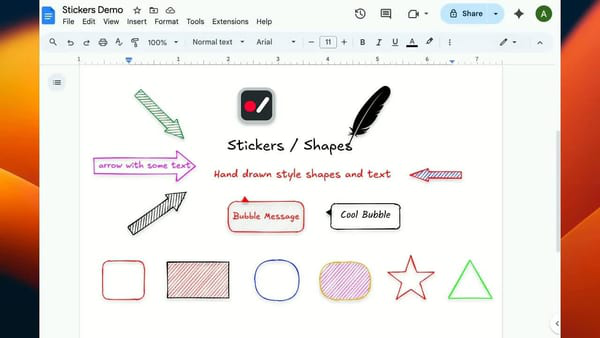
Standout features that differentiate Screentell from competitors like Loom or Screen Studio include cinematic 3D transforms powered by graphics libraries (such as three.js), enabling smooth perspective shifts, rotations, and motion paths that guide viewer attention professionally. Additional highlights are focus zooms (2D/3D), highly customizable stickers and annotations (arrows, bubbles, shapes, text, image uploads, hand-drawn styles with color/border/roundness controls), dynamic face-cam layers (movable, resizable, animatable, or hidden), background layouts with padding and shadows, clip cutting/trimming, variable speed control, and video cropping. Users can also import existing videos for editing. Exports support MP4, WebM, or GIF formats with customizable resolution, quality, and codecs, all rendered locally.
Limitations include no advanced audio mixing or effects beyond basic recording, absence of AI-driven features (effects rely on Web APIs and manual controls), browser-only operation (no native mobile or dedicated desktop app), and dependence on local device resources for complex 3D edits. Free-tier export restrictions (watermark and length limits) push users toward paid plans for full HD/unlimited output. No built-in cloud collaboration or sharing is mentioned, keeping everything device-local.
User Experience
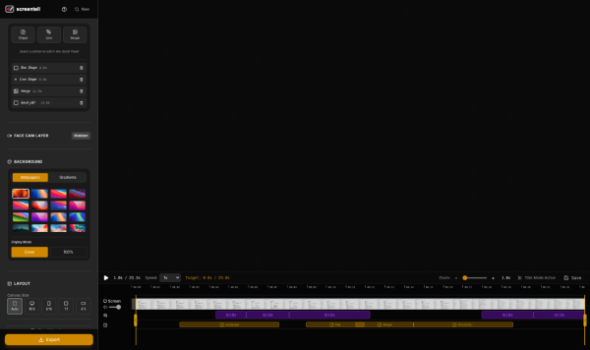
Screentell boasts an exceptionally low learning curve thanks to its intuitive three-step process: record, edit, and export. The interface is clean, modern, and WYSIWYG, with drag-and-drop timeline handles, preview player, and contextual panels for effects—making it accessible even for non-video editors. Basic recordings can be completed and polished in under 10 minutes, while advanced 3D transforms and stickers feel natural once familiar (presets and custom templates were added based on early user feedback). It runs best in modern Chromium browsers; permissions for screen/camera/audio are straightforward via browser prompts.
Documentation includes an official quick-start guide, FAQ section, and blog with practical how-tos and comparisons. Support resources are growing but limited as a newer tool—primarily through in-app help, founder updates on X, and blog posts rather than extensive community forums or live chat. Overall, the experience feels magical for its no-install simplicity and immediate results, with users on Product Hunt praising the "impressive web tech" and smooth onboarding.
Performance & Reliability
Performance is efficient for most use cases because everything processes locally using browser Web APIs, delivering fast recording and reasonable export times on standard hardware. High-quality 3D effects and multi-track editing leverage GPU acceleration where available, producing smooth outputs without server lag. Reliability is strong for privacy (videos never leave the device and are stored locally), with no reported data breaches or upload dependencies.
Known issues are minimal but hardware-dependent: complex 3D projects or long videos can tax lower-end devices, leading to potential rendering slowdowns or browser memory pressure. Early user feedback and reviews note no widespread bugs, though very long sessions may require saving progress manually. As a relatively new tool (launched early 2026), long-term reliability data is limited, but current sentiment highlights consistent cross-platform behavior on supported browsers. No major complaints surfaced in reviews or social searches as of March 2026.
Pricing & Value
Screentell offers transparent, competitive pricing with a generous free tier. The free plan allows unlimited recording and editing but includes a watermark, lower-resolution exports, and limits on video length (typically around 3 minutes). Pro plans unlock watermark-free HD exports, unlimited length, and full feature access:
- Monthly: $6.99 per user
- Yearly: approximately $49.99 (saving ~37–40%)
- Lifetime: $99.99 one-time payment (best value, includes future updates)
No enterprise options are prominently listed, keeping focus on individuals and small teams.
Value is exceptional compared to alternatives: cheaper than Loom ($15+/mo), VEED.IO, or Kapwing while delivering unique 3D cinematic effects and full local privacy that desktop tools like OBS or Screen Studio lack in simplicity. The lifetime option provides outstanding long-term ROI for frequent users, making it a strong choice for budget-conscious creators seeking professional polish without recurring high costs.
Practical Tutorial
Here is a step-by-step walkthrough for a common task—creating a polished product demo with 3D focus zoom and annotations—based on the official quick-start guide and blog resources. This example assumes a software walkthrough (e.g., demonstrating a web app feature).
-
Access and Record: Visit https://screentell.com/ (or directly /record) in a Chromium browser. Click "Start Recording." Select your screen/window/tab (enable system audio sharing), toggle webcam for face-cam and microphone if desired, then click "Start Recording." Perform your demo (e.g., navigate the app interface). Stop recording via the in-app controls—the video loads automatically into the editor.
-
Enter the Editor and Trim: Use the timeline at the bottom. Drag handles to trim unwanted start/end sections. Scrub through the clip to preview.
-
Add Cinematic 3D Focus Zoom: Select a key moment on the timeline. Switch to the Motion/Focus track and add a 3D transform segment. In the right-side panel, set starting keyframes (position, rotation, zoom) by dragging on the preview canvas or using sliders. Add ending keyframes a few seconds later for smooth interpolation—e.g., a gentle zoom and perspective shift onto a button. Adjust timing for natural motion.
-
Apply Stickers/Annotations and Face-Cam: Click the Sticker track to add an element (arrow, bubble, text, or upload image). Drag to position, then customize color, border, size, and hand-drawn style in the panel; set duration by dragging the clip on the timeline. For the face-cam layer, resize/move it (e.g., corner inset) and apply subtle animation keyframes if needed for dynamism.
-
Polish with Speed and Layout: Adjust clip speed on selected sections for emphasis. Add background padding or shadow via layout options for a clean, professional frame.
-
Preview and Export: Play the full preview to ensure smoothness. Click Export, choose MP4 (recommended), set resolution/quality, and render locally. Download the file—Pro plan removes watermark and unlocks unlimited length.
The entire process typically takes 5–15 minutes. For more details or video examples, refer to the official quick-start guide and blog tutorials on creating 3D demo videos. Projects save to local browser storage for later resumption.
Final Verdict
Screentell earns a strong 4.5 out of 5 rating for its innovative blend of accessibility, privacy, and cinematic editing power in a no-install package. It excels for creators, developers, marketers, and YouTubers who want quick, studio-quality demos and walkthroughs with standout 3D effects at an affordable price—perfect for individuals or small teams prioritizing speed and visual polish over advanced collaboration or heavy production suites.
Avoid it if you need deep cloud collaboration, mobile editing, extensive audio post-production, or enterprise-scale features, or if your workflow involves very long/complex videos on low-end hardware (where browser limits may appear). Newer-tool status means support and integrations are still maturing.
Screentell is the go-to browser-based solution for anyone tired of boring screen recordings who wants professional cinematic results without the hassle of installs or subscriptions.