Sensetask Review: Automate Document Workflows with AI Power
Overview & Purpose

SenseTask is an AI-powered document processing and workflow automation platform that converts unstructured business documents—such as invoices, purchase orders, transport documents, contracts, and multi-document collections—into structured, validated data. It automates classification, data extraction, validation against business rules, reconciliation (including N-way matching), and seamless integration with ERP and operational systems, enabling organizations to eliminate manual data entry and focus on exceptions, approvals, and strategic decisions. Primary use cases include invoice and e-invoice processing, procurement workflows, logistics document handling, digital archiving with advanced search, and compliance-driven automation across finance and operations.
The platform targets enterprise finance, procurement, and operational teams in mid-sized to large organizations, particularly in sectors like logistics, accounting, and supply chain where high document volumes create bottlenecks. It is not designed primarily for developers (though API access exists in higher tiers), marketers, or designers; instead, it serves business users who need no-code tools to streamline document-heavy processes.
Key Features & Capabilities
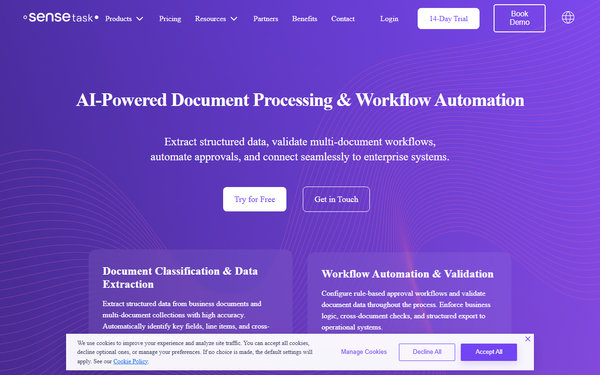
Core functionality revolves around end-to-end document lifecycle management: intelligent classification of document types and formats, AI-driven extraction of headers, line items, totals, and cross-document relationships, multi-document validation with custom business logic, automated routing and approvals, exception handling, and ERP/master data synchronization. Users can ingest documents via email, API, desktop upload, or e-invoicing platforms, with real-time discrepancy detection and audit trails.
Standout features that differentiate SenseTask include its ability to process multi-document collections with contextual understanding and N-way matching (beyond simple OCR tools), continuous AI improvement from user validations, an AI Copilot for no-code data extraction, and persistent master-data associations that “remember” supplier mappings or SKUs. Integrations cover SharePoint, specific ERPs (e.g., WinMentor, Nexus, RO e-Factura via ANAF), and API-driven exports, while advanced workflow orchestration supports multi-level approvals and custom reports.
Limitations include tiered restrictions on captured labels (25 in Starter, 35 in Pro), workflows, users, and workspaces, with no unlimited free tier—only a trial via registration. Page-based billing can become expensive for high-volume users without Enterprise customization. Public documentation shows strong support for certain regional e-invoicing (e.g., Romania), but broader global ERP integrations may require Enterprise-level custom work. Missing features noted in comparisons include extensive mobile apps or deeply customizable machine-learning model training found in some enterprise competitors.

User Experience
SenseTask offers a low learning curve for core tasks thanks to its intuitive, no-code interface with drag-and-drop uploads, visual workflow builders, and AI-assisted review screens. Non-technical users can quickly configure folders, labels, and rules, while the clean dashboard supports efficient document review and search. Feedback from independent sources highlights its user-friendliness even for complex approval chains.
The interface quality appears modern and focused on productivity, with features like duplicate detection, barcode recognition, and step-by-step validation prompts reducing cognitive load. Comprehensive documentation at help.sensetask.com provides detailed guides, while support resources include in-app issue reporting, contact forms, and dedicated account management in Enterprise plans. No extensive video library or community forum is prominently featured, but the responsive team receives praise in testimonials.
Performance & Reliability
Processing is fast and efficient, with official claims of 89.2% average time savings, 10x faster invoice handling, and 3.1x ROI within the first year. AI extraction and validation deliver high straight-through processing rates by flagging only exceptions, and continuous learning from corrections improves accuracy over time. Multi-document reconciliation and ERP matching operate in real time with minimal latency reported in case examples.
As of March 2026, independent user reviews on major platforms like G2 and Capterra are extremely limited or unavailable publicly, making broad reliability data sparse. Site testimonials consistently highlight error elimination and rapid processing of large volumes, with no widespread reports of downtime, inaccurate extractions, or integration failures in available sources. Potential early-stage startup challenges around scaling AI robustness are noted in one review, but current users report stable performance for core document automation needs.
Pricing & Value
SenseTask uses a tiered, page-based subscription model with no setup fees:
- Starter: Starts at $99/month for 250 pages, up to 25 capture labels, 3 workflows, 3 users, and 1-year data retention; extra pages at $0.30 each.
- Pro: Starts at $399/month for 1,500 pages, up to 35 labels, 10 workflows, email auto-import, API access, 15 users, and 2-year retention; extra pages at $0.25 each.
- Enterprise: Custom pricing starting at $12,000/year for 1,500+ pages, unlimited custom features, dedicated support, AI Copilot, and extended retention.
A free trial is available via registration; overages are automatically charged per page.
Value is strong for mid-to-large teams with moderate-to-high document volumes, delivering claimed ROI through time savings and error reduction that often outweighs per-page costs compared to manual processes or fragmented tools. It competes favorably against specialized OCR or workflow platforms by unifying everything in one system, though small businesses or low-volume users may find Starter pricing less economical than unlimited alternatives.
Practical Tutorial
Official documentation provides excellent step-by-step guides at https://help.sensetask.com/docs/. Below is a practical walkthrough for a common task—processing and approving a supplier invoice—based directly on the platform’s “Upload of Files” and “Review of Files” sections. This example assumes you have signed up for a Starter or Pro trial and created a workspace.
- Upload the Invoice: Log in, navigate to your workflow folder, and click “Upload files from your PC” (or use email auto-import in Pro). Drag and drop the PDF or image. For multi-page files, use the built-in splitter if it contains mixed document types.
- AI Auto-Processing: SenseTask automatically classifies the document, extracts data into predefined labels (e.g., invoice number, date, vendor, total), detects tables/line items, barcodes, and checkboxes. The AI Copilot suggests values where confidence is high.
- Review the Document:
- Step 1: Verify any active integrations (e.g., ERP or master-data sync).
- Step 2: Validate non-tabular labels—edit any incorrect fields (e.g., supplier name) and confirm accuracy.
- Step 3: Review and extract tables—check line items for quantity, price, and totals; correct mismatches.
- Step 4: Associate labels with external data (e.g., match vendor to ERP record).
- Step 5: Approve the file to trigger workflow routing, export, or notifications.
- Export or Archive: Once approved, data exports automatically to configured destinations (CSV, SharePoint, or ERP) via the default export template.
- Monitor: Use the activity log and search filters to track processing statistics and audit history.
For full interactive details and screenshots, refer to the official guides: “Reviewing a document” and linked sub-steps at https://help.sensetask.com/docs/. Real-world example: A logistics team processing 500 monthly transport invoices reported cutting review time from hours to minutes using this flow.
Final Verdict
SenseTask earns a 4.3/5 rating—excellent for unified AI document automation with strong workflow depth, though limited independent reviews and page-based pricing temper the score for some users. Organizations with finance or procurement teams handling high volumes of invoices and related documents should use it to achieve dramatic efficiency gains and ERP integration without heavy IT involvement. Small teams with minimal document throughput or those requiring deeply customizable ML models and mobile-first experiences should avoid it in favor of more established or unlimited alternatives. SenseTask is a smart investment for any business ready to turn document chaos into automated insight.