SEO Content Machine Review: Automate Bulk SEO Content at Scale
Overview & Purpose

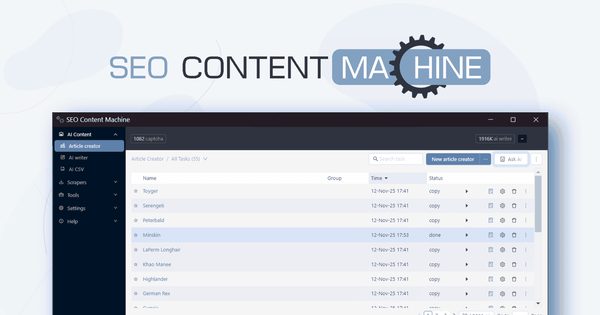
SEO Content Machine is a desktop software application (available for Windows, Mac, and Linux) that automates the entire SEO content creation pipeline. It scrapes data from sources like Google SERPs, People Also Ask, Archive.org, competitor pages, Google Maps, images, and videos; feeds that data into AI models for generation, rewriting, spinning, and translation; then exports to WordPress XML or publishes directly with scheduling. The tool turns keywords or datasets into hundreds of unique, keyword-rich articles or programmatic pages without manual intervention once workflows are set up. Primary use cases include scaling content for affiliate and niche sites, creating local SEO city/service pages, supporting link-building campaigns and PBNs, and building automated programmatic SEO pipelines that run daily or on demand. It is particularly suited for producing supporting content at volume while keeping costs low long-term.
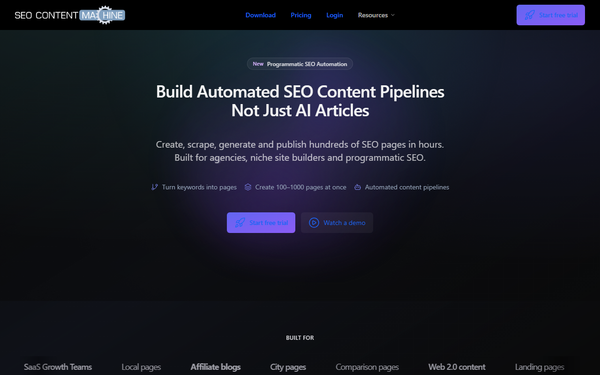
The target audience is SEO agencies handling 100–1,000+ pages per month, niche/affiliate site builders, local SEO specialists, link builders, and SaaS growth teams focused on high-volume, repeatable content production. It is not aimed at casual bloggers or designers seeking simple one-off articles but at professionals who need infrastructure for continuous, automated output.
Key Features & Capabilities
Core functionality revolves around an end-to-end automated workflow: keyword input → data scraping → AI content generation/rewriting/translation → spinning and media insertion → WordPress XML export or scheduled publishing. Key tools include the Article Generator, Content Wizard for outlines, Bulk Article Rewriter, Google Maps Scraper for business data, Image/Video Scraper, Archive.org scraper, and competitor page extraction for structured data. It supports any AI provider (OpenAI/ChatGPT, local models like Llama) or pay-as-you-go credits, multi-language translation, contextual link and media insertion, and direct integration with WordPress for auto-posting.
Standout features that differentiate it from competitors (such as Jasper, Surfer, or pure AI writers) include the full pipeline automation that runs continuously without usage caps, n8n and API/webhook support for programmatic SEO (e.g., scrape → generate → publish loops), one-time lifetime licensing with unlimited generation, competitor reverse-engineering via scraping, and built-in scheduling for daily/weekly runs. The ability to own your AI stack and switch models as technology evolves, plus pre-built templates for tools like GSA SER or Senuke, sets it apart from subscription-based cloud tools that cap output or charge per word.
Limitations include the need for external AI API keys (or optional pay-as-you-go credits), potential captcha solver credits for heavy scraping, reliance on human post-editing for premium money sites (AI output is strong for supporting/PBN/local pages but not always publication-ready without review), and its desktop-only nature (requires installation and local resources, no cloud SaaS alternative). There is no built-in plagiarism checker or advanced on-page SEO scoring found in some newer competitors.

User Experience
Ease of use starts with helpful setup wizards for basic article creation, making core tasks accessible after a short onboarding period. However, building advanced automated pipelines (especially with n8n or API integrations) involves a medium-to-steep learning curve best suited for SEO professionals already comfortable with tools and automation. The interface is a functional desktop application—clean and wizard-driven for everyday tasks but dated in visual design compared to modern web SaaS tools; tabs, project management, and batch controls keep it organized once learned.
Documentation is solid with an active forum offering tutorials, API guides, n8n setup walkthroughs, and user Q&A, plus a YouTube channel with feature demos and older “in 5 minutes” videos. Support receives consistent praise for responsiveness and quick bug fixes from the developer. Overall, SEO pros report it saves significant time after initial setup, though beginners may need several hours to master the full toolbox.
Performance & Reliability
The software excels at speed and efficiency for bulk operations, generating and publishing hundreds of articles in hours with images, links, and unique variations inserted automatically. Batch processing handles large keyword lists without slowdowns, and projects resume automatically after interruptions. With 10+ years on the market and frequent bimonthly updates, it remains reliable for daily production runs; users highlight consistent scraping success and fast AI prompt execution when connected to capable models.
Known issues are minor and manageable: scraping can consume captcha credits during heavy Google use (optional paid solvers or alternative search engines recommended), output quality varies with the chosen AI model and spinner (external paid spinners like WordAi improve results), and occasional rate limits depend on the user’s AI provider. No widespread complaints of crashes, data loss, or abandonment appear in recent reviews; the active developer and forum ensure quick resolutions. Performance has improved steadily with AI advancements and n8n integration.
Pricing & Value
SEO Content Machine follows a one-time purchase model: a $198 lifetime license grants full software access forever, including 1 year of updates and unlimited content generation. Optional pay-as-you-go credits cover extra AI usage (e.g., 100K credits for $5) and captcha solving (1,200 credits for $10) if your workflows exceed free scraping or you prefer not to use personal API keys. There is no free tier or trial, though the license includes lifetime use once purchased. No recurring subscription is required for core functionality.
Value is exceptional for high-volume users: the one-time cost replaces ongoing SaaS fees (often $24+/month elsewhere) while delivering unlimited scale, full pipeline control, and ownership of your AI stack. Compared to alternatives like Jasper or Frase (recurring, word-limited) or pure scrapers, it offers superior long-term ROI for agencies and site builders producing content at scale for link building, PBNs, or programmatic SEO. The price drops even lower via occasional AppSumo deals, making it one of the most affordable infrastructure tools in the category.
Practical Tutorial
Official tutorials and demos are available on the SEO Content Machine YouTube channel and forum (e.g., “SEO Content Machine + AI – New Walkthrough” and n8n integration guides). Below is a step-by-step walkthrough for a common task—generating and publishing 10 localized city pages for a local SEO campaign (example keyword set: “plumber in [City]” for 10 U.S. cities).
- Launch the software and open the Article Creator tool (or Content Wizard for outlines first).
- Add your main keywords or upload a CSV list (e.g., “plumber in New York”, “plumber in Chicago”, etc.). The tool automatically searches Google for related terms and People Also Ask data; select relevant ones via checkboxes and set language/country.
- Configure scraping: Enable competitor scraping, Google Maps for business details (name, address, reviews), image/video scraper, and Archive.org fallback. Choose quality settings (e.g., “Readable” for better flow).
- Connect your AI model: Enter OpenAI API key (or local model path) and set prompt templates to incorporate scraped data (e.g., “Write a 1,500-word service page using these headings and local business facts”).
- Set spinner, media, and links: Select built-in Soft Spin or external spinner credentials; specify 3–5 images/videos per article and contextual link anchors (e.g., brand name variations).
- Choose output: Select WordPress XML format or direct publish; set article count (10), paragraph length, and variations for uniqueness.
- Click “Generate” or “Add Task”—the batch runs in the background, scraping, generating, rewriting, and inserting media/links. Monitor progress in the Content Tasks tab.
- Publish: Open the Blogs Manager or WordPress Poster, add your site credentials, import the generated XML/articles, apply final touches if needed, and schedule automated posting (daily or on demand).
This process typically completes in under an hour for 10 pages. For full automation, integrate with n8n using the official forum guide to trigger the workflow on a schedule. Export examples and videos are linked directly in the software and on https://www.youtube.com/c/seocontentmachine.
Final Verdict
Overall rating: 4.5 out of 5. This review is based on research conducted in March 2026 from the official website, pricing page, AppSumo reviews, detailed user tutorials, and forum activity.
SEO specialists, agencies, and programmatic site builders who need to produce hundreds of pages monthly at minimal ongoing cost should use this tool—it delivers true end-to-end automation, lifetime ownership, and powerful scraping + AI pipelines that scale effortlessly for local SEO, link building, and niche content.
Avoid it if you are a complete beginner, prefer a no-install cloud SaaS with guided templates, or require zero-editing, publication-ready content for premium client sites without additional review.
One-sentence recommendation: For SEO professionals serious about scaling content affordably through automation, SEO Content Machine remains a standout lifetime investment that turns keywords into published pages on autopilot.