Shellmate Review: The Ultimate AI Companion for macOS Terminal
Overview & Purpose

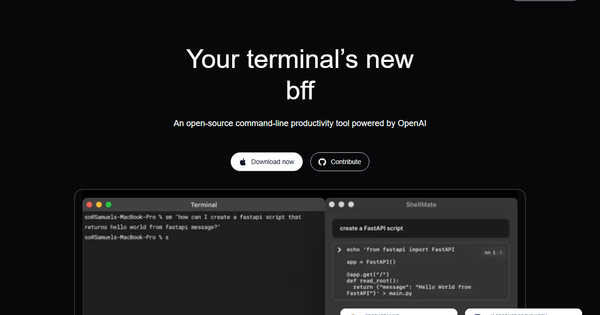
ShellMate is an open-source command-line productivity tool designed as a seamless companion for macOS Terminal users. It leverages OpenAI's models to interpret natural language queries and generate relevant command suggestions directly within the terminal environment, eliminating the need to switch contexts or search external documentation. Primary use cases include quickly recalling obscure commands or syntax, fixing errors based on recent terminal history, predicting upcoming commands for repetitive workflows, and focusing AI attention on selected text for targeted assistance. It is particularly valuable for streamlining repetitive terminal tasks while maintaining focus and flow.
The target audience is primarily macOS-based developers, system administrators, DevOps engineers, and power users who spend significant time in the command line. It is less suited for non-technical users, cross-platform teams, or those preferring fully local/offline solutions, as it requires an internet connection and OpenAI integration.
Key Features & Capabilities
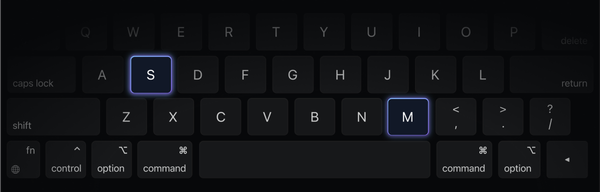
Core functionality revolves around translating natural language into executable terminal commands via a simple sm shortcut. Users can query with text arguments (e.g., sm “find a file?”), pipe from standard input, or highlight text in the terminal to direct the AI’s focus without rephrasing questions. The standout predictive awareness feature analyzes terminal history to automatically detect errors, suggest fixes, and anticipate next commands, keeping users in flow without manual intervention.
Differentiating factors include its native macOS integration (running alongside Apple’s Terminal.app), zero-context-switch insertion of suggestions, and history-aware intelligence—capabilities not as tightly woven into general-purpose CLI AI tools like Warp’s AI or standalone utilities such as aichat. Open-source under MIT license, it allows community contributions and customization.
Limitations include macOS exclusivity (no Linux or Windows support), dependence on OpenAI’s API (no built-in local models or alternatives like Anthropic/Groq), potential privacy concerns from sending history snippets to OpenAI, and the requirement for users to manually provide and manage their own API key. No advanced features like multi-model selection, offline caching, or enterprise SSO are present.
User Experience
Installation is straightforward for most users: download the DMG from the official site for a one-click setup, or build from source via Xcode for developers. Configuration involves entering an OpenAI API key either through the app’s settings view or by editing a Swift file—simple for technical users but a minor hurdle for beginners. The learning curve is minimal; once running, invoking sm feels intuitive and natural.
The interface is clean and non-intrusive, relying on macOS-native shortcuts and direct insertion into the active terminal without pop-ups or browser redirects. No flashy GUI elements distract from the command-line focus. Documentation is basic but functional, consisting of the GitHub README with installation steps and examples; there are no extensive official guides, video tutorials, or community forums beyond standard GitHub issues. Support is community-driven through the open-source repo, with responsive maintainer updates noted in early development phases.
Performance & Reliability
Response times depend on OpenAI API latency and network conditions—typically a few seconds for suggestions, which is efficient for most workflows but not instantaneous like local tools. The predictive history analysis and error detection work reliably in practice for common scenarios, maintaining terminal flow effectively. No widespread performance degradation or crashes were reported in available sources as of the research date.
Known issues are minimal due to the tool’s niche adoption (approximately 133 GitHub stars). Occasional setup friction for source builds (e.g., certificate signing or Sentry token configuration) exists, but the DMG installer avoids these. Common user feedback highlights consistent command accuracy when history context is provided, with the usual caveat that AI suggestions should always be reviewed before execution. No major reliability complaints surfaced in public discussions or issue trackers.
Pricing & Value
ShellMate is completely free and open-source (MIT license), with no tiers, subscriptions, or enterprise options. The only ongoing cost is standard OpenAI API usage (pay-per-token rates, typically pennies per session for light use). There is no built-in free tier beyond what users configure themselves.
Value proposition is strong for macOS power users: it delivers premium AI assistance comparable to paid tools like Warp or Fig (now discontinued) without licensing fees, while offering full transparency and customizability. Compared to free alternatives (e.g., generic CLI wrappers), its deep terminal history integration and native shortcut provide superior convenience, making it a high-ROI addition for anyone already paying for OpenAI access.
Practical Tutorial
A step-by-step walkthrough for a common task—fixing a “command not found” error and discovering a better command—using real ShellMate syntax (based on official examples; no dedicated video tutorials exist, but the GitHub README provides the foundation).
-
Install and configure: Download the DMG from https://www.deepspring.ai/shellmate and install. Launch ShellMate, navigate to its settings/permissions view, and enter your OpenAI API key (obtain one at platform.openai.com). Grant necessary macOS permissions for terminal access and shortcut binding.
-
Open Terminal and trigger a scenario: Run a failing command, e.g.,
ls -l /nonexistent/path. Note the error. -
Invoke ShellMate for fix: Type
sm “fix the error and suggest the correct command”(or simplysm “what went wrong?”after the error appears). Press Enter. -
Review and insert suggestion: ShellMate analyzes history, detects the path issue, and suggests something like
ls -l ~orfind / -name "targetfile" 2>/dev/null. Use arrow keys or click to accept and insert the corrected command directly into your prompt. -
Advanced with highlight: For context-specific help, highlight output text (e.g., an error message), then press the ShellMate shortcut (configured during setup) and ask “explain this and fix it.”
-
Predictive flow: After successful execution, ShellMate may proactively suggest the next logical command (e.g., “pipe this to grep?”) based on history patterns.
For more examples, refer to the GitHub repository at https://github.com/srosro/deepspring-shellmate. Always verify and test AI-generated commands in a safe environment.
Final Verdict
Overall rating: 4.2/5. ShellMate excels for macOS developers and sysadmins who want frictionless, context-aware AI assistance to reduce command lookup time and maintain terminal momentum—ideal if you already use OpenAI and value open-source transparency. Avoid it if you work cross-platform, prioritize fully local/privacy-first tools, or need extensive documentation and enterprise support, as its scope remains Mac-centric and community-driven.
ShellMate is a smart, lightweight addition to any macOS power user’s toolkit that genuinely keeps you in flow—highly recommended for Terminal enthusiasts tired of tabbing to Google.