ShootSolo Review: The Ultimate AI Voice-Controlled Camera App
Overview & Purpose
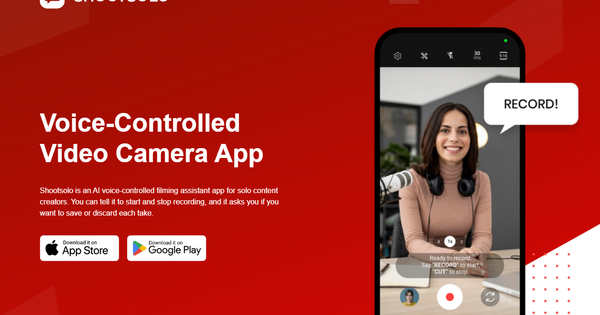
ShootSolo is an AI-powered, voice-controlled video camera app designed as a hands-free filming assistant for solo content creators. It allows users to control recording entirely through simple voice commands—such as saying “Start Recording” or “Stop Recording”—without needing to touch the device, set timers, or get up from position. After each take, the app’s AI automatically prompts whether to save or discard the clip, ensuring only high-quality footage ends up in the gallery and streamlining post-production. Additional capabilities include a 2-in-1 framing grid for optimizing shots across horizontal (YouTube) and vertical (TikTok/Instagram) formats in one take, seamless front/back camera switching, and multi-phone recording for capturing multiple angles simultaneously with synchronized voice triggers.
Primary use cases center on independent video production where a crew isn’t available: creating YouTube videos, TikToks, vlogs, podcasts, educational content, or business presentations. The target audience includes solo influencers, content creators, educators, marketers, podcasters, and small business professionals who film alone on smartphones. It solves common pain points like constant device interaction and cluttered galleries, making professional-looking results more accessible without expensive equipment or assistants. Research for this review was conducted as of March 2026 using the official website, App Store listings, Google Play references, and third-party analyses.
Key Features & Capabilities
Core functionality revolves around voice-activated recording and intelligent clip management. Users speak commands to start/stop filming, switch cameras, and receive AI-driven save/discard prompts immediately after each take. The standout 2-in-1 framing grid overlays crop guides so creators can film once in landscape while previewing how it will appear in portrait social formats—eliminating the need for multiple shoots or manual cropping later.
Differentiating features include multi-phone recording: install the app on multiple devices, issue one voice command, and all phones begin/stop simultaneously, automatically aligning clips for easy multi-angle editing with no manual syncing required. The interface remains clean, distraction-free, and optimized for quick operation, with 4K support on compatible devices.
Compared to competitors like basic camera apps or timer-based tools (e.g., AutoPod or standard iOS/Android recorders), ShootSolo’s AI assistant and real-time framing/multi-device sync set it apart by reducing workflow friction for true solo operation. Limitations include reliance on clear voice recognition (which can falter in noisy environments), no support for advanced professional codecs like Apple ProRes (noted in user feedback), and a freemium model where some extended capabilities may require credits. No deep integrations with editing software (e.g., direct export to Premiere or CapCut) or offline voice processing beyond basic commands are mentioned. Advanced multi-device setups may require minor technical familiarity for optimal sync.
User Experience
ShootSolo boasts an intuitive, creator-focused interface that is clean, fast, and distraction-free—designed specifically so users stay immersed in performance rather than fiddling with controls. New users report a short learning curve: voice commands feel natural after one or two practice sessions, and the app’s prompts guide the workflow seamlessly. Updates through 2025 (up to version 1.0.7) refined UI responsiveness and eliminated early voice/button bugs, resulting in smoother operation.
Documentation is minimal—primarily in-app tooltips and short demo videos on the developer’s YouTube and Instagram channels rather than extensive written guides or a knowledge base. Support resources appear limited to standard app feedback channels, with no dedicated help center or community forum noted. Overall, the experience earns praise for simplicity and focus on core pain relief, though users in loud settings or those preferring visual-only controls may find voice dependency initially frustrating.
Performance & Reliability
The app performs efficiently for its intended mobile-first workflow, with responsive voice activation, quick save/discard processing, and stable multi-device syncing once devices are running the app. 4K recording works reliably on supported hardware, and gallery management keeps storage usage low by discarding unwanted takes instantly. Real-world testing in reviews highlights that commands feel “natural once you get used to them,” with filming sessions becoming noticeably less stressful and more organized.
Known issues from updates and feedback include occasional voice recognition struggles in noisy environments (addressed in patches) and early bugs with command/button overlap (fixed by mid-2025). With only a small number of public ratings (5.0/5 from limited reviews on the App Store), long-term reliability data is sparse, but no widespread crashes or major complaints appear in current sources. Performance remains solid for typical indoor/outdoor solo shoots, though heavy multi-device use may depend on stable local network conditions for seamless triggering.
Pricing & Value
ShootSolo follows a freemium model: the core app is completely free to download and use on both iOS and Android, including essential voice recording, framing grid, save/discard prompts, and basic multi-device support. In-app purchases consist of “Shoot Solo Credits” priced at $1.99, $9.99, and $29.99, which users can also earn via watching ads; these likely unlock extended recording limits, premium features, or ad removal, though exact redemption details are not publicly detailed beyond the credit system introduced in 2025 updates.
Value is strong for the target audience: free entry lets creators test the hands-free workflow risk-free, delivering significant time savings versus manual filming or post-editing culling. Compared to alternatives (paid timer apps or complex multi-cam rigs), it offers superior convenience at lower or zero upfront cost. The credits model provides flexibility without forcing upgrades, making it accessible for hobbyists and professionals alike—though power users may eventually invest for unlimited sessions.
Practical Tutorial
Official short demo videos are available on the developer’s YouTube channel and Instagram reels (search “Shootsolo hands-free” or visit linked examples such as the multi-angle demo). Below is a step-by-step walkthrough for a common task—recording a hands-free product review video optimized for both YouTube and TikTok using the framing grid and saving only the best take. This is based on app functionality and public demos.
- Download and install ShootSolo from the App Store (iOS) or Google Play (Android). Open the app and grant camera, microphone, and (for multi-device) local network permissions.
- Position your phone on a tripod or stable surface. Tap the framing grid toggle (usually in the top menu) to enable 2-in-1 mode—this overlays vertical crop guides on your horizontal preview so you can compose for both platforms simultaneously.
- For a single-device review: Say clearly, “Start Recording.” The app begins capturing immediately (no button press needed). Perform your content while staying in frame.
- When finished, say “Stop Recording.” The AI instantly prompts: “Save or discard this take?” Respond verbally or tap to keep only strong footage—discarded clips are deleted permanently to save space.
- For multi-angle setup (recommended for professional polish): Install the app on a second phone, position it for a different angle (e.g., close-up), and enable it. Say “Start Recording” once—both devices respond simultaneously and stay perfectly synced.
- Switch cameras mid-take if needed by saying “Switch to front camera” or “Switch to back camera.” Review saved clips in the in-app gallery, then export directly to your camera roll or editing app.
- Repeat takes as needed; the app keeps your gallery clutter-free automatically.
This process typically takes under a minute to start and eliminates all manual interaction after setup. For visual guidance, watch the official Instagram reel demonstrating multi-angle voice sync or the YouTube short titled “How to record MULTIPLE camera angles with Shootsolo.”
Final Verdict
Overall rating: 4.5 out of 5—excellent innovation for its niche but docked slightly for limited user reviews, voice dependency in noisy settings, and early-stage feature depth.
Solo content creators, influencers, educators, and marketers filming on smartphones should use this tool because it genuinely removes the biggest barriers to hands-free, efficient solo production, saving time and reducing frustration while delivering multi-platform-ready footage. Avoid it if you primarily use Android devices expecting full parity with iOS (though both exist, iOS updates lead), require pro-level video codecs like ProRes for color grading, or prefer fully manual controls without voice reliance.
ShootSolo is a must-try free tool for any solo creator tired of running back and forth to stop recordings—download it today and transform how you film.