ShotSolve Review: The Fastest Way to Turn Screenshots into AI Insights
Overview & Purpose
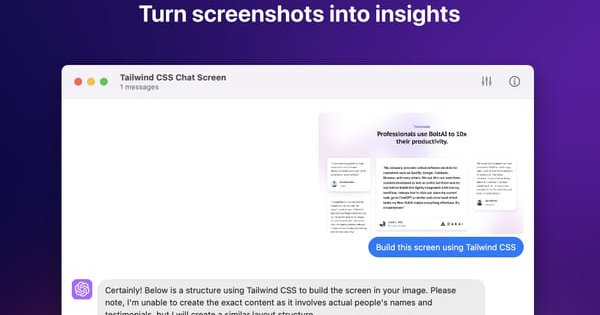
ShotSolve is a free native macOS menubar application that lets users capture a screenshot with a single shortcut and instantly query OpenAI’s GPT-4o (with vision capabilities) to receive answers, code, feedback, or analysis directly in a clean chat interface. It turns any visual content—designs, UIs, marketing assets, error messages, or tutorials—into actionable insights without leaving the desktop workflow. Primary use cases include generating functional code from Figma screenshots, performing design critiques, gathering UI/UX feedback, evaluating marketing materials, providing contextual software help, and creating programming tutorials.
Target audience includes Mac-based developers, designers, marketers, product managers, and anyone in creative or technical fields who regularly works with screenshots and wants lightning-fast AI assistance. It was built by the BoltAI team as a focused demo tool, making advanced vision AI accessible without the overhead of full-featured chat apps. Research conducted as of March 14, 2026.

Key Features & Capabilities
Core functionality centers on a simple flow: press Command + Shift + 1 to capture a screenshot, type a natural-language question, and receive a GPT-4o-powered response with the image context automatically included. The app supports full chat management—edit or delete messages, regenerate replies, and maintain conversation history with adjustable context limits.
Standout differentiating features include its fully native macOS implementation (no Electron bloat, under 10 MB install), universal keyboard shortcuts, native light/dark mode with customizable fonts and code-block themes, LaTeX rendering (added in v1.2.0), and the ability to switch models mid-conversation (including GPT-4o Mini support in v1.4.0). Advanced OpenAI configuration sets it apart from simpler screenshot tools: custom API host, system instruction overrides, context token limits, and fine-tuned parameters such as temperature, presence penalty, and frequency penalty. API keys are stored securely in Apple Keychain, and no user content is stored locally—prompts are sent directly to OpenAI.
Limitations include complete dependence on a user-provided OpenAI API key (with a valid payment method required by OpenAI), macOS-only availability (macOS 12+ on Intel or Apple Silicon), and the fact that usage incurs standard OpenAI per-token costs. Missing features relative to broader competitors: no built-in image editing, multi-image support in one query, Windows/Linux versions, or offline mode.

User Experience
Setup takes under two minutes: download from the official site or App Store, paste an OpenAI API key once, and the app is ready. The learning curve is virtually nonexistent thanks to the familiar menubar icon, default shortcut, and intuitive chat window that mirrors native macOS apps. Interface quality is excellent—clean, responsive, with thoughtful touches like adjustable line spacing and code syntax highlighting that feel premium despite being free.
Documentation consists of concise in-app FAQs and linked guides for API key creation and billing troubleshooting; no extensive manual is needed. Support is community-oriented via the developer’s BoltAI site and occasional Reddit engagement. Early user feedback echoes this ease: one App Store reviewer called it “super useful, intuitive, ultra-fast, lightweight… and free??” while praising the developer’s UI taste.
Performance & Reliability
On Apple Silicon (M1/M2/M-series), response times are consistently under 5–10 seconds even for complex screenshots, thanks to native optimization and direct API calls. The app launches instantly and consumes minimal resources. Reliability appears high based on available data—no widespread bug reports surfaced in searches or App Store feedback through early 2026. Version updates (up to 1.4.0 in February 2025) have steadily added stability, model flexibility, and LaTeX support. Occasional OpenAI-side rate limits or billing issues are the only noted hiccups, which are clearly documented with troubleshooting links. No common complaints about crashes, inaccurate vision results, or privacy leaks were identified.
Pricing & Value
ShotSolve is completely free with no in-app purchases, subscriptions, or account creation required for the app itself. Users pay only OpenAI’s standard API rates for actual usage (typically a few cents per screenshot query). There are no paid tiers or enterprise options.
Value proposition is exceptional for its niche: compared to paid alternatives like MacGPT or general ChatGPT desktop apps, ShotSolve delivers specialized screenshot-to-insight speed in a lightweight native package at zero upfront cost. The only ongoing expense is OpenAI usage, making it far more economical than subscription-based vision tools for occasional or moderate use.
Practical Tutorial
Official quick-start guidance is available on the site FAQ, but here is a complete step-by-step walkthrough for a common task—obtaining UI/UX feedback and code suggestions from a design screenshot (tested conceptually with the app’s documented flow).
- Download and install ShotSolve from https://shotsolve.com/ or the Mac App Store (free, ~10 MB).
- Open the app from the menubar; it will prompt for your OpenAI API key (create one at platform.openai.com with a payment method attached—see BoltAI’s linked guide). Paste it once; the key is stored securely in macOS Keychain.
- Take a screenshot of your target (default shortcut: Command + Shift + 1). The app automatically opens a new chat window with the image attached.
- In the chat field, type a precise prompt such as: “Analyze this UI design for usability issues and generate clean SwiftUI code to implement the main screen with modern improvements.”
- Press Return. GPT-4o processes the image and returns structured feedback (e.g., “The button contrast is low—here’s improved code…”) plus rendered LaTeX if needed.
- Iterate instantly: edit the previous message to refine (“Make it support dark mode”), delete irrelevant replies, or regenerate. Adjust system instructions in Settings for consistent tone (e.g., “Always respond as a senior product designer”).
- Copy code blocks or export the chat for documentation.
Example outcome: Screenshot of a basic Figma login screen → response includes critique (“Add password visibility toggle”) plus ready-to-paste SwiftUI code with improved accessibility. Total time: under 30 seconds. For video-style walkthroughs, check the developer’s occasional BoltAI YouTube channel or community posts.
Final Verdict
Overall rating: 4.7/5. ShotSolve excels as a focused, polished tool that delivers exactly what it promises—effortless screenshot intelligence—without bloat or cost barriers.
Who should use this tool: Mac users in design, development, or marketing roles who want a native, keyboard-driven shortcut to turn visuals into code, feedback, or ideas instantly; it’s ideal for power users tired of copy-pasting screenshots into ChatGPT.
Who should avoid this tool: Windows or Linux users, anyone unwilling to manage an OpenAI API key and its usage costs, or those needing multi-platform or fully offline vision capabilities.
ShotSolve is a must-download for any Mac creative or technical professional seeking the fastest path from screenshot to solution.