Simplified Review: The Ultimate All-in-One AI Marketing Tool
Overview & Purpose

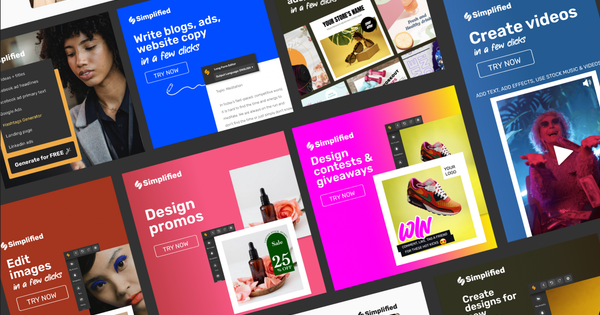
Simplified is an all-in-one AI-powered marketing and design platform that combines graphic design, copywriting, video editing, social media management, and real-time collaboration into a single workspace. It enables users to create, edit, and publish professional content quickly using AI automation, eliminating the need to switch between multiple tools. Primary use cases include generating branded graphics and images, writing marketing copy, editing and repurposing videos into short clips, scheduling social media posts, managing content calendars, and facilitating team feedback on projects.
The tool targets graphic designers, copywriters, video makers, social media marketers, marketing teams, freelancers, influencers, podcasters, and small-to-medium agencies. It is particularly suited for non-technical users who need fast content creation without deep expertise in specialized software, as well as growing teams seeking centralized collaboration.
Key Features & Capabilities
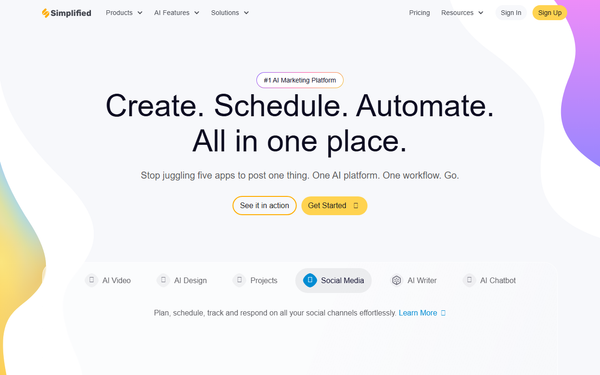
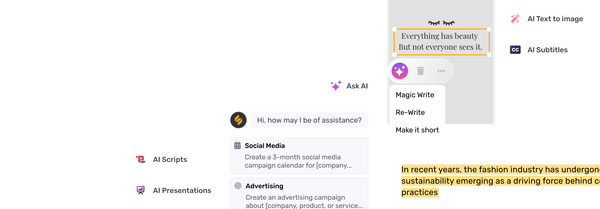
Core functionality revolves around AI-driven tools for content creation and distribution. Key capabilities include an AI image generator, AI photo editor, AI presentation and thumbnail maker, AI ads generator, AI blog and bulk post writer, AI short clips creator (with virality scoring), AI voice cloning, AI subtitle generator, and a full video editor. Users also get access to millions of royalty-free photos, videos, and audio clips; thousands of templates; a content rewriter; company bio generator; social media scheduler; link shortener; and analytics. Collaboration features encompass unlimited workspaces, real-time comments, shared folders, and team editing.
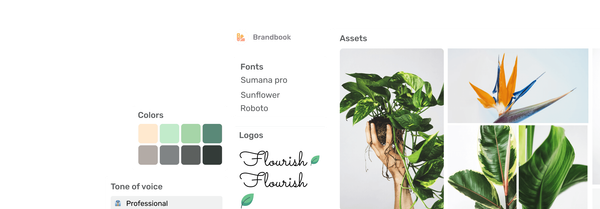
Standout features that differentiate Simplified from competitors like Canva include deep AI integration across design, writing, and video (such as text-to-video, voice cloning, and bulk AI generation), built-in social media publishing with scheduling and inbox management, brand consistency tools (colors, fonts, logos applied automatically), and seamless integrations with LinkedIn, Instagram, TikTok, Shopify, YouTube, and WordPress. The platform emphasizes one-click workflows and content repurposing, making it a true all-in-one replacement for disparate tools.
Limitations include credit-based restrictions on AI generations (quotas do not roll over and can exhaust quickly in lower plans), occasional lack of advanced customization for professional designers (e.g., no SVG export in some cases), and features like premium stock or advanced analytics locked behind paid tiers. Video editing and AI outputs can sometimes require manual refinement for high-end results.
User Experience
Simplified offers a clean, intuitive interface with drag-and-drop functionality, making it accessible for beginners while providing enough depth for experienced users. The learning curve is low—most users report getting productive within minutes thanks to AI prompts and pre-built templates. Mobile apps for iOS and Android extend usability on the go.
Interface quality is praised for its simplicity and modern design, though some users note occasional clutter from the abundance of tools and recent navigation changes that can feel disorienting. Documentation is comprehensive via the Simplified Help Center, which includes hundreds of articles on graphic design, video editing, AI tools, collaboration, and pricing. Live chat support is available, with paid plans offering priority assistance. Community feedback highlights responsive initial help but slower resolution for complex issues.
Performance & Reliability
The platform performs efficiently for most design and writing tasks, with AI generations completing in seconds. Browser-based editing eliminates software installation, and real-time collaboration works smoothly for small teams. However, common complaints include lag and choppiness during larger video projects, buggy behavior in the mobile app or complex editors, and slower load times for high-resolution assets.
Known issues from user reviews (as of April 2026) involve AI outputs occasionally being generic or requiring multiple attempts, video editor crashes, and performance dips on lower-end devices. Reliability is generally high for daily marketing workflows, with strong uptime reported, but heavy AI users may hit quota walls quickly. Overall ratings reflect solid dependability: 4.6/5 on G2 (over 5,000 reviews) and 4.7/5 on Capterra.
Pricing & Value
Simplified uses a freemium model with a Free Forever plan that includes basic templates, stock assets, limited one-time AI credits (e.g., 5,000 AI writer words, restricted video minutes), 3 social channels, and 5-50 GB storage depending on the module. Watermarks and feature limitations apply.
Paid plans start with Pro (approximately $19/month billed annually for individuals: 100K AI words/month, 100 design credits, 7 social accounts, 200 GB storage). Business targets small teams (around $49/month annual: higher limits, 3+ users, 2 TB storage). Enterprise begins at $399/month (billed annually) with unlimited AI, custom seats, SSO, advanced automations, and dedicated support. A 7-day $1 trial is often available for paid tiers. Additional AI credits or seats are available as add-ons.
Value proposition is strong for teams needing an integrated suite—it often replaces multiple subscriptions (e.g., Canva + separate AI writers + schedulers) at competitive pricing. Free tier suits light testing, while paid plans deliver excellent ROI through time savings and brand consistency. Compared to alternatives, it offers more AI depth and social tools, though power users may supplement for unlimited needs.
Practical Tutorial
A common task is using the AI Social Media Post Generator to create and schedule branded posts. Here is a step-by-step walkthrough (based on official capabilities as of April 2026):
- Log in to your Simplified account at app.simplified.com (sign up for free if needed) and navigate to the Social Media dashboard.
- Scroll to the AI Tools section and select "AI Post Generator."
- Connect or select your social media account(s) (supports up to the limit of your plan).
- Enter your topic, brand details, tone, and any specific requirements (e.g., "Create 5 engaging Instagram posts about eco-friendly product launches with our brand colors").
- Click "Generate." The AI produces multiple ready-to-use posts with suggested images, captions, and hashtags.
- Customize outputs using the built-in designer (add brand assets, edit text, or regenerate sections).
- Preview, add to your content calendar or queue, and schedule directly to platforms like Instagram or LinkedIn. Enable best-time posting or UTM tracking as needed.
- Track performance in the analytics dashboard.
This process typically takes under 5 minutes. For video-based content, try the AI Short Clips tool on uploaded footage. Official guides are available in the Help Center or at simplified.com/ai-social-media-post-generator.
Final Verdict
Simplified earns a strong 4.6 out of 5 overall. It excels for marketers, social media teams, freelancers, and small agencies who value speed, AI assistance, and unified workflows in one affordable platform. Users should choose it when needing quick, on-brand content creation and publishing without juggling apps. Avoid it if you require pixel-perfect advanced design tools, unlimited free AI generations, or enterprise-grade video editing without any lag—specialized alternatives like Adobe Suite or dedicated schedulers may fit better. In one sentence: Simplified is a powerful all-in-one AI hub that streamlines marketing content creation for busy teams, delivering impressive value as long as you stay within its credit limits.