Skills.sh Review: The Essential NPM for AI Agent Skills
Overview & Purpose
Skills.sh serves as the central registry and package manager for Agent Skills, an open standard pioneered by Anthropic and now widely adopted. Developed by Vercel Labs, it allows developers to discover, install, and manage modular “skills” — self-contained packages of procedural knowledge, instructions, templates, scripts, and resources that extend AI agents such as Anthropic’s Claude Code, Cursor, GitHub Copilot, Gemini CLI, OpenCode, and over 40 others. Each skill is a directory with a SKILL.md file containing YAML frontmatter for metadata and detailed Markdown guidance, plus optional executable resources. Skills load via progressive disclosure: lightweight metadata enters the agent’s context for discovery, while full instructions and resources activate on-demand, preventing context bloat and enabling repeatable, specialized workflows.
Primary use cases include turning generic LLMs into domain-specific agents for tasks like React/Next.js best practices, Azure operations, frontend design guidelines, browser automation, testing workflows, or internal compliance processes. It facilitates sharing expertise across teams and projects while keeping agents efficient and deterministic.
Target audience is primarily software developers, engineering teams, and organizations using AI coding agents daily. It also benefits technical product managers and designers who maintain agent-augmented workflows (e.g., UI component libraries). It is less relevant for purely non-technical roles such as general marketers without direct agent interaction.
Key Features & Capabilities
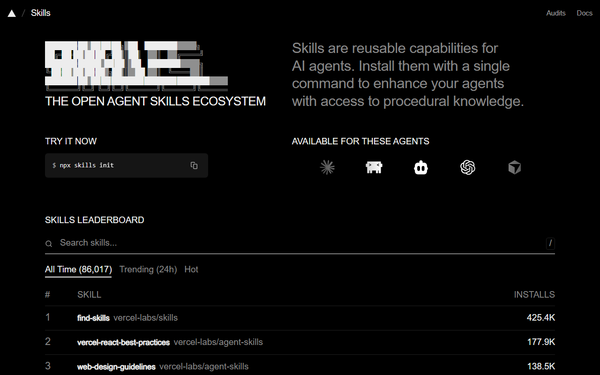
Core functionality centers on the public leaderboard at skills.sh (ranked by install counts) and the lightweight CLI (npx skills). Key commands include npx skills find [query] for interactive discovery, npx skills add owner/repo (or @specific-skill, full Git URLs, or local paths), npx skills update, list, remove, check, and init for scaffolding new skills. Skills install to agent-specific directories (global ~/.claude/skills/, project .agents/skills/, etc.) via symlinks or copies and are auto-detected by supported agents.
Standout features that differentiate it from competitors include true cross-agent compatibility, GitHub-native distribution for easy forking and versioning, efficient progressive disclosure, and a centralized discovery hub with telemetry-powered leaderboards. Unlike manual prompt files, scattered GitHub repos, or proprietary agent tools, Skills.sh provides an npm-like experience for AI capabilities while remaining fully open and inspectable.
Limitations include no built-in sandboxing or execution runtime (relies on the host agent), variable skill quality due to open publishing, and emerging but incomplete security scanning. Advanced features such as tool calling remain agent-dependent, and the ecosystem can feel fragmented with overlapping skills from multiple registries.
User Experience
Ease of use is excellent with virtually no learning curve for core tasks — simply run an npx command with no local install required. The web interface at skills.sh is clean and focused on browsing, searching, and the leaderboard, though it lacks advanced previews or editing tools. The CLI provides clear, interactive output and sensible defaults.
Documentation is solid but distributed: the Agent Skills specification at agentskills.io offers comprehensive examples and integration guides, while the CLI GitHub repo and community resources (YouTube crash courses, Medium tutorials) cover practical usage. Support is community-driven via GitHub issues and forums; no official helpdesk exists, but the active ecosystem and rapid updates make troubleshooting straightforward. Overall, the experience feels polished and developer-friendly.
Performance & Reliability
Installation and updates are near-instantaneous and lightweight, as skills are typically small Markdown files plus optional assets. Runtime efficiency is a major strength — progressive disclosure keeps context windows lean, leading to faster and more deterministic agent responses. Top skills with hundreds of thousands of installs demonstrate strong real-world reliability.
Known issues are primarily ecosystem-wide rather than platform-specific. Common user complaints revolve around supply-chain security: early 2026 audits identified hundreds of malicious or flawed packages across skill registries (including those indexed by skills.sh), with concerns around prompt injection and malware. Occasional symlink or detection hiccups appear in certain agents (e.g., Cursor), but these are minor and quickly addressed. No widespread outages or performance bottlenecks have been reported; reliability improves significantly when users stick to high-install, vetted skills.
Pricing & Value
Skills.sh and its CLI are completely free and open-source (MIT license) with no tiers, subscriptions, or enterprise upsells. All skills are publicly hosted on GitHub and installable at zero cost.
The value proposition is outstanding compared to alternatives such as maintaining manual skill folders, using fragmented community repos, or relying on paid prompt-engineering services. It saves significant time on context management and knowledge sharing while standardizing workflows across teams. For frequent AI-agent users, the productivity gains far outweigh the minor overhead of reviewing popular skills, making it one of the highest-ROI tools in the emerging agent ecosystem.
Practical Tutorial
A common task is enhancing an AI coding agent with specialized frontend knowledge, such as Vercel’s React best practices skill. Here is a complete step-by-step walkthrough using real commands (tested via official documentation as of March 2026):
- Open your terminal in the project (or any) directory.
- Search the registry interactively:
npx skills find react(or visit https://skills.sh/ and browse the leaderboard). - Install the skill collection or specific skill:
npx skills add vercel-labs/agent-skills(the CLI will list available skills in the repo and prompt for selection; use@vercel-react-best-practicesfor a targeted install). Add-gfor global scope or-a claude,cursorto target specific agents. Use--allto install everything without prompts. - Verify installation:
npx skills list(or check folders like~/.claude/skills/or your project’s.agents/skills/). - (Optional) Update all skills later:
npx skills update. - Use the skill in your agent: Open Claude Code, Cursor, or another supported tool and start a session with a prompt such as “Refactor this React component following best practices from the installed skill.” The agent automatically recognizes the metadata and loads full instructions (hooks, state management, performance patterns, etc.) on demand.
- To create your own skill: Run
npx skills init my-custom-skill, edit the generated SKILL.md with YAML frontmatter and detailed Markdown steps, commit to a GitHub repo, and share the owner/repo link.
For advanced examples (Azure, design systems, etc.) or full specification details, see https://agentskills.io/specification and the official CLI repository. Community video tutorials such as “Claude Code Skills & skills.sh - Crash Course” on YouTube provide visual walkthroughs.
Final Verdict
Overall rating: 8.5/10. Skills.sh is a game-changing, well-executed tool that brings much-needed standardization and discoverability to the agent ecosystem, though security vigilance remains essential in an open registry.
Developers and teams actively using AI coding agents (Claude Code, Cursor, Copilot, etc.) should adopt it immediately to codify expertise, reduce prompt engineering overhead, and enable reliable, shareable workflows. Avoid it or proceed with strict manual auditing if you operate in regulated/high-security environments where supply-chain risks are unacceptable or if you prefer fully closed, vendor-managed systems.
One-sentence recommendation: Skills.sh is the essential “npm for AI agents” — install it today to turn generic LLMs into specialized, collaborative powerhouses with minimal effort and maximum impact.