Sluqe Review: Turn Voice Notes Into an AI-Powered Second Brain
Overview & Purpose
Sluqe is an AI-powered voice note and conversation platform that captures spoken thoughts through one-tap recording, delivers accurate transcription with speaker diarization, and automatically transforms recordings into organized, searchable insights. It goes beyond basic transcription by extracting key takeaways, decisions, and action items while building a personal "memory layer" that enables natural language queries across all past notes. Primary use cases include capturing meeting discussions, lectures, brainstorming sessions, personal reflections, journaling, and research notes—eliminating manual note-taking and allowing users to focus on ideas rather than documentation. The tool is ideal for turning scattered voice recordings into an instantly retrievable knowledge base, saving professionals an estimated 5-10 hours per month.
Target audience includes product managers, startup founders, writers and researchers, students, content creators, and professionals who rely on spoken ideas or attend frequent calls and meetings. It suits individuals and small teams prioritizing personal productivity over heavy enterprise collaboration tools.
Key Features & Capabilities
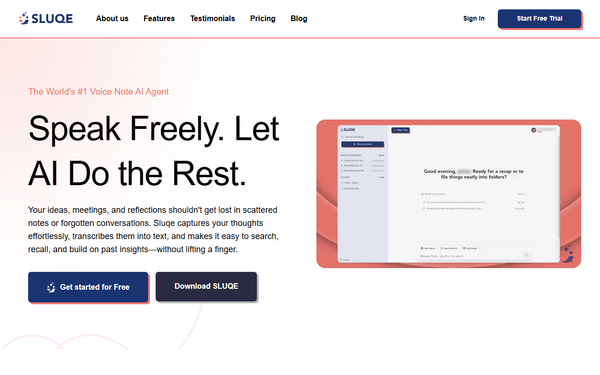
Core functionality centers on fast recording, real-time or near-instant AI transcription (90-99% accuracy under optimal conditions, improving with user corrections and vocabulary learning), smart summaries, automatic organization into folders/tags, and AI-powered search/chat that understands context and synonyms. Standout features include speaker diarization (labeling multiple speakers in conversations), automatic extraction of key takeaways/decisions/action items without manual input, natural language querying (e.g., "What were the action items from last week's call?"), cross-device cloud sync, and a conversational AI chat interface for interacting with your note history like a second brain. These differentiate Sluqe from basic voice recorders or meeting-focused competitors like Otter.ai by emphasizing effortless personal knowledge capture and long-term memory rather than real-time meeting bots or extensive third-party integrations.
Additional capabilities include noise filtering, support for accents/technical jargon, export options (TXT, PDF, DOCX), and collaborative sharing with privacy controls. Limitations include no full offline AI processing (internet required for transcription, summarization, and search), absence of deep native integrations with tools like Slack, Zoom, or calendars, potential storage buildup for heavy users, and no native desktop application (web access and browser extensions available instead). Speaker diarization works well but performs best in clear, structured conversations.
User Experience
Sluqe offers an exceptionally low learning curve: setup takes under five minutes via email or social login, with one-tap recording and intuitive mobile/web interfaces that feel clean and modern. Users praise the seamless flow from recording to AI-processed notes, with visual audio levels, real-time progress indicators, and easy editing tools for transcripts. The interface prioritizes simplicity—folders for organization, prominent search/chat bar, and automatic structuring—making it accessible even for non-technical users.
Documentation is practical rather than exhaustive, relying on detailed blog guides covering setup, best practices, and advanced tips; in-app help is minimal but sufficient. Support resources include email/contact forms (no live chat or extensive knowledge base noted), with quick bug fixes reflected in recent app updates (e.g., improved AI chat responsiveness in version 1.0.2). Overall, the experience feels reliable and stress-free, though heavy users may occasionally wish for more customization over automatic organization.
Performance & Reliability
Transcription processes quickly—typically 30-60 seconds for a five-minute note—and delivers high accuracy (95%+ in optimal quiet conditions with clear speech), handling background noise filtering, homophones, and jargon effectively while improving over time as the AI learns user patterns. Search and AI chat responses are near-instant, with summaries and action item extraction happening automatically post-recording. The platform is reliable for daily use across iOS, Android, and web, with cloud sync ensuring notes are accessible everywhere.
Known issues are minor and typical for AI audio tools: performance dips in very noisy environments or with heavy accents (mitigated by slower, clearer speech); full functionality requires a stable internet connection; and occasional manual corrections are needed for proper nouns or numbers. As a relatively new app (launched 2025, current versions around 1.0.x), public complaints are scarce—no widespread reliability problems surfaced on review sites or forums. Accuracy and speed earn consistent praise in independent tests.
Pricing & Value
Sluqe follows a freemium model with a limited free tier (approximately 300 minutes of transcription per month for basic use). The Pro plan is priced at $19.99 per month (or equivalent annual billing), including 50 hours of voice notes, 500 AI chat interactions, full app access, and advanced features. The Unlimited plan costs $49.99 per month for heavy users with no caps on recordings or queries. Earlier promotional periods (e.g., Pro free until late 2025) have ended; risk-free trials or money-back options are referenced in guides. No dedicated enterprise plans are publicly detailed—custom options may be available via contact.
Value is strong for individuals and small teams: the time savings and automatic organization deliver clear ROI compared to manual note-taking or pricier alternatives like Otter.ai (which often targets teams with higher per-user costs and more integrations). Free tier suits light users or testing, while paid plans unlock the full memory layer and scalability without overpaying for unused meeting-specific features.
Practical Tutorial
Official tutorials are available on the Sluqe blog, including comprehensive guides for recording and AI processing. Below is a step-by-step walkthrough for a common task—recording a team call or personal brainstorming session and instantly retrieving action items/decisions—based on the official process (as of March 2026). Link to full official guide: https://www.sluqe.com/blogs/how-to-create-voice-notes-ai-transcription.
-
Download and Set Up: Install the Sluqe app from the Apple App Store or Google Play (or access via web at sluqe.com and sign up with email/social login). Grant microphone access, select language/dialect, and choose transcription style (verbatim or clean). This takes under five minutes.
-
Record Your Note: Open the app and tap the large recording button. Speak naturally (e.g., "Team call: Discuss Q1 goals—decide on new feature priority and assign follow-ups to Alex by Friday"). Pause/resume as needed. For multi-person calls, speak in clear turns to aid speaker diarization. Pro tip: Keep sessions under 10 minutes for faster processing; use a quiet space and hold the device 6-8 inches from your mouth.
-
AI Processing: Stop recording—the app automatically transcribes (30-60 seconds typical), filters noise, separates speakers, generates smart summaries, and extracts key takeaways, decisions, and action items. Review the structured output: full transcript, summary section, and dedicated action items list.
-
Organize and Edit: Move the note into a folder (e.g., "Team Meetings") and add tags like #action or #Q1. Make minor edits for accuracy if needed (AI learns from corrections).
-
Search and Retrieve Insights: Use natural language search or AI chat: type or ask "What were the action items from my last team call?" or "Decisions on feature priorities?" Results appear instantly across your entire note history. Export or share the action list via PDF/email if needed.
This process turns a 10-minute recording into actionable, searchable content in minutes—no manual notes required. For video demos or variations (e.g., journaling), check the Sluqe blogs section.
Final Verdict
Overall rating: 4.5 out of 5. Sluqe excels as a personal productivity powerhouse for individuals and small teams who speak more than they type, delivering automatic organization and conversational recall that truly feels like an extension of your mind. It shines for product managers, founders, researchers, students, and creators seeking to capture ideas on the go without losing context. Avoid it if you require full offline functionality, extensive third-party integrations, unlimited free usage, or enterprise-scale team collaboration features. Sluqe is a smart investment for anyone ready to replace scattered notes with an intelligent, searchable second brain.